|
获取最新的快照版本,请使用 Spring AI 1.1.3! |
Ollama 聊天
通过 Ollama,您可以在本地运行多种大型语言模型(LLMs),并从这些模型生成文本。
Spring AI 使用 OllamaChatModel API 支持 Ollama 的聊天补全功能。
| Ollama同样提供了一个与OpenAI API兼容的端点。 OpenAI API兼容性部分说明了如何使用Spring AI OpenAI连接到Ollama服务器。 |
前提条件
首先,您需要访问一个Ollama实例。有几种选择,包括以下:
-
通过Kubernetes服务绑定连接到Ollama实例。
您可以在应用程序中从Ollama模型库拉取所需模型:
ollama pull <model-name>您也可以拉取数千个免费的Hugging Face GGUF模型:
ollama pull hf.co/<username>/<model-repository>另外,您可以启用自动下载所需模型的选项: 模型自动拉取.
自动配置
|
There has been a significant change in the Spring AI auto-configuration, starter modules' artifact names. Please refer to the 升级说明以获取更多信息。 |
Spring AI 为 Ollama 聊天集成提供了 Spring Boot 自动配置功能。要启用它,请将以下依赖项添加到项目的 Maven pom.xml 或 Gradle build.gradle 构建文件中:
-
Maven
-
Gradle
<dependency>
   <groupId>org.springframework.ai</groupId>
   <artifactId>spring-ai-starter-model-ollama</artifactId>
</dependency>
dependencies {
implementation 'org.springframework.ai:spring-ai-starter-model-ollama'
}| 参考以下依赖管理部分,添加Spring AI BOM到你的构建文件中。 |
基本属性
前缀 spring.ai.ollama 是配置与 Ollama 连接的属性前缀。
属性 |
描述 |
默认 |
spring.ai.ollama.base-url |
Ollama API 服务器运行的基础URL。 |
|
这里是初始化Ollama集成和自动拉取模型的属性设置。
属性 |
描述 |
默认 |
spring.ai.ollama.init.pull-model-strategy |
是否在启动时拉取模型以及如何拉取。 |
|
spring.ai.ollama.init.timeout |
等待模型被拉取的时长。 |
|
spring.ai.ollama.init.max-retries |
模型拉取操作的最大重试次数。 |
|
spring.ai.ollama.init.chat.include |
在初始化任务中包含此类模型。 |
|
spring.ai.ollama.init.chat.additional-models |
除通过默认属性配置的模型之外,需要额外初始化的模型。 |
|
聊天属性
|
启用和禁用聊天自动配置现在通过顶级属性使用前缀 要启用,请设置 spring.ai.model.chat=ollama (默认已启用) 要禁用,请设置 spring.ai.model.chat=none(或任何不匹配 ollama 的值) 这种修改是为了允许配置多个模型。 |
前缀 spring.ai.ollama.chat.options 是配置Ollama聊天模型的属性前缀。
它包含了Ollama请求(高级)参数,如 model、keep-alive 和 format,以及Ollama模型的 options 属性设置。
以下是Ollama聊天模型的高级请求参数:
属性 |
描述 |
默认 |
spring.ai.ollama.chat.enabled(已移除,不再有效) |
启用Ollama聊天模型。 |
true |
spring.ai.model.chat |
启用Ollama聊天模型。 |
Ollama |
spring.ai.ollama.chat.options.model |
所使用的支持模型的名称。 |
密史脱拉风 |
spring.ai.ollama.chat.options.format |
返回响应的格式。目前,唯一可接受的值是 |
- |
spring.ai.ollama.chat.options.keep_alive |
控制模型在请求后保持加载在内存中的时长 |
5m |
剩余的options个属性基于Ollama有效参数及值和Ollama类型。默认值依据Ollama类型默认值设定。
属性 |
描述 |
默认 |
spring.ai.ollama.chat.options.numa |
是否使用NUMA。 |
false |
spring.ai.ollama.chat.options.num-ctx |
设置用于生成下一个Tokens的上下文窗口的大小。 |
2048 |
spring.ai.ollama.chat.options.num-batch |
提示处理最大批次大小。 |
512 |
spring.ai.ollama.chat.options.num-gpu |
发送到GPU(s)的层数。在macOS上,默认为1以启用Metal支持,设置为0则禁用。此处的1表示NumGPU应动态设置。 |
-1 |
spring.ai.ollama.chat.options.main-gpu |
在使用多块GPU时,此选项用于控制哪些小型张量使用的GPU。对于这些小型张量,跨所有GPU分配计算的开销并不划算。被选中的GPU将稍微占用更多的VRAM来存储临时结果的缓冲区。 |
0 |
spring.ai.ollama.chat.options.low-vram |
- |
false |
spring.ai.ollama.chat.options.f16-kv |
- |
true |
spring.ai.ollama.chat.options.logits-all |
为所有Tokens返回logits,而不仅仅是最后一个。为了使 completions 能够返回 logprobs,此选项必须为真。 |
- |
spring.ai.ollama.chat.options.vocab-only |
仅加载词汇表,不加载权重。 |
- |
spring.ai.ollama.chat.options.use-mmap |
默认情况下,模型会被映射到内存中,这使得系统能够按需只加载模型的必要部分。然而,如果模型大小超过您总RAM量,或者系统可用内存较低,使用mmap可能会增加页面交换的风险,从而负面影响性能。禁用mmap会导致加载时间变慢,但如果未使用mlock,可能会减少页面调度。请注意,如果模型大小超过总RAM量,关闭mmap将根本阻止模型加载。 |
空值 |
spring.ai.ollama.chat.options.use-mlock |
将模型锁定在内存中,防止在使用内存映射时将其换出。这可以提高性能,但会牺牲内存映射的一些优势,因为它需要更多的RAM来运行,并且在模型加载到RAM时可能减慢加载时间。 |
false |
spring.ai.ollama.chat.options.num-thread |
设置计算过程中使用的线程数。默认情况下,Ollama 会自动检测以达到最佳性能。建议将此值设置为系统物理CPU核心数(而非逻辑核心数)。0 = 让运行时自动决定。 |
0 |
spring.ai.ollama.chat.options.num-keep |
- |
4 |
spring.ai.ollama.chat.options.seed |
设置用于生成的随机数种子。将此设置为特定数值将使模型在接收到相同的提示时生成相同的文本。 |
-1 |
spring.ai.ollama.chat.options.num-predict |
生成文本时预测的最大Tokens数量。(-1 = 无限生成, -2 = 填充上下文) |
-1 |
spring.ai.ollama.chat.options.top-k |
降低生成无意义内容的概率。较高的值(例如,100)将提供更加多样化的答案,而较低的值(例如,10)则更为保守。 |
40 |
spring.ai.ollama.chat.options.top-p |
与 top-k 配合使用。较高的值(例如,0.95)将产生更多样化的文本,而较低的值(例如,0.5)将生成更集中和保守的文本。 |
0.9 |
spring.ai.ollama.chat.options.min-p |
作为`top_p`的替代方案,旨在确保质量和多样性的平衡。参数p表示一个标记被考虑的最低概率,相对于最可能标记的概率。例如,如果p=0.05且最可能的标记概率为0.9,则值小于0.045的logits会被过滤掉。 |
0.0 |
spring.ai.ollama.chat.options.tfs-z |
无尾采样用于减少输出中较不可能的Tokens的影响。较高的值(例如,2.0)会更大程度地减少这种影响,而1.0的值则会禁用此设置。 |
1.0 |
spring.ai.ollama.chat.options.typical-p |
- |
1.0 |
spring.ai.ollama.chat.options.repeat-last-n |
设置模型回溯以防重复的时间跨度。默认值为64,0表示禁用,-1表示回溯长度等于上下文数量(num_ctx)。 |
64 |
spring.ai.ollama.chat.options.temperature |
模型的温度。提高温度将使模型的回答更具创造性。 |
0.8 |
spring.ai.ollama.chat.options.repeat-penalty |
设置重复内容的惩罚强度。值越高(例如,1.5),对重复内容的惩罚越重;值越低(例如,0.9),则对重复内容更加宽容。 |
1.1 |
spring.ai.ollama.chat.options.presence-penalty |
- |
0.0 |
spring.ai.ollama.chat.options.frequency-penalty |
- |
0.0 |
spring.ai.ollama.chat.options.mirostat |
启用Mirostat采样以控制困惑度。(默认值:0,0=禁用,1=Mirostat,2=Mirostat 2.0) |
0 |
spring.ai.ollama.chat.options.mirostat-tau |
控制输出的一致性与多样性之间的平衡。较低的值将产生更集中且连贯的文本。 |
5.0 |
spring.ai.ollama.chat.options.mirostat-eta |
影响算法根据生成文本的反馈进行响应的速度。较低的学习率将导致调整速度较慢,而较高的学习率将使算法更加灵敏。 |
0.1 |
spring.ai.ollama.chat.options.penalize-newline |
- |
true |
spring.ai.ollama.chat.options.stop |
设置要使用的停止序列。当遇到此模式时,LLM 将停止生成文本并返回。可以在模型文件中通过指定多个独立的停止参数来设置多个停止模式。 |
- |
spring.ai.ollama.chat.options.functions |
函数列表,通过它们的名称来识别,以便在单个提示请求中启用函数调用。具有这些名称的函数必须存在于functionCallbacks注册表中。 |
- |
spring.ai.ollama.chat.options.proxy-tool-calls |
如果为真,Spring AI 将不会在内部处理函数调用,而是将其代理给客户端。此时,由客户端负责处理函数调用、将其分发到相应的函数并返回结果。如果为假(默认值),Spring AI 将在内部处理函数调用。仅适用于支持函数调用的聊天模型。 |
false |
所有以spring.ai.ollama.chat.options为前缀的属性都可以通过向Prompt调用中添加请求特定的运行时选项在运行时覆盖。 |
运行时选项
OllamaOptions.java 类提供了模型配置,例如要使用的模型、温度等。
On start-up, the default options can be configured with the OllamaChatModel(api, options) constructor or the spring.ai.ollama.chat.options.* properties.
在运行时,您可以通过向 Prompt 调用添加新的、特定于请求的选项来覆盖默认选项。
例如,要为特定请求覆盖默认模型和温度:
ChatResponse response = chatModel.call(
    new Prompt(
        "Generate the names of 5 famous pirates.",
        OllamaOptions.builder()
            .model(OllamaModel.LLAMA3_1)
            .temperature(0.4)
            .build()
));| 除了模型特定的 OllamaOptions 之外,你还可以使用通过 ChatOptions#builder() 创建的可移植 ChatOptions 实例。 |
模型自动拉取
Spring AI Ollama 可在您的 Ollama 实例中未提供模型时自动拉取它们。 此功能对于开发和测试特别有用,同时也适用于将您的应用程序部署到新环境。
| 您也可以按名称拉取任何数千个免费的Hugging Face GGUF模型。 |
模型拉取有三种策略:
-
always(定义于PullModelStrategy.ALWAYS):始终拉取模型,即使它已可用。确保使用模型的最新版本很有帮助。 -
when_missing(定义于PullModelStrategy.WHEN_MISSING):仅在模型尚未获取时才拉取。这可能导致使用模型的较旧版本。 -
never(定义于PullModelStrategy.NEVER中):从不自动拉取模型。
| 由于在下载模型时可能存在延迟,不建议在生产环境中使用自动拉取功能。建议事先评估并预先下载所需的模型。 |
所有通过配置属性和默认选项定义的模型都可在启动时自动拉取。 您可以使用配置属性来设置拉取策略、超时时间和最大重试次数:
spring:
  ai:
    ollama:
      init:
        pull-model-strategy: always
        timeout: 60s
max-retries: 1| 应用程序在Ollama中所有指定的模型都可用之前,不会完成其初始化。根据模型大小和互联网连接速度,这可能会显著延长应用程序的启动时间。 |
您可以在启动时初始化额外的模型,这对于在运行时动态使用的模型非常有用:
spring:
  ai:
    ollama:
      init:
        pull-model-strategy: always
        chat:
          additional-models:
            - llama3.2
            - qwen2.5
如果您只想对特定类型的模型应用拉取策略,可以从初始化任务中排除聊天模型:
spring:
  ai:
    ollama:
      init:
        pull-model-strategy: always
        chat:
          include: false
此配置将拉取策略应用于所有模型,除了聊天模型。
函数调用
您可以使用OllamaChatModel注册自定义Java函数,并让Ollama模型智能地选择输出一个包含参数的JSON对象,以调用一个或多个已注册的函数。
这是一种将LLM功能与外部工具和API连接起来的强大技术。
了解更多关于工具调用的信息。
| 您需要使用 Ollama 0.2.8 或更高版本以利用函数调用功能,并且需要 Ollama 0.4.6 或更高版本以在流模式下使用这些功能。 |
多模态
多模态是指模型同时理解和处理来自多种来源信息的能力,这些来源包括文本、图像、音频及其他数据格式。
Ollama中支持多模态的模型有LLaVA和BakLLaVA(查看完整列表)。 更多详情,请参阅LLaVA:大型语言与视觉助手.
Ollama 消息API提供了"images"参数,以便将base64编码的图片列表与消息一起发送。
Spring AI的消息接口通过引入媒体类型,促进了多模态AI模型的开发。
此类型包含了关于消息中媒体附件的数据和详细信息,利用了Spring的org.springframework.util.MimeType和一个org.springframework.core.io.Resource来处理原始媒体数据。
以下是一个简单的代码示例,摘自OllamaChatModelMultimodalIT.java,展示了用户文本与图像的融合。
var imageResource = new ClassPathResource("/multimodal.test.png");

var userMessage = new UserMessage("Explain what do you see on this picture?",
        new Media(MimeTypeUtils.IMAGE_PNG, this.imageResource));

ChatResponse response = chatModel.call(new Prompt(this.userMessage,
OllamaOptions.builder().model(OllamaModel.LLAVA)).build());示例展示了一个模型,其输入为multimodal.test.png号图像:
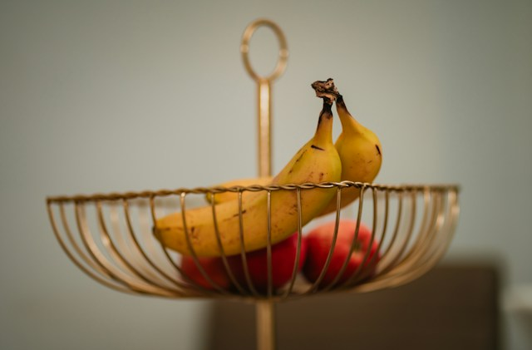
伴随着文本信息 "解释一下你在图片中看到了什么?",并生成如下的回复:
The image shows a small metal basket filled with ripe bananas and red apples. The basket is placed on a surface,
which appears to be a table or countertop, as there's a hint of what seems like a kitchen cabinet or drawer in
the background. There's also a gold-colored ring visible behind the basket, which could indicate that this
photo was taken in an area with metallic decorations or fixtures. The overall setting suggests a home environment
where fruits are being displayed, possibly for convenience or aesthetic purposes.
结构化输出
Ollama提供了自定义的结构化输出API,确保您的模型生成的响应严格遵循您提供的JSON Schema格式。
除了现有的Spring AI模型无关的结构化输出转换器之外,这些API还提供了增强的控制和精确度。
配置
Spring AI 允许您使用 OllamaOptions 构建器以编程方式配置响应格式。
使用聊天选项构建器
您可以使用下面所示的 OllamaOptions 构建器以编程方式设置响应格式:
String jsonSchema = """
        {
            "type": "object",
            "properties": {
                "steps": {
                    "type": "array",
                    "items": {
                        "type": "object",
                        "properties": {
                            "explanation": { "type": "string" },
                            "output": { "type": "string" }
                        },
                        "required": ["explanation", "output"],
                        "additionalProperties": false
                    }
                },
                "final_answer": { "type": "string" }
            },
            "required": ["steps", "final_answer"],
            "additionalProperties": false
        }
        """;

Prompt prompt = new Prompt("how can I solve 8x + 7 = -23",
        OllamaOptions.builder()
            .model(OllamaModel.LLAMA3_2.getName())
            .format(new ObjectMapper().readValue(jsonSchema, Map.class))
            .build());

ChatResponse response = this.ollamaChatModel.call(this.prompt);
与BeanOutputConverter工具集成
您可以利用现有的BeanOutputConverter工具自动从领域对象生成JSON Schema,之后将结构化响应转换为领域特定的实例:
record MathReasoning(
    @JsonProperty(required = true, value = "steps") Steps steps,
    @JsonProperty(required = true, value = "final_answer") String finalAnswer) {

    record Steps(
        @JsonProperty(required = true, value = "items") Items[] items) {

        record Items(
            @JsonProperty(required = true, value = "explanation") String explanation,
            @JsonProperty(required = true, value = "output") String output) {
        }
    }
}

var outputConverter = new BeanOutputConverter<>(MathReasoning.class);

Prompt prompt = new Prompt("how can I solve 8x + 7 = -23",
        OllamaOptions.builder()
            .model(OllamaModel.LLAMA3_2.getName())
            .format(outputConverter.getJsonSchemaMap())
            .build());

ChatResponse response = this.ollamaChatModel.call(this.prompt);
String content = this.response.getResult().getOutput().getText();

MathReasoning mathReasoning = this.outputConverter.convert(this.content);
确保使用 @JsonProperty(required = true,…) 注解来生成一个模式,该模式能准确地将字段标记为 required。
尽管这对于JSON Schema是可选的,但为了使结构化响应正确工作,建议这样做。 |
OpenAI API 兼容性
Ollama与OpenAI API兼容,您可以使用Spring AI OpenAI客户端与Ollama通信并使用工具。 为此,您需要将OpenAI基础URL配置为您的Ollama实例:`0`,并选择提供的Ollama模型之一:`1`。
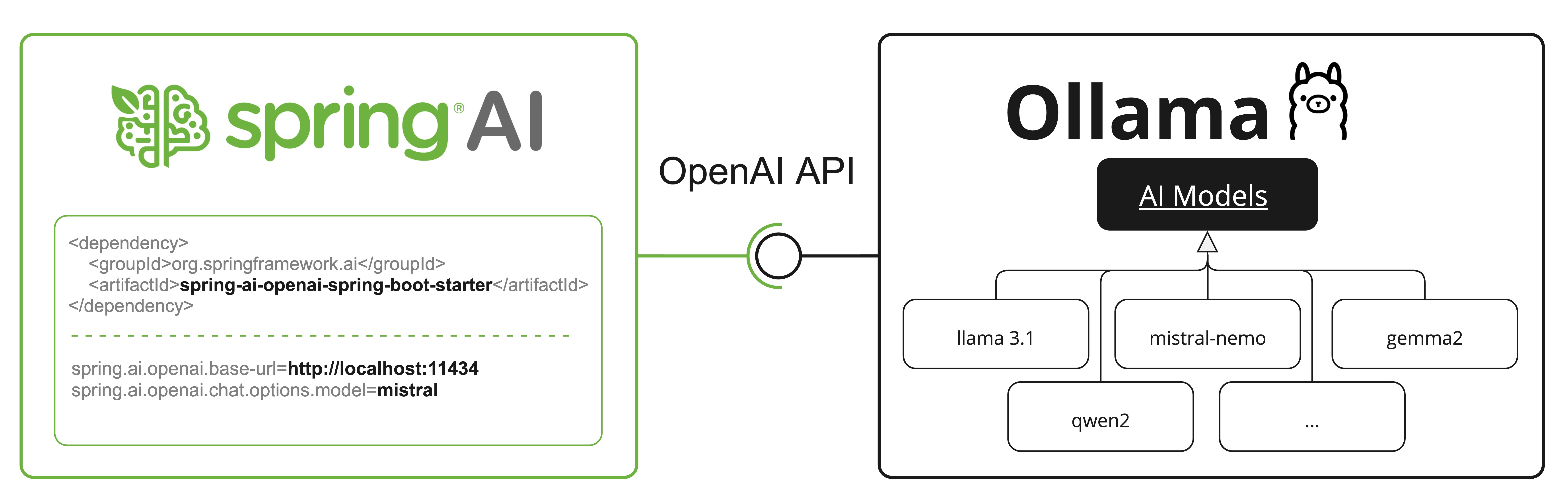
查看OllamaWithOpenAiChatModelIT.java测试中的示例,了解如何通过Spring AI OpenAI使用Ollama。
HuggingFace 模型
Ollama开箱即用地支持所有GGUF Hugging Face 聊天模型。
您可以通过名称拉取这些模型,如:ollama pull hf.co/<username>/<model-repository>,或配置自动拉取策略:模型自动拉取:
spring.ai.ollama.chat.options.model=hf.co/bartowski/gemma-2-2b-it-GGUF
spring.ai.ollama.init.pull-model-strategy=always-
spring.ai.ollama.chat.options.model: 指定要使用的Hugging Face GGUF模型。 -
spring.ai.ollama.init.pull-model-strategy=always: (可选)启用启动时自动模型拉取。对于生产环境,您应预先下载模型以避免延迟:ollama pull hf.co/bartowski/gemma-2-2b-it-GGUF。
示例控制器
创建一个新的Spring Boot项目,并将spring-boot-starter-web添加到您的pom(或gradle)依赖中。
在src/main/resources目录下添加一个application.yaml文件,以启用并配置Ollama聊天模型:
spring:
  ai:
    ollama:
      base-url: http://localhost:11434
      chat:
        options:
          model: mistral
temperature: 0.7将base-url替换为您的Ollama服务器URL。 |
这将创建一个您可以注入到类中的OllamaChatModel实现。
下面是一个使用聊天模型进行文本生成的简单@RestController类的例子。
@RestController
public class ChatController {

    private final OllamaChatModel chatModel;

    @Autowired
    public ChatController(OllamaChatModel chatModel) {
        this.chatModel = chatModel;
    }

    @GetMapping("/ai/generate")
    public Map<String,String> generate(@RequestParam(value = "message", defaultValue = "Tell me a joke") String message) {
        return Map.of("generation", this.chatModel.call(message));
    }

    @GetMapping("/ai/generateStream")
	public Flux<ChatResponse> generateStream(@RequestParam(value = "message", defaultValue = "Tell me a joke") String message) {
        Prompt prompt = new Prompt(new UserMessage(message));
        return this.chatModel.stream(prompt);
    }

}
手动配置
如果您不想使用Spring Boot的自动配置,您可以在应用程序中手动配置OllamaChatModel。
OllamaChatModel实现了ChatModel和StreamingChatModel,并使用OllamaApi低级客户端连接到Ollama服务。
要在项目中使用,请将 spring-ai-ollama 依赖项添加到 Maven pom.xml 或 Gradle build.gradle 的构建文件中:
-
Maven
-
Gradle
<dependency>
    <groupId>org.springframework.ai</groupId>
    <artifactId>spring-ai-ollama</artifactId>
</dependency>
dependencies {
implementation 'org.springframework.ai:spring-ai-ollama'
}| 参考以下依赖管理部分,添加Spring AI BOM到你的构建文件中。 |
spring-ai-ollama 依赖项还提供了对 OllamaEmbeddingModel 的访问。有关 OllamaEmbeddingModel 的更多信息,请参阅 Ollama 嵌入模型 部分。 |
接下来,创建一个OllamaChatModel实例,并使用它来发送文本生成请求:
var ollamaApi = OllamaApi.builder().build();

var chatModel = OllamaChatModel.builder()
                    .ollamaApi(ollamaApi)
                    .defaultOptions(
                        OllamaOptions.builder()
                            .model(OllamaModel.MISTRAL)
                            .temperature(0.9)
                            .build())
                    .build();

ChatResponse response = this.chatModel.call(
    new Prompt("Generate the names of 5 famous pirates."));

// Or with streaming responses
Flux<ChatResponse> response = this.chatModel.stream(
new Prompt("Generate the names of 5 famous pirates."));数字OllamaOptions为所有聊天请求提供配置信息。
OllamaApi底层客户端
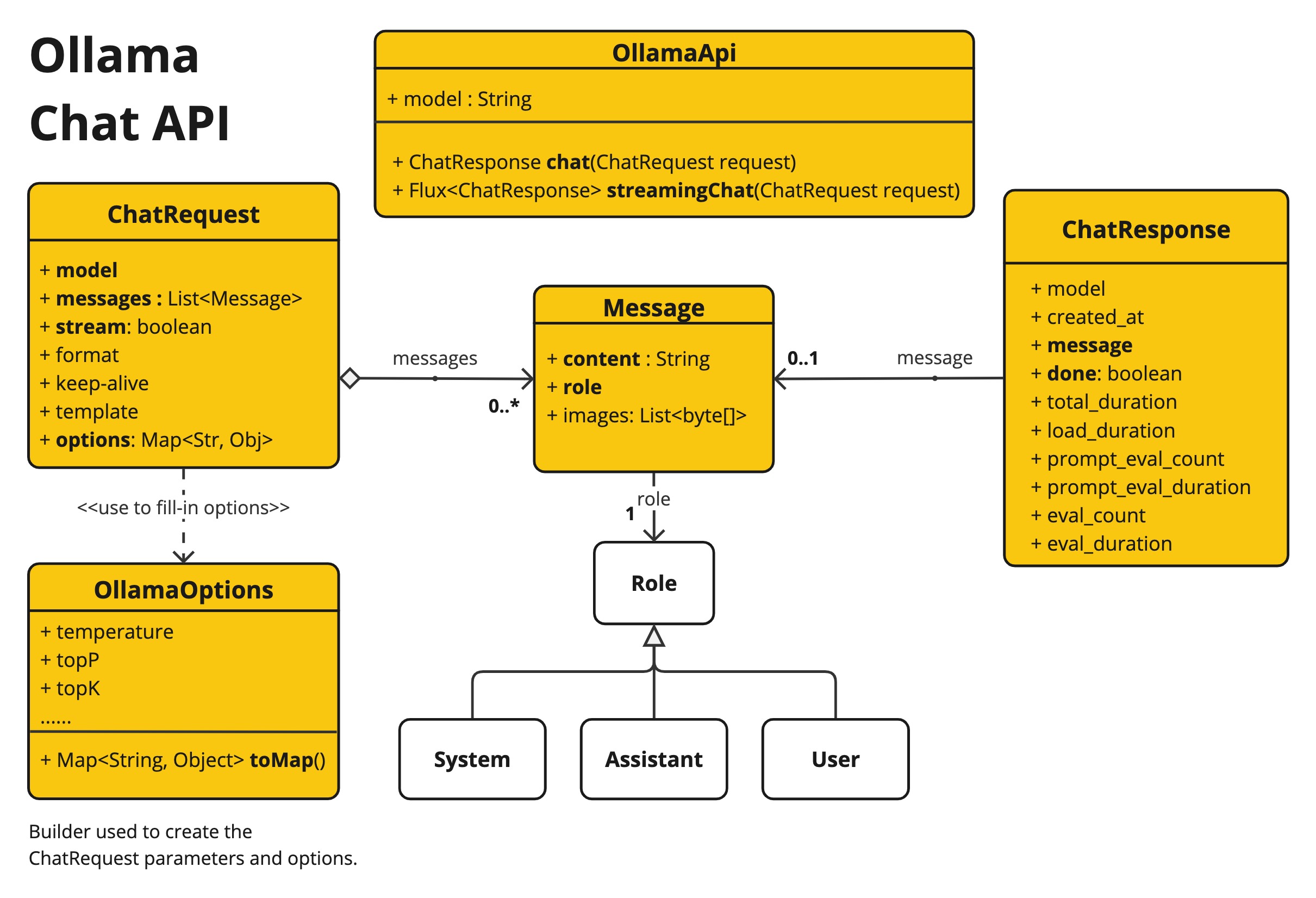
OllamaApi 为 Ollama 聊天补全 API 提供了一个轻量级的 Java 客户端。
以下类图展示了OllamaApi聊天接口和构建模块:
OllamaApi 是一个低级API,不建议直接使用。请改用 OllamaChatModel 。 |
以下是一个简单示例,展示了如何以编程方式使用API:
OllamaApi ollamaApi = new OllamaApi("YOUR_HOST:YOUR_PORT");

// Sync request
var request = ChatRequest.builder("orca-mini")
    .stream(false) // not streaming
    .messages(List.of(
            Message.builder(Role.SYSTEM)
                .content("You are a geography teacher. You are talking to a student.")
                .build(),
            Message.builder(Role.USER)
                .content("What is the capital of Bulgaria and what is the size? "
                        + "What is the national anthem?")
                .build()))
    .options(OllamaOptions.builder().temperature(0.9).build())
    .build();

ChatResponse response = this.ollamaApi.chat(this.request);

// Streaming request
var request2 = ChatRequest.builder("orca-mini")
    .ttream(true) // streaming
    .messages(List.of(Message.builder(Role.USER)
        .content("What is the capital of Bulgaria and what is the size? " + "What is the national anthem?")
        .build()))
    .options(OllamaOptions.builder().temperature(0.9).build().toMap())
    .build();

Flux<ChatResponse> streamingResponse = this.ollamaApi.streamingChat(this.request2);