|
获取最新的快照版本,请使用 Spring AI 1.1.3! |
Anthropic Chat
Anthropic Claude 是一系列基础人工智能模型,可用于多种应用场景。 对于开发者和企业而言,您可以利用 API 访问权限,并直接基于 Anthropic 的 AI 基础设施 进行构建。
Spring AI 支持 Anthropic 的 消息传递 API 用于同步和流式文本生成。
| Anthropic 的 Claude 模型也可通过 Amazon Bedrock Converse 使用。 Spring AI 也提供了专门的 Amazon Bedrock Converse Anthropic 客户端实现。 |
前提条件
您需要在 Anthropic 门户上创建一个 API 密钥。
在 Anthropic API仪表板上创建账户,并在获取API密钥页面生成API密钥。
Spring AI 项目定义了一个名为 spring.ai.anthropic.api-key 的配置属性,您应该将其设置为从 anthropic.com 获取的 API Key 的值。
您可以在application.properties文件中设置此配置属性:
spring.ai.anthropic.api-key=<your-anthropic-api-key>为了在处理API密钥等敏感信息时增强安全性,您可以使用Spring表达式语言(SpEL)引用自定义环境变量:
# In application.yml
spring:
  ai:
    anthropic:
      api-key: ${ANTHROPIC_API_KEY}
# In your environment or .env file
export ANTHROPIC_API_KEY=<your-anthropic-api-key>您也可以在应用程序代码中以编程方式获取此配置:
// Retrieve API key from a secure source or environment variable
String apiKey = System.getenv("ANTHROPIC_API_KEY");自动配置
|
There has been a significant change in the Spring AI auto-configuration, starter modules' artifact names. Please refer to the 升级说明以获取更多信息。 |
Spring AI 为 Anthropic Chat Client 提供了 Spring Boot 自动配置。
要启用它,请将以下依赖项添加到项目的 Maven pom.xml 或 Gradle build.gradle 文件中:
-
Maven
-
Gradle
<dependency>
    <groupId>org.springframework.ai</groupId>
    <artifactId>spring-ai-starter-model-anthropic</artifactId>
</dependency>
dependencies {
implementation 'org.springframework.ai:spring-ai-starter-model-anthropic'
}| 参考以下依赖管理部分,添加Spring AI BOM到你的构建文件中。 |
聊天属性
重试属性
前缀 spring.ai.retry 用作属性前缀,可让您配置 Anthropic 聊天模型的重试机制。
| 属性 | 描述 | 默认 |
|---|---|---|
spring.ai.retry.max-attempts |
最大重试次数。 |
10 |
spring.ai.retry.backoff.initial-interval |
指数退避策略的初始睡眠时长。 |
2 秒 |
spring.ai.retry.backoff.multiplier |
退避间隔乘数。 |
5 |
spring.ai.retry.backoff.max-interval |
最大退避时长。 |
3 分钟。 |
spring.ai.retry.on-client-errors |
如果为false,则抛出NonTransientAiException,且不重试客户端错误代码 |
false |
spring.ai.retry.exclude-on-http-codes |
不应触发重试的HTTP状态代码列表(例如,用于抛出非暂时性AI异常)。 |
empty |
spring.ai.retry.on-http-codes |
应触发重试的HTTP状态码列表(例如,用于抛出TransientAiException)。 |
empty |
| 目前,重试策略不适用于流式 API。 |
连接属性
前缀 spring.ai.anthropic 用作属性前缀,可让您连接到 Anthropic。
| 属性 | 描述 | 默认 |
|---|---|---|
spring.ai.anthropic.base-url |
要连接的URL |
|
spring.ai.anthropic.completions-path |
要追加到基URL后面的路径是什么。 |
|
spring.ai.anthropic.version |
Anthropic API 版本 |
2023-06-01 |
spring.ai.anthropic.api-key |
API 密钥 |
- |
spring.ai.anthropic.beta-version |
启用新的/实验性功能。如果设置为 |
|
配置属性
|
启用和禁用聊天自动配置现在通过顶级属性使用前缀 要启用,spring.ai.model.chat=anthropic(默认已启用) 要禁用,spring.ai.model.chat=none(或任何与 anthropic 不匹配的值) 这种修改是为了允许配置多个模型。 |
前缀 spring.ai.anthropic.chat 是属性前缀,可让您为 Anthropic 配置聊天模型实现。
| 属性 | 描述 | 默认 |
|---|---|---|
spring.ai.anthropic.chat.enabled(已移除且不再有效) |
启用 Anthropic 聊天模型。 |
true |
spring.ai.model.chat |
启用 Anthropic 聊天模型。 |
人类的 |
spring.ai.anthropic.chat.options.model |
这是要使用的Anthropic Chat模型。支持: |
|
spring.ai.anthropic.chat.options.temperature |
用于控制生成完成内容的表面创新性的采样温度。较高的值会使输出更加随机,而较低的值会使结果更加集中和确定性。不建议在同一完成请求中同时修改温度(temperature)和顶级概率(top_p),因为这两个设置之间的相互作用难以预测。 |
0.8 |
spring.ai.anthropic.chat.options.max-tokens |
聊天补全时生成的最大Tokens数量。输入Tokens和生成Tokens的总长度受到模型上下文长度的限制。 |
500 |
spring.ai.anthropic.chat.options.stop-sequence |
自定义文本序列,将导致模型停止生成。我们的模型通常会在自然完成其本轮对话时停止,此时的响应停止原因将是“end_turn”。如果您希望模型在遇到自定义文本字符串时停止生成,可以使用stop_sequences参数。如果模型遇到其中任何一个自定义序列,响应停止原因值将为“stop_sequence”,且响应停止序列值将包含匹配到的停止序列。 |
- |
spring.ai.anthropic.chat.options.top-p |
使用核采样。在核采样中,我们按概率递减的顺序计算每个后续标记的所有选项的累积分布,并在达到由 top_p 指定的特定概率时截断。您应仅调整温度或 top_p,而不能同时调整两者。仅推荐用于高级用例。通常情况下,您只需使用温度即可。 |
- |
spring.ai.anthropic.chat.options.top-k |
仅从每个后续标记的前 K 个选项中采样。用于去除“长尾”的低概率响应。在此了解更多技术细节。仅推荐用于高级用例。通常您只需使用温度参数即可。 |
- |
spring.ai.anthropic.chat.options.toolNames |
由其名称标识的工具列表,用于在单个提示请求中启用工具调用。具有这些名称的工具必须存在于 toolCallbacks 注册表中。 |
- |
spring.ai.anthropic.chat.options.toolCallbacks |
向ChatModel注册的工具回调。 |
- |
spring.ai.anthropic.chat.options.internal-tool-execution-enabled |
如果为 false,Spring AI 将不内部处理工具调用,而是将它们代理给客户端。此后,处理工具调用、将其分派给适当函数并返回结果的责任在于客户端。如果为 true(默认值),Spring AI 将内部处理函数调用。此设置仅适用于支持函数调用的聊天模型。 |
true |
(已弃用 - 替换为 |
函数列表,通过它们的名称来识别,以便在单个提示请求中启用函数调用。具有这些名称的函数必须存在于functionCallbacks注册表中。 |
- |
(已弃用 - 替换为 |
工具函数回调,用于注册到 ChatModel。 |
- |
(已弃用 - 替换为取反的 |
如果为真,Spring AI 将不会在内部处理函数调用,而是将其代理给客户端。此时,由客户端负责处理函数调用、将其分发到相应的函数并返回结果。如果为假(默认值),Spring AI 将在内部处理函数调用。仅适用于支持函数调用的聊天模型。 |
false |
spring.ai.anthropic.chat.options.http-headers |
可选的 HTTP 头部,将被添加到聊天补全请求中。 |
- |
| 有关模型别名及其描述的最新列表,请参阅Anthropic 官方模型别名文档。 |
所有以spring.ai.anthropic.chat.options为前缀的属性都可以通过向Prompt调用中添加特定于请求的运行时选项在运行时覆盖。 |
运行时选项
The AnthropicChatOptions.java provides model configurations, such as the model to use, the temperature, the max token count, etc.
On start-up, the default options can be configured with the AnthropicChatModel(api, options) constructor or the spring.ai.anthropic.chat.options.* properties.
在运行时,您可以通过向Prompt调用添加新的、针对请求的选项来覆盖默认选项。
例如,要为特定请求覆盖默认模型和温度:
ChatResponse response = chatModel.call(
    new Prompt(
        "Generate the names of 5 famous pirates.",
        AnthropicChatOptions.builder()
            .model("claude-3-7-sonnet-latest")
            .temperature(0.4)
        .build()
));| 除了特定于模型的AnthropicChatOptions之外,您还可以使用一个可移植的ChatOptions实例,该实例是通过ChatOptions#builder()创建的。 |
思考
Anthropic Claude 模型支持“思考”功能,允许模型在给出最终答案之前展示其推理过程。此功能能够实现更加透明和详尽的问题解决,尤其适用于需要逐步推理的复杂问题。
|
支持的模型 思维功能由以下 Claude 模型支持:
模型能力:
API 请求结构在所有支持的模型中都相同,但输出行为有所不同。 |
思考配置
要启用对任何受支持的 Claude 模型的推理,请在您的请求中包含以下配置:
必填配置
-
添加
thinking对象:-
"type": "enabled" -
budget_tokens: 推理的标记限制(建议从1024开始)
-
-
Tokens预算规则:
-
budget_tokens必须通常小于max_tokens -
Claude 可能使用的标记数少于分配的标记数。
-
更大的预算会增加推理的深度,但可能会影响延迟。
-
在使用带有交错思维的工具调用时(仅限 Claude 4),此约束将被放宽,但 Spring AI 尚不支持。
-
关键考虑因素
-
Claude 3.7 在响应中返回完整的思维内容
-
Claude 4 返回一个模型内部推理的 摘要 版本,以降低延迟并保护敏感内容
-
思考Tokens可计费,作为输出Tokens的一部分(即使并非所有Tokens都在响应中可见)
-
交错思考仅在Claude 4模型上可用,并需要beta标头
interleaved-thinking-2025-05-14
工具集成与交叉思考
Claude 4 模型支持在工具使用过程中进行交错式思考,使模型能够在工具调用之间进行推理。
|
当前的 Spring AI 实现分别支持基础思维和工具使用,但尚未支持将思维与工具使用交织进行(即在多次工具调用之间持续进行思维)。 |
有关使用工具进行交错思考的详细信息,请参阅 Anthropic 文档。
非流式示例
以下是使用 ChatClient API 在非流式请求中启用思考功能的方法:
ChatClient chatClient = ChatClient.create(chatModel);

// For Claude 3.7 Sonnet - explicit thinking configuration required
ChatResponse response = chatClient.prompt()
    .options(AnthropicChatOptions.builder()
        .model("claude-3-7-sonnet-latest")
        .temperature(1.0)  // Temperature should be set to 1 when thinking is enabled
        .maxTokens(8192)
        .thinking(AnthropicApi.ThinkingType.ENABLED, 2048)  // Must be ≥1024 && < max_tokens
        .build())
    .user("Are there an infinite number of prime numbers such that n mod 4 == 3?")
    .call()
    .chatResponse();

// For Claude 4 models - thinking is enabled by default
ChatResponse response4 = chatClient.prompt()
    .options(AnthropicChatOptions.builder()
        .model("claude-opus-4-0")
        .maxTokens(8192)
        // No explicit thinking configuration needed
        .build())
    .user("Are there an infinite number of prime numbers such that n mod 4 == 3?")
    .call()
    .chatResponse();

// Process the response which may contain thinking content
for (Generation generation : response.getResults()) {
    AssistantMessage message = generation.getOutput();
    if (message.getText() != null) {
        // Regular text response
        System.out.println("Text response: " + message.getText());
    }
    else if (message.getMetadata().containsKey("signature")) {
        // Thinking content
        System.out.println("Thinking: " + message.getMetadata().get("thinking"));
        System.out.println("Signature: " + message.getMetadata().get("signature"));
    }
}
流式示例
您还可以使用流式响应进行思考:
ChatClient chatClient = ChatClient.create(chatModel);

// For Claude 3.7 Sonnet - explicit thinking configuration
Flux<ChatResponse> responseFlux = chatClient.prompt()
    .options(AnthropicChatOptions.builder()
        .model("claude-3-7-sonnet-latest")
        .temperature(1.0)
        .maxTokens(8192)
        .thinking(AnthropicApi.ThinkingType.ENABLED, 2048)
        .build())
    .user("Are there an infinite number of prime numbers such that n mod 4 == 3?")
    .stream();

// For Claude 4 models - thinking is enabled by default
Flux<ChatResponse> responseFlux4 = chatClient.prompt()
    .options(AnthropicChatOptions.builder()
        .model("claude-opus-4-0")
        .maxTokens(8192)
        // No explicit thinking configuration needed
        .build())
    .user("Are there an infinite number of prime numbers such that n mod 4 == 3?")
    .stream();

// For streaming, you might want to collect just the text responses
String textContent = responseFlux.collectList()
    .block()
    .stream()
    .map(ChatResponse::getResults)
    .flatMap(List::stream)
    .map(Generation::getOutput)
    .map(AssistantMessage::getText)
    .filter(text -> text != null && !text.isBlank())
.collect(Collectors.joining());工具/函数调用
您可以使用 AnthropicChatModel 注册自定义 Java 工具,并让 Anthropic Claude 模型智能地选择输出一个包含参数的 JSON 对象,以调用一个或多个已注册的函数。
这是一种将 LLM 功能与外部工具和 API 相连接的强大技术。
了解更多关于 工具调用 的信息。
多模态
多模态是指模型同时理解和处理来自多种来源的信息的能力,包括文本、PDF、图像和数据格式。
图片
目前,Anthropic Claude 3 支持 base64 源类型用于 images,以及 image/jpeg、image/png、image/gif 和 image/webp 媒体类型。
请查看视觉指南以获取更多信息。
Anthropic Claude 3.5 Sonnet 还支持 pdf 源类型用于 application/pdf 文件。
Spring AI的Message接口通过引入媒体类型来支持多模态AI模型。
此类型包含消息中媒体附件的数据和信息,使用Spring的org.springframework.util.MimeType及一个java.lang.Object来存储原始媒体数据。
以下是摘自 AnthropicChatModelIT.java 的一个简单代码示例,展示了用户文本与图像的结合。
var imageData = new ClassPathResource("/multimodal.test.png");

var userMessage = new UserMessage("Explain what do you see on this picture?",
        List.of(new Media(MimeTypeUtils.IMAGE_PNG, this.imageData)));

ChatResponse response = chatModel.call(new Prompt(List.of(this.userMessage)));

logger.info(response.getResult().getOutput().getContent());
它以 multimodal.test.png 图像作为输入:

以及文本消息“解释一下你在这张图片上看到了什么?”,并生成类似如下的回复:
The image shows a close-up view of a wire fruit basket containing several pieces of fruit.
...
从 Sonnet 3.5 开始,提供 PDF 支持(测试版)。
使用 application/pdf 媒体类型将 PDF 文件附加到消息中:
var pdfData = new ClassPathResource("/spring-ai-reference-overview.pdf");

var userMessage = new UserMessage(
        "You are a very professional document summarization specialist. Please summarize the given document.",
        List.of(new Media(new MimeType("application", "pdf"), pdfData)));

var response = this.chatModel.call(new Prompt(List.of(userMessage)));
示例控制器
创建一个新的Spring Boot项目,并将spring-boot-starter-web添加到您的pom(或gradle)依赖中。
添加一个application.properties文件,位于src/main/resources目录下,以启用并配置Anthropic聊天模型:
spring.ai.anthropic.api-key=YOUR_API_KEY
spring.ai.anthropic.chat.options.model=claude-3-5-sonnet-latest
spring.ai.anthropic.chat.options.temperature=0.7
spring.ai.anthropic.chat.options.max-tokens=450
将 api-key 替换为您的 Anthropic 凭证。 |
这将创建一个AnthropicChatModel实现,您可以将其注入到您的类中。
以下是一个使用聊天模型进行文本生成的简单@Controller类的例子。
@RestController
public class ChatController {

    private final AnthropicChatModel chatModel;

    @Autowired
    public ChatController(AnthropicChatModel chatModel) {
        this.chatModel = chatModel;
    }

    @GetMapping("/ai/generate")
    public Map generate(@RequestParam(value = "message", defaultValue = "Tell me a joke") String message) {
        return Map.of("generation", this.chatModel.call(message));
    }

    @GetMapping("/ai/generateStream")
	public Flux<ChatResponse> generateStream(@RequestParam(value = "message", defaultValue = "Tell me a joke") String message) {
        Prompt prompt = new Prompt(new UserMessage(message));
        return this.chatModel.stream(prompt);
    }
}
手动配置
The AnthropicChatModel implements the ChatModel and StreamingChatModel and uses the Low-level AnthropicApi Client to connect to the Anthropic service.
将 spring-ai-anthropic 依赖添加到您项目的 Maven pom.xml 文件中:
<dependency>
    <groupId>org.springframework.ai</groupId>
    <artifactId>spring-ai-anthropic</artifactId>
</dependency>
或者添加到您的Gradle 构建脚本文件中。
dependencies {
    implementation 'org.springframework.ai:spring-ai-anthropic'
}| 参考以下依赖管理部分,添加Spring AI BOM到你的构建文件中。 |
接下来,创建一个AnthropicChatModel并用它来生成文本:
var anthropicApi = new AnthropicApi(System.getenv("ANTHROPIC_API_KEY"));
var anthropicChatOptions = AnthropicChatOptions.builder()
            .model("claude-3-7-sonnet-20250219")
            .temperature(0.4)
            .maxTokens(200)
        .build()
var chatModel = AnthropicChatModel.builder().anthropicApi(anthropicApi)
                .defaultOptions(anthropicChatOptions).build();

ChatResponse response = this.chatModel.call(
    new Prompt("Generate the names of 5 famous pirates."));

// Or with streaming responses
Flux<ChatResponse> response = this.chatModel.stream(
new Prompt("Generate the names of 5 famous pirates."));数字AnthropicChatOptions为聊天请求提供了配置信息。
数字AnthropicChatOptions.Builder是流利选项构建器。
低级AnthropicApi客户端
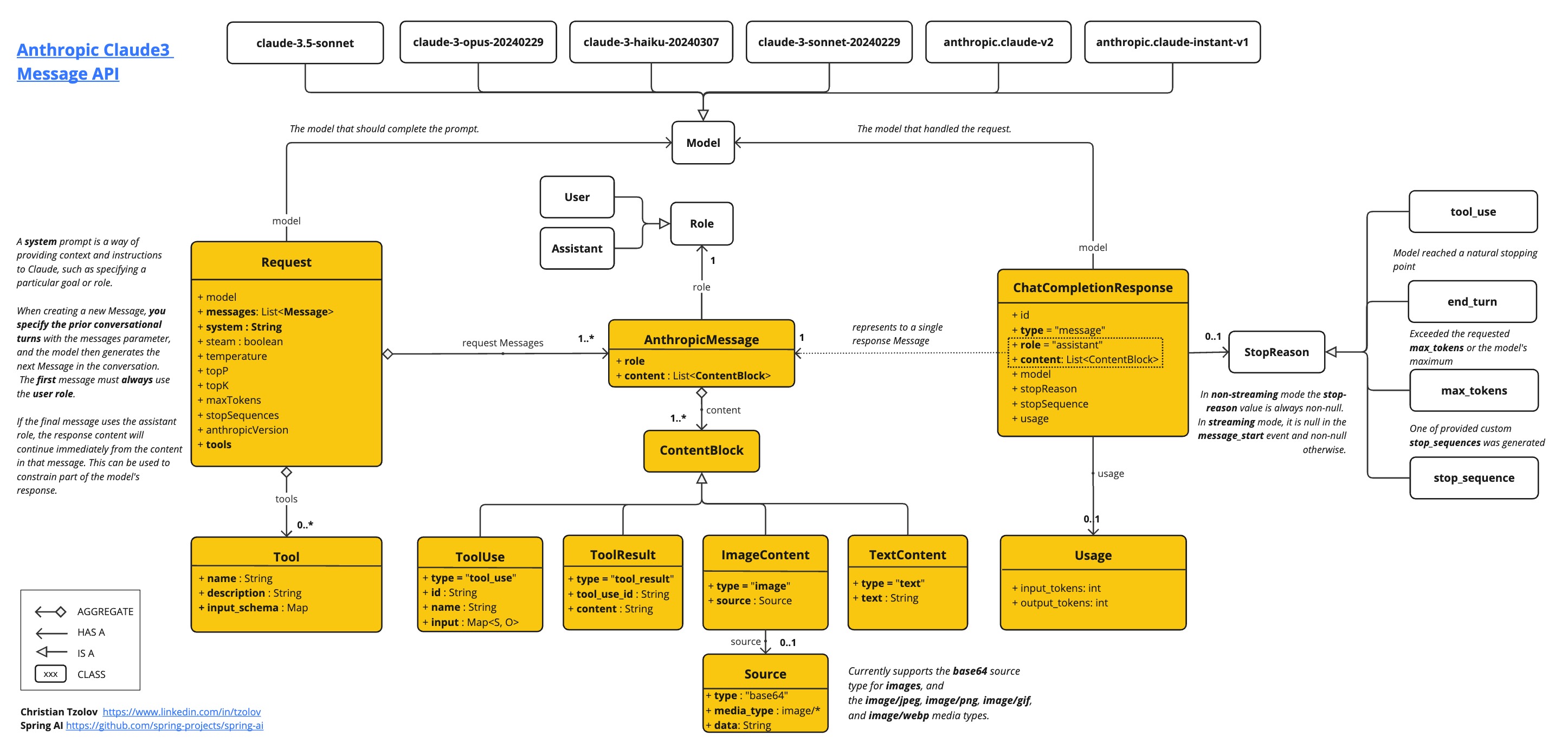
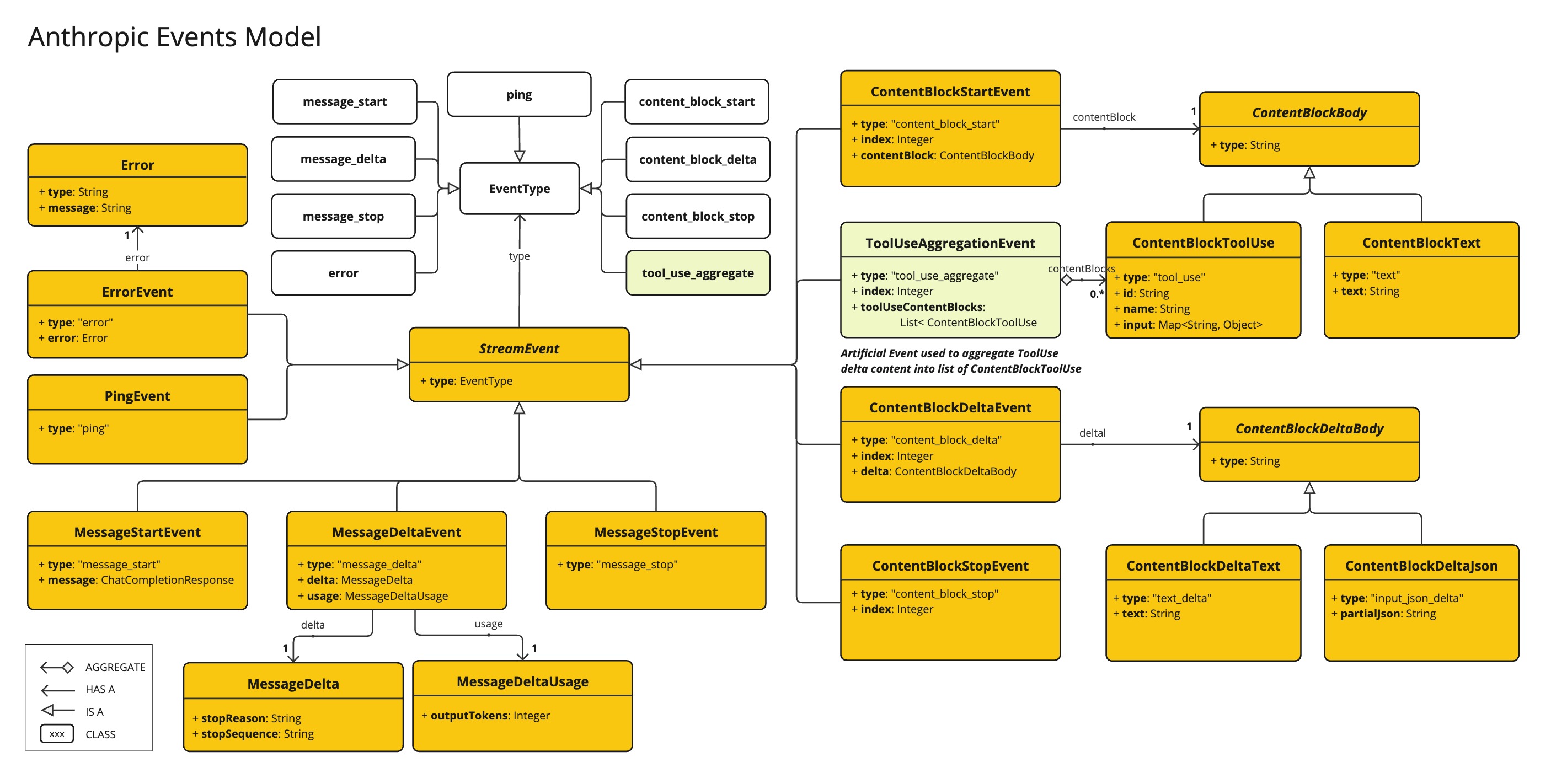
The AnthropicApi provides is lightweight Java client for Anthropic Message API.
以下类图说明了 AnthropicApi 聊天接口和构建块:
以下是如何以编程方式使用API的简单代码片段:
AnthropicApi anthropicApi =
    new AnthropicApi(System.getenv("ANTHROPIC_API_KEY"));

AnthropicMessage chatCompletionMessage = new AnthropicMessage(
        List.of(new ContentBlock("Tell me a Joke?")), Role.USER);

// Sync request
ResponseEntity<ChatCompletionResponse> response = this.anthropicApi
    .chatCompletionEntity(new ChatCompletionRequest(AnthropicApi.ChatModel.CLAUDE_OPUS_4_5.getValue(),
            List.of(this.chatCompletionMessage), null, 100, 0.8, false));

// Streaming request
Flux<StreamResponse> response = this.anthropicApi
    .chatCompletionStream(new ChatCompletionRequest(AnthropicApi.ChatModel.CLAUDE_OPUS_4_5.getValue(),
            List.of(this.chatCompletionMessage), null, 100, 0.8, true));
请参阅 AnthropicApi.java 的 JavaDoc 以获取更多信息。
底层API示例
-
The AnthropicApiIT.java test provides some general examples how to use the lightweight library.