使用 Spring Cloud Contract
1. 在 Nexus 或 Artifactory 中使用存根进行提供者契约测试
您可以查看 开发您的第一个基于 Spring Cloud Contract 的应用 链接,以了解在 Nexus 或 Artifactory 流程中使用存根进行提供方契约测试。
您还可以查看 工作坊页面,获取逐步操作指南,了解如何完成此流程。
2. 使用 Git 中的存根进行提供者契约测试
在此流程中,我们执行提供者契约测试(生产者并不了解消费者如何使用其API)。存根被上传到一个独立的仓库(它们不会上传至Artifactory或Nexus)。
2.1. 前提条件
$ tree .
└── META-INF
   └── folder.with.group.id.as.its.name
       └── folder-with-artifact-id
           └── folder-with-version
               ├── contractA.groovy
               ├── contractB.yml
               └── contractC.groovy
2.2. The Flow
流程看起来完全就像在
开始构建第一个基于Spring Cloud Contract的应用程序
中所展示的一样,只是Stub Storage的实现是一个git仓库。
您可以阅读更多关于设置 git 仓库以及消费者和生产者一侧的How To 页面的文档。
2.3.Consumer设置
为了从 Git 仓库而非 Nexus 或 Artifactory 获取存根(stubs),您需要在 Stub Runner 的 repositoryRoot 属性的 URL 中使用 git 协议。以下示例展示了如何进行配置:
@AutoConfigureStubRunner(
stubsMode = StubRunnerProperties.StubsMode.REMOTE,
        repositoryRoot = "git://[email protected]:spring-cloud-samples/spring-cloud-contract-nodejs-contracts-git.git",
ids = "com.example:artifact-id:0.0.1")@Rule
public StubRunnerRule rule = new StubRunnerRule()
.downloadStub("com.example","artifact-id", "0.0.1")
.repoRoot("git://[email protected]:spring-cloud-samples/spring-cloud-contract-nodejs-contracts-git.git")
.stubsMode(StubRunnerProperties.StubsMode.REMOTE);@RegisterExtension
public StubRunnerExtension stubRunnerExtension = new StubRunnerExtension()
.downloadStub("com.example","artifact-id", "0.0.1")
.repoRoot("git://[email protected]:spring-cloud-samples/spring-cloud-contract-nodejs-contracts-git.git")
.stubsMode(StubRunnerProperties.StubsMode.REMOTE);2.4. 设置生产者
要将存根推送到 Git 仓库而非 Nexus 或 Artifactory,您需要在插件设置的 URL 中使用 git 协议。此外,您还需显式告知插件在构建过程结束时推送存根。以下示例分别展示了如何在 Maven 和 Gradle 中实现此操作:
<plugin>
<groupId>org.springframework.cloud</groupId>
<artifactId>spring-cloud-contract-maven-plugin</artifactId>
<version>${spring-cloud-contract.version}</version>
<extensions>true</extensions>
<configuration>
<!-- Base class mappings etc. -->
<!-- We want to pick contracts from a Git repository -->
<contractsRepositoryUrl>git://git://[email protected]:spring-cloud-samples/spring-cloud-contract-nodejs-contracts-git.git</contractsRepositoryUrl>
<!-- We reuse the contract dependency section to set up the path
to the folder that contains the contract definitions. In our case the
path will be /groupId/artifactId/version/contracts -->
<contractDependency>
<groupId>${project.groupId}</groupId>
<artifactId>${project.artifactId}</artifactId>
<version>${project.version}</version>
</contractDependency>
<!-- The contracts mode can't be classpath -->
<contractsMode>REMOTE</contractsMode>
</configuration>
<executions>
<execution>
<phase>package</phase>
<goals>
<!-- By default we will not push the stubs back to SCM,
you have to explicitly add it as a goal -->
<goal>pushStubsToScm</goal>
</goals>
</execution>
</executions>
</plugin>contracts {
// We want to pick contracts from a Git repository
contractDependency {
stringNotation = "${project.group}:${project.name}:${project.version}"
}
/*
We reuse the contract dependency section to set up the path
to the folder that contains the contract definitions. In our case the
path will be /groupId/artifactId/version/contracts
*/
contractRepository {
repositoryUrl = "git://git://[email protected]:spring-cloud-samples/spring-cloud-contract-nodejs-contracts-git.git"
}
// The mode can't be classpath
contractsMode = "REMOTE"
// Base class mappings etc.
}
/*
In this scenario we want to publish stubs to SCM whenever
the `publish` task is run
*/
publish.dependsOn("publishStubsToScm")你可以更多地阅读如何在文档的 How To 部分 中设置 Git 仓库。
3. 在生产者端具有合同的驱动程序的合同
见 分步指南:使用生产者侧的契约进行消费者驱动的契约(CDC) 了解生产者侧的契约与消费者驱动的契约的流程。
与外部存储库中的契约一起驱动消费者驱动的契约
在此流程中,我们执行消费者驱动契约测试。契约定义存储在单独的仓库中。
See the workshop section for step-by-step instructions on how to do this flow.
4.1.前提条件
要使用消费者驱动的契约(consumer-driven contracts),并将契约存储在外部仓库中,您需要设置一个 Git 仓库,其内容如下:
-
包含每个生产者的所有契约定义。
-
可以将契约定义打包到 JAR 文件中。
-
对于每个合同生产者,都包含一种方式(例如
pom.xml)通过 Spring Cloud Contract 插件(SCC 插件)本地安装存根。
有关更多信息,请参阅我们的《如何操作》部分,其中介绍了如何设置此类存储库。 有关此类项目的示例,请参见 此示例。
您还需要配置了 Spring Cloud Contract Stub Runner 的消费者代码。有关此类项目的示例,请参见 此示例。您还需要配置了 Spring Cloud Contract 以及插件的生产者代码。有关此类项目的示例,请参见 此示例。存根存储使用的是 Nexus 或 Artifactory。
从高层角度来看,流程如下:
-
消费者与独立仓库中的契约定义进行协作。
-
当消费者的工作完成后,会在消费者端创建一个包含工作代码的分支,并向存放契约定义的独立仓库提交拉取请求。
-
生产者接管拉取请求,将其提交到包含契约定义的独立仓库,并将包含所有契约的JAR本地安装。
-
生产者从本地存储的JAR文件中生成测试用例,并编写缺失的实现代码,以使测试通过。
-
一旦生产者的工作完成,对包含合同定义的仓库的拉取请求将被合并。
-
经过CI工具使用契约定义构建存储库后,契约定义JAR文件将被上传到Nexus或Artifactory。生产者可以合并其分支。
-
最终,消费者可以切换到在线工作,从远程位置获取生产者的存档,并将分支合并到主分支。
4.2. 消费者流
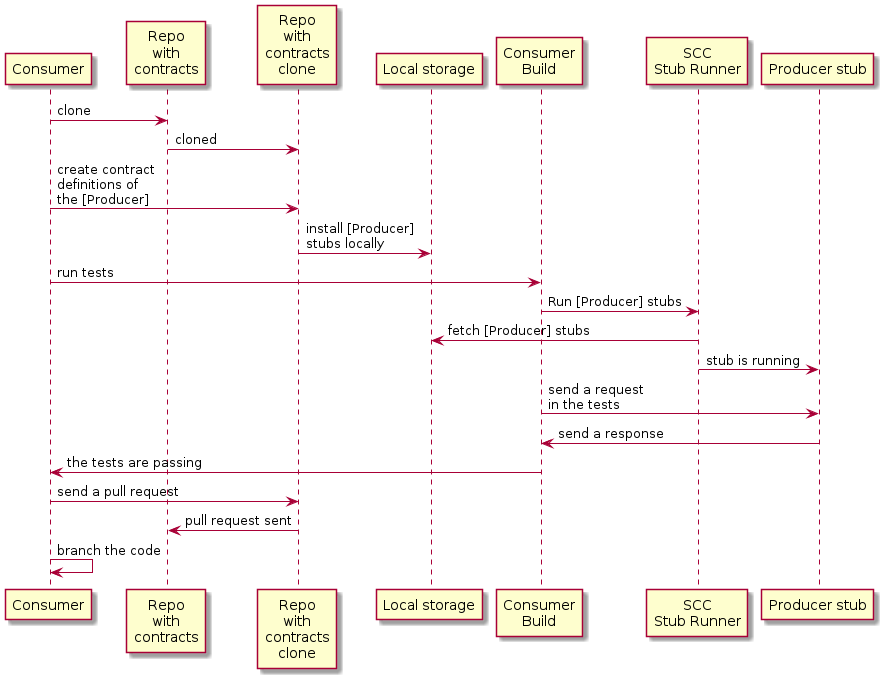
消费者:
-
在生产者发送请求时,写一个测试来捕获该请求。
测试失败,因为没有服务器存在。
-
克隆包含契约定义的仓库。
-
在文件夹中以合同形式设置要求,生产者的消费者名称作为生产者文件夹的子文件夹。
例如,对于名为
producer的生产者和名为consumer的使用者,这些合同将存储在src/main/resources/contracts/producer/consumer/)下 -
一旦定义了合同,就会将生产者存档安装到本地存储,如下例所示:
$ cd src/main/resource/contracts/producer $ ./mvnw clean install
-
为使用者测试设置Spring Cloud Contract (SCC) Stub Runner,以执行以下操作:
-
从本地存储获取生产者存根。
-
工作在存根-每个消费者模式(这会启用基于消费者驱动契约模式)。
SCC 框架 插件 运行器:
-
获取生产者存根。
-
Runs an in-memory HTTP server stub with the producer stubs. Now your test communicates with the HTTP server stub, and your tests pass.
-
创建一个拉取请求,提交到包含协议定义仓库中,用于生产者的新协议。
-
分支您的消费者代码,直到生产者团队合并其代码。
-
下图显示了以下 UML 图中显示的消费流:
4.3 产者流程
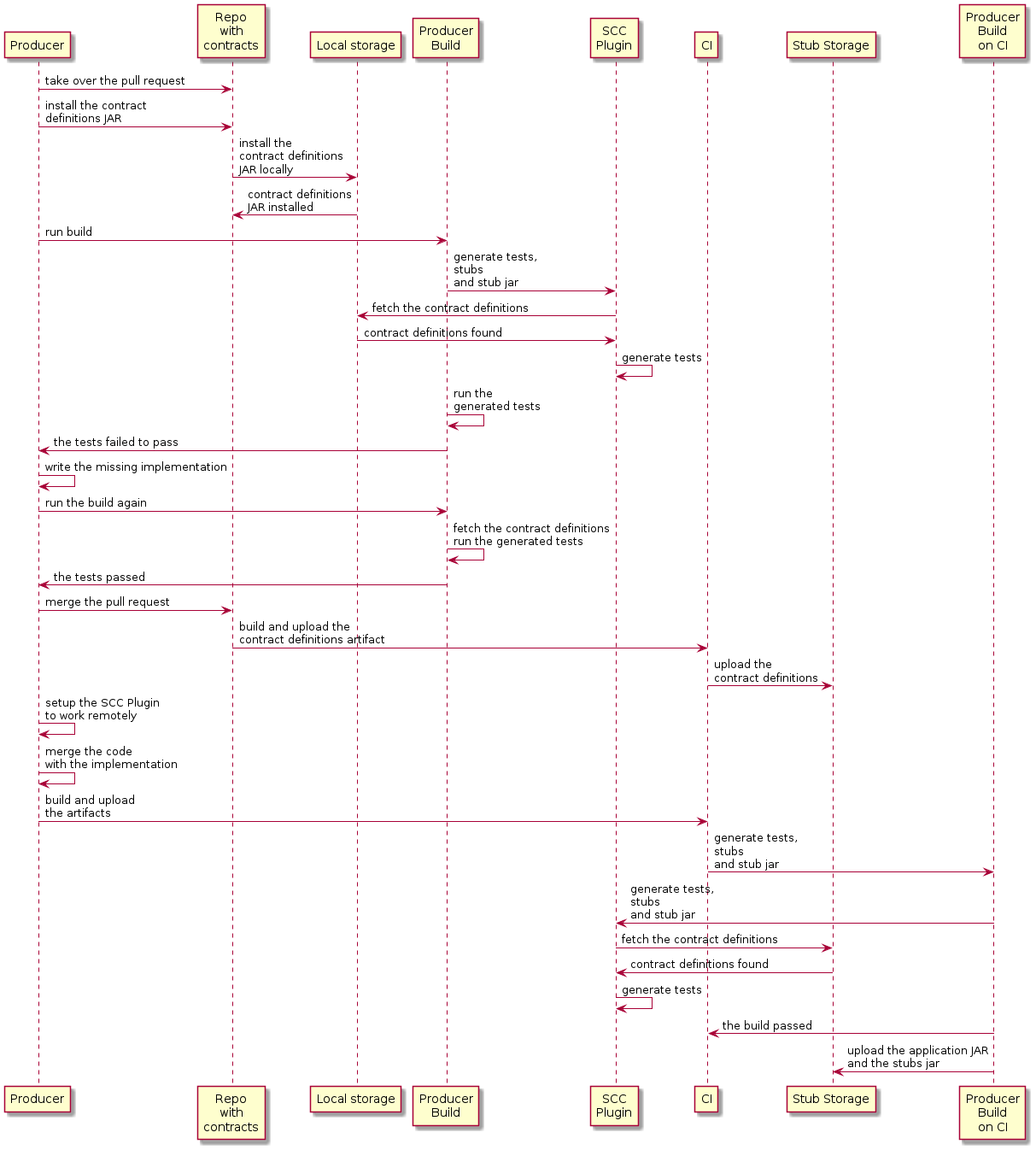
The producer:
-
接管具有合同定义的仓库的拉取请求。你可以从命令行进行,如下所示
$ git checkout -b the_branch_with_pull_request master git pull https://github.com/user_id/project_name.git the_branch_with_pull_request
-
安装合同定义,如下所示
$ ./mvnw clean install
-
设置插件从 JAR 文件而不是从
src/test/resources/contracts中获取合同定义,方法如下:Maven<plugin> <groupId>org.springframework.cloud</groupId> <artifactId>spring-cloud-contract-maven-plugin</artifactId> <version>${spring-cloud-contract.version}</version> <extensions>true</extensions> <configuration> <!-- We want to use the JAR with contracts with the following coordinates --> <contractDependency> <groupId>com.example</groupId> <artifactId>beer-contracts</artifactId> </contractDependency> <!-- The JAR with contracts should be taken from Maven local --> <contractsMode>LOCAL</contractsMode> <!-- ... additional configuration --> </configuration> </plugin>Gradlecontracts { // We want to use the JAR with contracts with the following coordinates // group id `com.example`, artifact id `beer-contracts`, LATEST version and NO classifier contractDependency { stringNotation = 'com.example:beer-contracts:+:' } // The JAR with contracts should be taken from Maven local contractsMode = "LOCAL" // Additional configuration } -
运行构建以生成测试和占位代码,如下:
Maven./mvnw clean installGradle./gradlew clean build -
编写缺失的实现,使测试通过。
-
合并包含协定定义的存储库中的拉取请求,如下所示:
$ git commit -am "Finished the implementation to make the contract tests pass" $ git checkout master $ git merge --no-ff the_branch_with_pull_request $ git push origin master
CI 系统使用契约定义构建项目,然后将包含契约定义的 JAR 文件上传到 Nexus 或 Artifactory。
-
切换到远程工作。
-
设置了插件,以便不再从本地存储中获取合同定义,而是从远程位置获取,如下所示:
Maven<plugin> <groupId>org.springframework.cloud</groupId> <artifactId>spring-cloud-contract-maven-plugin</artifactId> <version>${spring-cloud-contract.version}</version> <extensions>true</extensions> <configuration> <!-- We want to use the JAR with contracts with the following coordinates --> <contractDependency> <groupId>com.example</groupId> <artifactId>beer-contracts</artifactId> </contractDependency> <!-- The JAR with contracts should be taken from a remote location --> <contractsMode>REMOTE</contractsMode> <!-- ... additional configuration --> </configuration> </plugin>Gradlecontracts { // We want to use the JAR with contracts with the following coordinates // group id `com.example`, artifact id `beer-contracts`, LATEST version and NO classifier contractDependency { stringNotation = 'com.example:beer-contracts:+:' } // The JAR with contracts should be taken from a remote location contractsMode = "REMOTE" // Additional configuration } -
将生产者代码与新实现合并。
-
系统是:
-
构建项目。
-
生成测试、存根和存根 JAR。
-
将应用程序和存根 artifacts 上传到 Nexus 或 Artifactory。
-
下面的UML图显示了生产者过程:
5. 在生产者侧驱动合同的消费者,通过 git 推送
您可以阅读步骤指南,用于生产者侧合同上的契约驱动契约(CDC)来了解生产者侧契约驱动契约的流程。
存档存储实现是git仓库。我们将在描述提供者契约测试中存档的git设置部分。
您可以在文档的如何操作部分中了解有关为使用者和生产者侧设置git存储库的更多信息。
6. 非Spring应用程序在Artifactory中使用存根进行提供者契约测试
6.1. 流程
您可以阅读开发您的第一个基于Spring Cloud Contract的应用程序,了解有关在Nexus或Artifactory中使用存根进行提供者合同测试的流程。
6.2. 设置消费者
对于消费者端,您可以使用一个 JUnit 规则。这样就无需启动 Spring 上下文了。以下列表展示了该规则(适用于 JUnit 4 和 JUnit 5);
@Rule
    public StubRunnerRule rule = new StubRunnerRule()
            .downloadStub("com.example","artifact-id", "0.0.1")
            .repoRoot("git://[email protected]:spring-cloud-samples/spring-cloud-contract-nodejs-contracts-git.git")
.stubsMode(StubRunnerProperties.StubsMode.REMOTE);@Rule
public StubRunnerExtension stubRunnerExtension = new StubRunnerExtension()
.downloadStub("com.example","artifact-id", "0.0.1")
.repoRoot("git://[email protected]:spring-cloud-samples/spring-cloud-contract-nodejs-contracts-git.git")
.stubsMode(StubRunnerProperties.StubsMode.REMOTE);6.3. 设置生产者
默认情况下,Spring Cloud Contract 插件为生成的测试使用 Rest Assured 的 MockMvc 设置。由于非 Spring 应用不使用 MockMvc,您可以将 testMode 更改为 EXPLICIT,以向在特定端口上绑定的应用程序发送真实请求。
在本示例中,我们使用一个名为 Javalin 的框架来启动一个非 Spring HTTP 服务器。
假设我们有以下应用程序:
package com.example.demo;

import io.javalin.Javalin;

public class DemoApplication {

    public static void main(String[] args) {
        new DemoApplication().run(7000);
    }

    public Javalin start(int port) {
        return Javalin.create().start(port);
    }

    public Javalin registerGet(Javalin app) {
        return app.get("/", ctx -> ctx.result("Hello World"));
    }

    public Javalin run(int port) {
        return registerGet(start(port));
    }

}
鉴于该应用程序,我们可以设置插件以使用 EXPLICIT 模式(即向真实端口发送请求),如下所示:
<plugin>
    <groupId>org.springframework.cloud</groupId>
    <artifactId>spring-cloud-contract-maven-plugin</artifactId>
    <version>${spring-cloud-contract.version}</version>
    <extensions>true</extensions>
    <configuration>
        <baseClassForTests>com.example.demo.BaseClass</baseClassForTests>
        <!-- This will setup the EXPLICIT mode for the tests -->
        <testMode>EXPLICIT</testMode>
    </configuration>
</plugin>contracts {
// This will setup the EXPLICIT mode for the tests
testMode = "EXPLICIT"
baseClassForTests = "com.example.demo.BaseClass"
}基类可能类似于以下内容:
import io.javalin.Javalin;
import io.restassured.RestAssured;
import org.junit.After;
import org.junit.Before;
import org.springframework.util.SocketUtils;

public class BaseClass {

    Javalin app;

    @Before
    public void setup() {
        // pick a random port
        int port = SocketUtils.findAvailableTcpPort();
        // start the application at a random port
        this.app = start(port);
        // tell Rest Assured where the started application is
        RestAssured.baseURI = "http://localhost:" + port;
    }

    @After
    public void close() {
        // stop the server after each test
        this.app.stop();
    }

    private Javalin start(int port) {
        // reuse the production logic to start a server
        return new DemoApplication().run(port);
    }
}
采用这种配置:
-
我们已设置 Spring Cloud Contract 插件,以
EXPLICIT模式发送真实请求,而非模拟请求。 -
我们已定义了一个基类,其功能包括:
-
为每个测试在随机端口上启动 HTTP 服务器。
-
设置 Rest Assured 以向该端口发送请求。
-
在每次测试后关闭 HTTP 服务器。
-
7. 在非JVM世界中使用Artifactory中的存根进行提供者契约测试
在此流程中,我们假设:
-
API 生产者和 API 消费者是非 JVM 应用程序。
-
合同定义以 YAML 格式编写。
-
存根存储为 Artifactory 或 Nexus。
-
Spring Cloud Contract Docker(SCC Docker)和 Spring Cloud Contract Stub Runner Docker(SCC Stub Runner Docker)镜像被使用。
您可以在此处了解如何将 Spring Cloud Contract 与 Docker 结合使用以获取更多详情。此处
这里,您可以阅读一篇关于如何在多语言环境中使用 Spring Cloud Contract 的博客文章。
这里,您可以找到一个使用 Spring Cloud Contract 作为生产者和消费者的 NodeJS 应用程序示例。
7.1 生产者流程
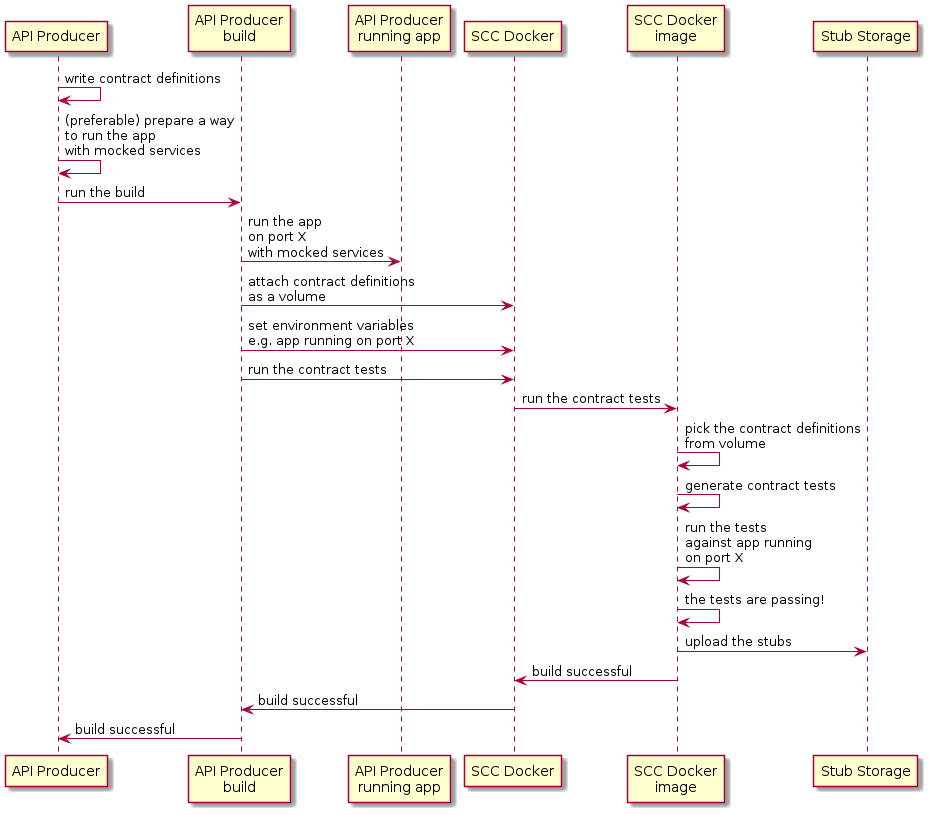
从高层次来看,生产者:
-
编写契约定义(例如,使用 YAML 格式)。
-
设置构建工具以:
-
启动在给定端口上使用模拟服务的应用程序。
如果无法进行模拟,您可以设置基础设施并在状态化方式下定义测试。
-
运行 Spring Cloud Contract Docker 映像,并将正在运行的应用程序的端口作为环境变量传递。
-
SCC Docker镜像:<ul><li>从挂载的卷生成测试。</li><li>针对正在运行的应用程序运行测试。</li></ul>
在测试完成之后,存档会被上传到存档仓库(例如Artifactory或Git)。<br>
以下UML图显示了生产者流程:
7.2. 消费者流程
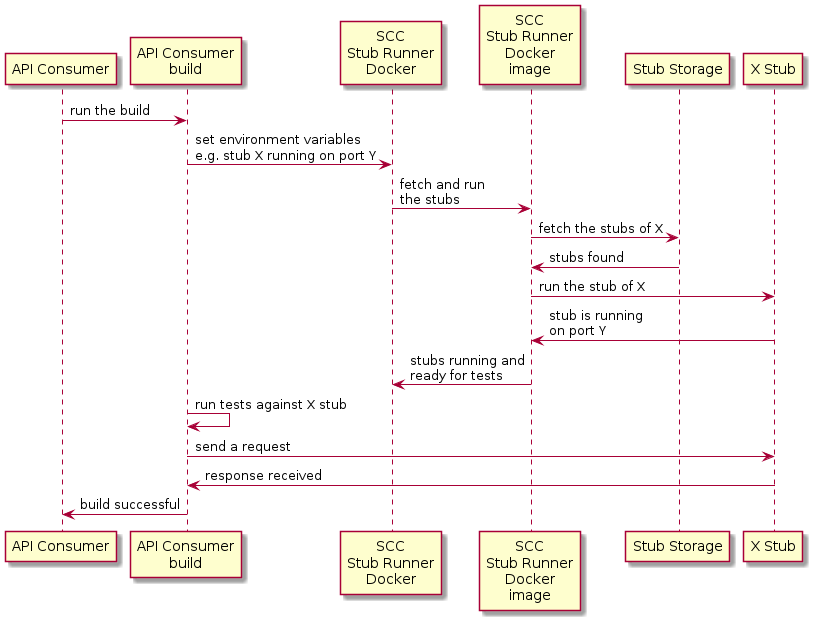
从高层来看,用户:
-
设置构建工具以:
-
开始运行 Spring Cloud Contract Stub Runner Docker 镜像并启动模拟实例。
环境变量配置:
-
存根获取。
-
该仓库的位置。
注意:
-
使用本地存储,您也可以将其作为卷进行挂载。
-
这些端口是存根正在运行的,需要公开。
-
-
针对正在运行的存根运行应用程序测试。
下图显示了以下 UML 图中显示的消费流:
8. 使用 REST Docs 和 Nexus 或 Artifactory 中的存根进行提供者契约测试
在此流程中,我们不使用 Spring Cloud Contract 插件来生成测试和存根。我们编写 Spring RESTDocs,并从中自动生成功能存根。最后,我们配置构建过程,将存根打包并上传至存根存储站点——在我们的案例中,为 Nexus 或 Artifactory。
参见研讨会页面,了解如何使用此流程的分步说明。
8.1. 生产者流程
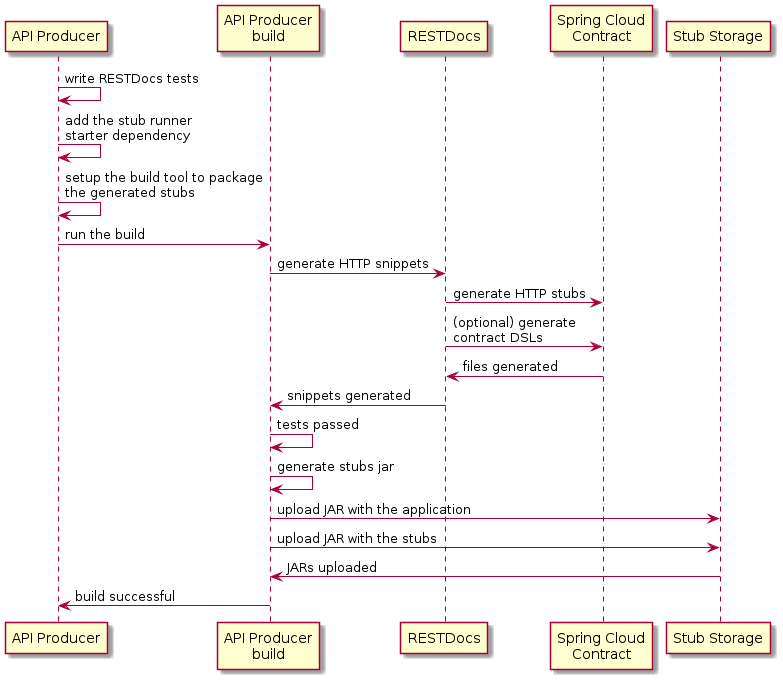
作为生产商,我们:
-
编写我们的 API 的 RESTDocs 测试。
-
添加 Spring Cloud Contract Stub Runner 的 starter 到我们的构建中(
spring-cloud-starter-contract-stub-runner),如下所示:Maven<dependencies> <dependency> <groupId>org.springframework.cloud</groupId> <artifactId>spring-cloud-starter-contract-stub-runner</artifactId> <scope>test</scope> </dependency> </dependencies> <dependencyManagement> <dependencies> <dependency> <groupId>org.springframework.cloud</groupId> <artifactId>spring-cloud-dependencies</artifactId> <version>${spring-cloud.version}</version> <type>pom</type> <scope>import</scope> </dependency> </dependencies> </dependencyManagement>Gradledependencies { testImplementation 'org.springframework.cloud:spring-cloud-starter-contract-stub-runner' } dependencyManagement { imports { mavenBom "org.springframework.cloud:spring-cloud-dependencies:${springCloudVersion}" } } -
我们设置构建工具来打包我们的存根,如下所示:
Maven<!-- pom.xml --> <plugins> <plugin> <groupId>org.apache.maven.plugins</groupId> <artifactId>maven-assembly-plugin</artifactId> <executions> <execution> <id>stub</id> <phase>prepare-package</phase> <goals> <goal>single</goal> </goals> <inherited>false</inherited> <configuration> <attach>true</attach> <descriptors> ${basedir}/src/assembly/stub.xml </descriptors> </configuration> </execution> </executions> </plugin> </plugins> <!-- src/assembly/stub.xml --> <assembly xmlns="http://maven.apache.org/plugins/maven-assembly-plugin/assembly/1.1.3" xmlns:xsi="http://www.w3.org/2001/XMLSchema-instance" xsi:schemaLocation="http://maven.apache.org/plugins/maven-assembly-plugin/assembly/1.1.3 http://maven.apache.org/xsd/assembly-1.1.3.xsd"> <id>stubs</id> <formats> <format>jar</format> </formats> <includeBaseDirectory>false</includeBaseDirectory> <fileSets> <fileSet> <directory>${project.build.directory}/generated-snippets/stubs</directory> <outputDirectory>META-INF/${project.groupId}/${project.artifactId}/${project.version}/mappings</outputDirectory> <includes> <include>**/*</include> </includes> </fileSet> </fileSets> </assembly>Gradletask stubsJar(type: Jar) { classifier = "stubs" into("META-INF/${project.group}/${project.name}/${project.version}/mappings") { include('**/*.*') from("${project.buildDir}/generated-snippets/stubs") } } // we need the tests to pass to build the stub jar stubsJar.dependsOn(test) bootJar.dependsOn(stubsJar)
现在,当我们运行测试时,存根会自动发布并打包。
以下UML图显示了生产者流程:
8.2. 消费者流程
由于消费者流程不受生成存根工具的影响,您可以阅读开发您的第一个基于 Spring Cloud Contract 的应用程序,了解使用 Nexus 或 Artifactory 中的存根进行提供方合同测试时消费者的流程。
9. 接下来阅读什么
你现在应该已经了解了如何使用 Spring Cloud Contract 和一些你应该遵循的最佳实践。你可以继续学习有关特定Spring Cloud Contract 功能,或者跳过并阅读关于 Spring Cloud Contract 高级功能。