“操作指南”指南
1. 为什么使用 Spring Cloud Contract?
Spring Cloud Contract 在多语言环境中表现优异。该项目拥有许多非常有趣的功能。其中不少功能无疑使 Spring Cloud Contract Verifier 在消费者驱动契约(CDC)工具市场中脱颖而出。最引人注目的功能包括以下几点:
-
支持通过消息机制实现变更数据捕获(CDC)。
-
清晰易用,静态类型化的领域特定语言(DSL)。
-
能够将当前的 JSON 文件复制粘贴到合约中,并仅编辑其元素。
-
从已定义的契约自动生成测试。
-
存根运行器功能:存根会自动在运行时从 Nexus 或 Artifactory 下载。
-
Spring Cloud 集成:集成测试无需服务发现机制。
-
Spring Cloud Contract 集成与 Pact,并提供简单的钩子以扩展其功能。
-
通过 Docker 支持添加任何语言和框架的功能。
使用其他语言编写契约的方法
你可以使用YAML编写契约。有关更多信息,请参见此部分。
我们正在努力提供更多描述契约的方式。您可以通过 github-issues 查看更多信息。
3. 我如何为合同提供动态值?
关于桩(stubs)最大的挑战之一是它们的可重用性。只有当它们能够被广泛使用时,才能实现其目的。请求和响应元素中的硬编码值(如日期和ID)通常会使其变得困难。请考虑以下JSON请求:
{
    "time" : "2016-10-10 20:10:15",
    "id" : "9febab1c-6f36-4a0b-88d6-3b6a6d81cd4a",
    "body" : "foo"
}
现在考虑以下 JSON 响应:
{
    "time" : "2016-10-10 21:10:15",
    "id" : "c4231e1f-3ca9-48d3-b7e7-567d55f0d051",
    "body" : "bar"
}
想象一下,为 time 字段设置正确值所需的痛苦(假设此内容由数据库生成),这可能需要通过修改系统时钟或提供数据提供者的模拟实现来完成。同样的问题也适用于 id 字段。虽然你可以创建一个 UUID 生成器的模拟实现,但这样做意义不大。
因此,作为消费者,您希望发送一个与任何时间格式或任何 UUID 匹配的请求。这样,您的系统可以像往常一样工作,生成数据而无需进行任何模拟(stub)操作。假设在上述 JSON 中,最关键的部分是 body 字段。您可以专注于该字段,并为其他字段提供匹配规则。换句话说,您希望模拟服务按如下方式工作:
{
    "time" : "SOMETHING THAT MATCHES TIME",
    "id" : "SOMETHING THAT MATCHES UUID",
    "body" : "foo"
}
就响应而言,作为消费者,您需要一个具体的值,以便对其进行操作。因此,以下 JSON 是有效的:
{
    "time" : "2016-10-10 21:10:15",
    "id" : "c4231e1f-3ca9-48d3-b7e7-567d55f0d051",
    "body" : "bar"
}
在前面几节中,我们从契约生成了测试。因此,从生产者一方来看,情况就大不相同了。我们解析提供的契约,并且在测试中,我们希望向您的端点发送真实的请求。因此,对于生产者发起的请求情形,我们无法进行任何形式的匹配。我们需要具体的值,以便生产者的后端能够正常工作。因此,以下 JSON 将是有效的:
{
    "time" : "2016-10-10 20:10:15",
    "id" : "9febab1c-6f36-4a0b-88d6-3b6a6d81cd4a",
    "body" : "foo"
}
另一方面,从合同有效性角度来看,响应不一定必须包含 time 或 id 的具体值。假设你是在生产者端生成这些值。同样,你必须进行大量模拟(stubbing)操作,以确保始终返回相同的值。因此,从生产者端出发,你可能希望如下响应:
{
    "time" : "SOMETHING THAT MATCHES TIME",
    "id" : "SOMETHING THAT MATCHES UUID",
    "body" : "bar"
}
那么,您如何为消费者提供一个匹配器,同时为生产者提供一个具体值(反之亦然,在其他时间)?<br/>Spring Cloud Contract 允许您提供动态值。这意味着它在通信双方都可以不同。
您可以在 合同 DSL 部分了解更多信息。
| 阅读 与 JSON 相关的 Groovy 文档,以了解如何正确地构建请求和响应体。 |
4. 如何进行存根版本控制?
本节介绍存根的版本控制,您可以通过多种不同方式来处理:
4.1. API 版本控制
版本控制到底意味着什么?如果你指的是 API 版本,那么有多种不同的实现方式:
-
使用超媒体链接,切勿以任何方式对API进行版本控制
-
通过请求头和URL传递版本
我们并不试图回答哪种方法更好的问题。您应选择适合您需求并能为您创造商业价值的方法。
假设您对API进行版本控制。在这种情况下,您应为所支持的每个版本提供尽可能多的契约(contract)。您可以为每个版本创建一个子文件夹,或将其附加到契约名称上——无论哪种方式最适合您。
4.2. JAR 版本控制
如果您的意思是JAR文件中包含存根的版本,则主要有两种方法。
假设您正在进行持续交付和部署,这意味着每次通过流水线时都会生成一个新的 JAR 文件,并且该 JAR 文件可随时部署到生产环境。例如,您的 JAR 文件版本可能如下所示(因为其构建于 2016 年 10 月 20 日 20:15:21):
1.0.0.20161020-201521-RELEASE在这种情况下,您生成的存根JAR应如下所示:
1.0.0.20161020-201521-RELEASE-stubs.jar在这种情况下,您应在引用存根时,在application.yml或@AutoConfigureStubRunner内部提供最新版本的存根。您可以通过传递+符号来实现这一点。以下示例展示了如何操作:
@AutoConfigureStubRunner(ids = {"com.example:http-server-dsl:+:stubs:8080"})然而,如果版本控制是固定的(例如,1.0.4.RELEASE 或 2.1.1),则必须设置 JAR 版本的具体值。以下示例展示了如何为版本 2.1.1 执行此操作:
@AutoConfigureStubRunner(ids = {"com.example:http-server-dsl:2.1.1:stubs:8080"}){ {content} }
您可以调整分类器,以针对当前开发版本的其他服务存根或已部署到生产环境的存根运行测试。如果您在达到生产部署时修改构建配置,将存根与 prod-stubs 分类器一起部署,则可在一种情况下使用开发存根运行测试,而在另一种情况下使用生产存根运行测试。
以下示例适用于使用存根开发版本进行的测试:
@AutoConfigureStubRunner(ids = {"com.example:http-server-dsl:+:stubs:8080"})以下示例适用于使用存根生产版本进行测试的情况:
@AutoConfigureStubRunner(ids = {"com.example:http-server-dsl:+:prod-stubs:8080"})您还可以在部署流水线中通过属性传递这些值。
5. 如何使用带有契约的公共 Repository 而不是由生产者存储它们?
另一种存储契约的方式,而不是将其与生产者一同保存,是将它们存放在一个共同的位置。这种情况可能涉及安全问题(即消费者无法克隆生产者的代码)。此外,如果您将契约集中存放在一处,那么作为生产者,您就能了解自己有多少个消费者,以及在进行本地更改时可能会对哪个消费者造成影响。
5.1. 仓库结构
假设我们有一个生产者,其坐标为com.example:server,以及三个消费者:client1、client2和client3。 然后,在具有通用合约的存储库中,您可以拥有以下设置(您可以在这里检查)。 下面的清单显示了这样的结构:
├── com
│   └── example
│       └── server
│           ├── client1
│           │   └── expectation.groovy
│           ├── client2
│           │   └── expectation.groovy
│           ├── client3
│           │   └── expectation.groovy
│           └── pom.xml
├── mvnw
├── mvnw.cmd
├── pom.xml
└── src
    └── assembly
        └── contracts.xml
在斜杠分隔的 groupid/artifact id 文件夹(com/example/server)下,您对三个消费者(client1、client2 和 client3)有预期。这些预期是标准的 Groovy DSL 合同文件,如本文档中所述。该存储库必须生成一个 JAR 文件,使其内容与存储库内容一一对应。
以下示例显示了 pom.xml 文件位于 server 文件夹内:
<?xml version="1.0" encoding="UTF-8"?>
<project xmlns:xsi="http://www.w3.org/2001/XMLSchema-instance"
         xmlns="http://maven.apache.org/POM/4.0.0"
         xsi:schemaLocation="http://maven.apache.org/POM/4.0.0 https://maven.apache.org/xsd/maven-4.0.0.xsd">
    <modelVersion>4.0.0</modelVersion>

    <groupId>com.example</groupId>
    <artifactId>server</artifactId>
    <version>0.0.1</version>

    <name>Server Stubs</name>
    <description>POM used to install locally stubs for consumer side</description>

    <parent>
        <groupId>org.springframework.boot</groupId>
        <artifactId>spring-boot-starter-parent</artifactId>
        <version>2.4.6</version>
        <relativePath/>
    </parent>

    <properties>
        <project.build.sourceEncoding>UTF-8</project.build.sourceEncoding>
        <java.version>1.8</java.version>
        <spring-cloud-contract.version>3.0.4-SNAPSHOT</spring-cloud-contract.version>
        <spring-cloud-release.version>2020.0.3-SNAPSHOT</spring-cloud-release.version>
        <excludeBuildFolders>true</excludeBuildFolders>
    </properties>

    <dependencyManagement>
        <dependencies>
            <dependency>
                <groupId>org.springframework.cloud</groupId>
                <artifactId>spring-cloud-dependencies</artifactId>
                <version>${spring-cloud-release.version}</version>
                <type>pom</type>
                <scope>import</scope>
            </dependency>
        </dependencies>
    </dependencyManagement>

    <build>
        <plugins>
            <plugin>
                <groupId>org.springframework.cloud</groupId>
                <artifactId>spring-cloud-contract-maven-plugin</artifactId>
                <version>${spring-cloud-contract.version}</version>
                <extensions>true</extensions>
                <configuration>
                    <!-- By default it would search under src/test/resources/ -->
                    <contractsDirectory>${project.basedir}</contractsDirectory>
                </configuration>
            </plugin>
        </plugins>
    </build>

    <repositories>
        <repository>
            <id>spring-snapshots</id>
            <name>Spring Snapshots</name>
            <url>https://repo.spring.io/snapshot</url>
            <snapshots>
                <enabled>true</enabled>
            </snapshots>
        </repository>
        <repository>
            <id>spring-milestones</id>
            <name>Spring Milestones</name>
            <url>https://repo.spring.io/milestone</url>
            <snapshots>
                <enabled>false</enabled>
            </snapshots>
        </repository>
        <repository>
            <id>spring-releases</id>
            <name>Spring Releases</name>
            <url>https://repo.spring.io/release</url>
            <snapshots>
                <enabled>false</enabled>
            </snapshots>
        </repository>
    </repositories>
    <pluginRepositories>
        <pluginRepository>
            <id>spring-snapshots</id>
            <name>Spring Snapshots</name>
            <url>https://repo.spring.io/snapshot</url>
            <snapshots>
                <enabled>true</enabled>
            </snapshots>
        </pluginRepository>
        <pluginRepository>
            <id>spring-milestones</id>
            <name>Spring Milestones</name>
            <url>https://repo.spring.io/milestone</url>
            <snapshots>
                <enabled>false</enabled>
            </snapshots>
        </pluginRepository>
        <pluginRepository>
            <id>spring-releases</id>
            <name>Spring Releases</name>
            <url>https://repo.spring.io/release</url>
            <snapshots>
                <enabled>false</enabled>
            </snapshots>
        </pluginRepository>
    </pluginRepositories>

</project>
除了 Spring Cloud Contract Maven 插件外,没有其他依赖项。这些 pom.xml 个文件对于消费者端运行 mvn clean install -DskipTests 以本地安装生产者项目的存根(stubs)是必需的。
根目录中的 pom.xml 文件可以如下所示:
<?xml version="1.0" encoding="UTF-8"?>
<project xmlns:xsi="http://www.w3.org/2001/XMLSchema-instance"
         xmlns="http://maven.apache.org/POM/4.0.0"
         xsi:schemaLocation="http://maven.apache.org/POM/4.0.0 https://maven.apache.org/xsd/maven-4.0.0.xsd">
    <modelVersion>4.0.0</modelVersion>

    <groupId>com.example.standalone</groupId>
    <artifactId>contracts</artifactId>
    <version>0.0.1</version>

    <name>Contracts</name>
    <description>Contains all the Spring Cloud Contracts, well, contracts. JAR used by the
        producers to generate tests and stubs
    </description>

    <properties>
        <project.build.sourceEncoding>UTF-8</project.build.sourceEncoding>
    </properties>

    <build>
        <plugins>
            <plugin>
                <groupId>org.apache.maven.plugins</groupId>
                <artifactId>maven-assembly-plugin</artifactId>
                <executions>
                    <execution>
                        <id>contracts</id>
                        <phase>prepare-package</phase>
                        <goals>
                            <goal>single</goal>
                        </goals>
                        <configuration>
                            <attach>true</attach>
                            <descriptor>${basedir}/src/assembly/contracts.xml</descriptor>
                            <!-- If you want an explicit classifier remove the following line -->
                            <appendAssemblyId>false</appendAssemblyId>
                        </configuration>
                    </execution>
                </executions>
            </plugin>
        </plugins>
    </build>

</project>
它使用装配插件构建包含所有契约的 JAR 文件。以下示例展示了此类设置:
<assembly xmlns:xsi="http://www.w3.org/2001/XMLSchema-instance"
          xmlns="http://maven.apache.org/plugins/maven-assembly-plugin/assembly/1.1.3"
          xsi:schemaLocation="http://maven.apache.org/plugins/maven-assembly-plugin/assembly/1.1.3 https://maven.apache.org/xsd/assembly-1.1.3.xsd">
    <id>project</id>
    <formats>
        <format>jar</format>
    </formats>
    <includeBaseDirectory>false</includeBaseDirectory>
    <fileSets>
        <fileSet>
            <directory>${project.basedir}</directory>
            <outputDirectory>/</outputDirectory>
            <useDefaultExcludes>true</useDefaultExcludes>
            <excludes>
                <exclude>**/${project.build.directory}/**</exclude>
                <exclude>mvnw</exclude>
                <exclude>mvnw.cmd</exclude>
                <exclude>.mvn/**</exclude>
                <exclude>src/**</exclude>
            </excludes>
        </fileSet>
    </fileSets>
</assembly>
5.2. 工作流
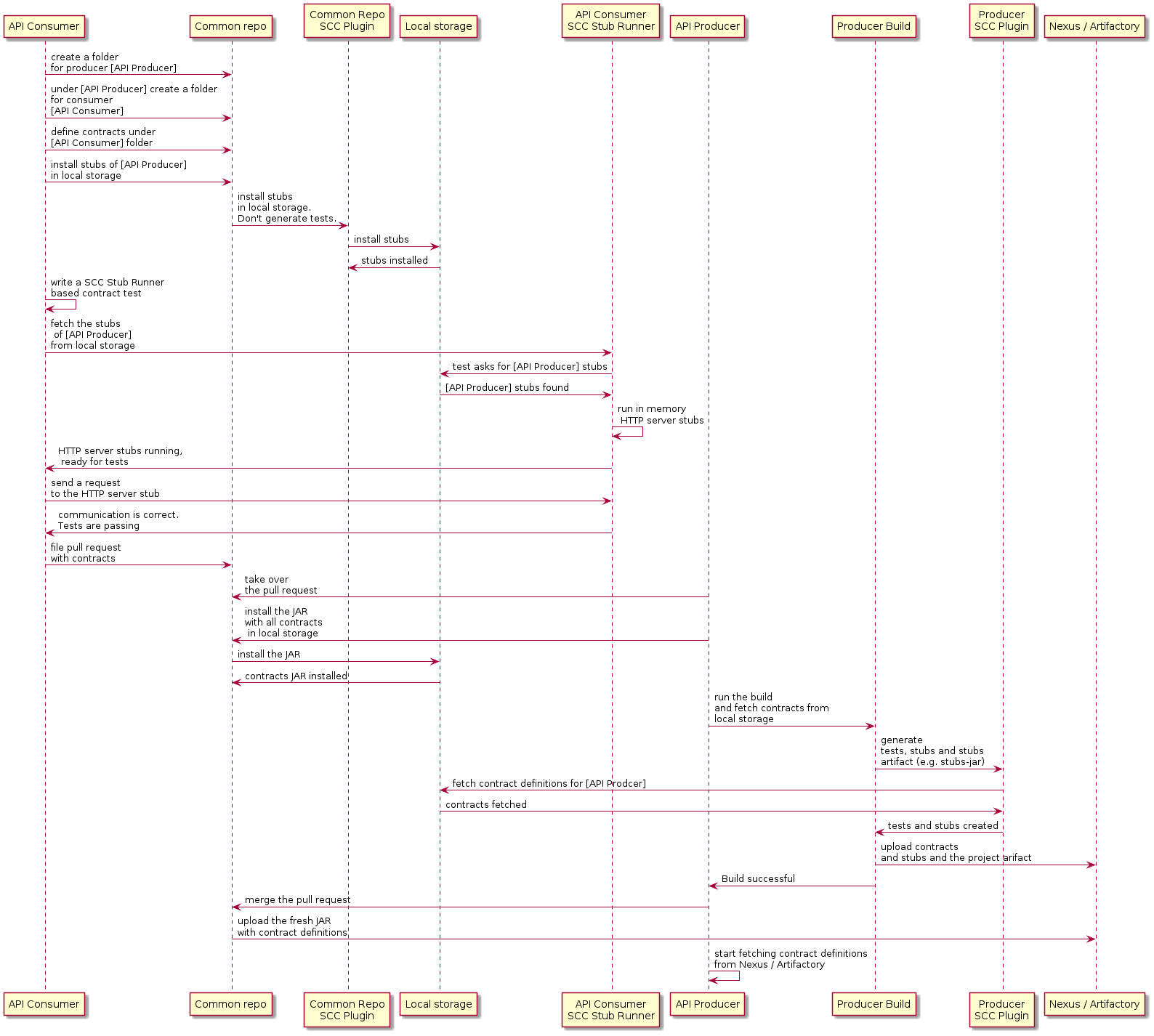
该工作流程假设在消费者端和生产者端均已配置 Spring Cloud Contract。此外,通用仓库中也已正确设置了相应的插件以管理契约。CI 作业已在通用仓库中设置,用于构建所有契约的构件并将其上传至 Nexus 或 Artifactory。下图展示了此工作流程的 UML 图:
5.3. 消费者
当消费者希望离线处理契约时,与其克隆生产者代码,不如由消费者团队克隆公共仓库,进入所需生产者文件夹(例如 com/example/server),然后运行 mvn clean install -DskipTests 以本地安装由契约转换而来的存根。
| 您需要在本地安装 Maven。 |
5.4. 生产者
作为生产者,您可以修改 Spring Cloud Contract Verifier,以提供包含契约的 JAR 的 URL 和依赖关系,如下所示:
<plugin>
    <groupId>org.springframework.cloud</groupId>
    <artifactId>spring-cloud-contract-maven-plugin</artifactId>
    <configuration>
        <contractsMode>REMOTE</contractsMode>
        <contractsRepositoryUrl>
            https://link/to/your/nexus/or/artifactory/or/sth
        </contractsRepositoryUrl>
        <contractDependency>
            <groupId>com.example.standalone</groupId>
            <artifactId>contracts</artifactId>
        </contractDependency>
    </configuration>
</plugin>
在此设置下,包含 groupid(即 com.example.standalone)和 artifactid(即 contracts)的 JAR 文件将从 link/to/your/nexus/or/artifactory/or/sth 下载。随后,该文件会被解压到本地临时文件夹中,并从中选取位于 com/example/server 的契约作为生成测试用例和存根所依据的契约。由于这一约定,生产方团队可以知晓在做出某些不兼容变更时,哪些消费方团队受到影响。
流程的其余部分看起来相同。
Spring for Apache Kafka 5.5.如何按主题而不是按生产者定义消息契约?
为避免在通用仓库中重复消息契约,当多个生产者向同一主题写入消息时,我们可以创建一种结构:将 REST 契约放置在每个生产者对应的文件夹中,而消息契约则放置在每个主题对应的文件夹中。
5.5.1. 基于Maven的项目
为了能够在生产者端进行工作,我们需要指定一个包含模式,以根据我们感兴趣的消息主题来过滤常见的存储库 JAR 文件。Maven Spring Cloud Contract 插件的 includedFiles 属性可实现此目的。此外,contractsPath 也必须被指定,因为默认路径将是常见的存储库 groupid/artifactid。以下示例展示了一个用于 Spring Cloud Contract 的 Maven 插件:
<plugin>
   <groupId>org.springframework.cloud</groupId>
   <artifactId>spring-cloud-contract-maven-plugin</artifactId>
   <version>${spring-cloud-contract.version}</version>
   <configuration>
      <contractsMode>REMOTE</contractsMode>
      <contractsRepositoryUrl>https://link/to/your/nexus/or/artifactory/or/sth</contractsRepositoryUrl>
      <contractDependency>
         <groupId>com.example</groupId>
         <artifactId>common-repo-with-contracts</artifactId>
         <version>+</version>
      </contractDependency>
      <contractsPath>/</contractsPath>
      <baseClassMappings>
         <baseClassMapping>
            <contractPackageRegex>.*messaging.*</contractPackageRegex>
            <baseClassFQN>com.example.services.MessagingBase</baseClassFQN>
         </baseClassMapping>
         <baseClassMapping>
            <contractPackageRegex>.*rest.*</contractPackageRegex>
            <baseClassFQN>com.example.services.TestBase</baseClassFQN>
         </baseClassMapping>
      </baseClassMappings>
      <includedFiles>
         <includedFile>**/${project.artifactId}/**</includedFile>
         <includedFile>**/${first-topic}/**</includedFile>
         <includedFile>**/${second-topic}/**</includedFile>
      </includedFiles>
   </configuration>
</plugin>| 前面列出的Maven插件中的许多值都可以进行更改。我们将其包含在内是为了说明目的,而非试图提供一个“典型”的示例。 |
5.5.2。对于Gradle项目
要使用 Gradle 项目:
-
添加一个自定义配置以用于常见的仓库依赖,如下所示:
ext { contractsGroupId = "com.example" contractsArtifactId = "common-repo" contractsVersion = "1.2.3" } configurations { contracts { transitive = false } } -
将通用仓库依赖项添加到您的类路径中,如下所示:
dependencies { contracts "${contractsGroupId}:${contractsArtifactId}:${contractsVersion}" testCompile "${contractsGroupId}:${contractsArtifactId}:${contractsVersion}" } -
将依赖项下载到适当的文件夹中,如下所示:
task getContracts(type: Copy) { from configurations.contracts into new File(project.buildDir, "downloadedContracts") } -
解压 JAR 文件,如下所示:
task unzipContracts(type: Copy) { def zipFile = new File(project.buildDir, "downloadedContracts/${contractsArtifactId}-${contractsVersion}.jar") def outputDir = file("${buildDir}/unpackedContracts") from zipTree(zipFile) into outputDir } -
清理未使用的合约,具体如下:
task deleteUnwantedContracts(type: Delete) { delete fileTree(dir: "${buildDir}/unpackedContracts", include: "**/*", excludes: [ "**/${project.name}/**"", "**/${first-topic}/**", "**/${second-topic}/**"]) } -
创建任务依赖关系,如下所示:
unzipContracts.dependsOn("getContracts") deleteUnwantedContracts.dependsOn("unzipContracts") build.dependsOn("deleteUnwantedContracts") -
通过指定包含契约的目录来配置插件,方法是设置
contractsDslDir属性,如下所示:contracts { contractsDslDir = new File("${buildDir}/unpackedContracts") }
6. 如何将Git用作合同和桩的存储?
在多语言世界中,存在不使用二进制存储的编程语言,如 Artifactory 和 Nexus 所采用的方式。从 Spring Cloud Contract 2.0.0 版本开始,我们提供了将契约(contracts)和存根(stubs)存储在 SCM(源代码管理)仓库中的机制。目前,唯一支持的 SCM 是 Git。
仓库必须具有以下设置(您可以从 此处 查看):
.
└── META-INF
    └── com.example
        └── beer-api-producer-git
            └── 0.0.1-SNAPSHOT
                ├── contracts
                │   └── beer-api-consumer
                │       ├── messaging
                │       │   ├── shouldSendAcceptedVerification.groovy
                │       │   └── shouldSendRejectedVerification.groovy
                │       └── rest
                │           ├── shouldGrantABeerIfOldEnough.groovy
                │           └── shouldRejectABeerIfTooYoung.groovy
                └── mappings
                    └── beer-api-consumer
                        └── rest
                            ├── shouldGrantABeerIfOldEnough.json
                            └── shouldRejectABeerIfTooYoung.json
在 META-INF 文件夹下:
-
我们将应用程序按
groupId分组(例如com.example)。 -
每个应用程序由其
artifactId表示(例如,beer-api-producer-git)。 -
接下来,每个应用按其版本进行组织(例如
0.0.1-SNAPSHOT)。从 Spring Cloud Contract 版本2.1.0开始,您可以按如下方式指定版本(假设您的版本遵循语义化版本控制):-
+或latest:用于查找您存根(stubs)的最新版本(假设快照版本始终是给定修订号的最新构件)。这意味着:-
如果您有
1.0.0.RELEASE、2.0.0.BUILD-SNAPSHOT和2.0.0.RELEASE,我们假定最新的为2.0.0.BUILD-SNAPSHOT。 -
如果您有
1.0.0.RELEASE和2.0.0.RELEASE,我们假设最新的是2.0.0.RELEASE。 -
如果您有一个名为
latest或+的版本,我们将选择该文件夹。
-
-
release: 用于查找您的存根(stubs)的最新发布版本。这意味着:-
如果您有
1.0.0.RELEASE、2.0.0.BUILD-SNAPSHOT和2.0.0.RELEASE,我们假定最新的是2.0.0.RELEASE。 -
如果您有一个名为
release的版本,我们将选择该文件夹。
-
-
最后,还有两个文件夹:
-
contracts: 最佳实践是将每个消费者所需的契约存储在以消费者名称命名的文件夹中(例如beer-api-consumer)。这样,您就可以使用stubs-per-consumer功能。后续的目录结构是任意的。 -
mappings: Maven 或 Gradle Spring Cloud Contract 插件将存根服务器映射推送到此文件夹。在消费者端,Stub Runner 会扫描此文件夹以启动带有存根定义的存根服务器。该文件夹结构是复制了在contracts子文件夹中创建的结构。
6.1. 协议约定
要控制契约的来源类型和位置(是二进制存储还是 SCM 仓库),您可使用仓库 URL 中的协议。Spring Cloud Contract 会遍历已注册的协议解析器,并尝试通过插件获取契约(contract),或从 Stub Runner 获取存根(stubs)。
对于 SCM 功能,目前我们支持 Git 仓库。要使用它,在需要放置仓库 URL 的属性中,您必须在连接 URL 前加上 git://。以下列表展示了一些示例:
git://file:///foo/bar
git://https://github.com/spring-cloud-samples/spring-cloud-contract-nodejs-contracts-git.git
git://[email protected]:spring-cloud-samples/spring-cloud-contract-nodejs-contracts-git.git
6.2. Producer
对于生产者而言,若要使用 SCM(源代码管理)方法,我们可以复用用于外部契约的相同机制。我们通过将 Spring Cloud Contract 配置为使用从以 git:// 协议开头的 URL 获取的 SCM 实现来实现这一点。
您必须手动在 Maven 中添加 pushStubsToScm 目标,或在 Gradle 中使用(绑定)pushStubsToScm 任务。我们不会将存根推送到您 Git 仓库的 origin 中。 |
以下列表包含了Maven和Gradle构建文件中的相关部分:
<plugin>
    <groupId>org.springframework.cloud</groupId>
    <artifactId>spring-cloud-contract-maven-plugin</artifactId>
    <version>${spring-cloud-contract.version}</version>
    <extensions>true</extensions>
    <configuration>
        <!-- Base class mappings etc. -->

        <!-- We want to pick contracts from a Git repository -->
        <contractsRepositoryUrl>git://https://github.com/spring-cloud-samples/spring-cloud-contract-nodejs-contracts-git.git</contractsRepositoryUrl>

        <!-- We reuse the contract dependency section to set up the path
        to the folder that contains the contract definitions. In our case the
        path will be /groupId/artifactId/version/contracts -->
        <contractDependency>
            <groupId>${project.groupId}</groupId>
            <artifactId>${project.artifactId}</artifactId>
            <version>${project.version}</version>
        </contractDependency>

        <!-- The contracts mode can't be classpath -->
        <contractsMode>REMOTE</contractsMode>
    </configuration>
    <executions>
        <execution>
            <phase>package</phase>
            <goals>
                <!-- By default we will not push the stubs back to SCM,
                you have to explicitly add it as a goal -->
                <goal>pushStubsToScm</goal>
            </goals>
        </execution>
    </executions>
</plugin>contracts {
// We want to pick contracts from a Git repository
contractDependency {
stringNotation = "${project.group}:${project.name}:${project.version}"
}
/*
We reuse the contract dependency section to set up the path
to the folder that contains the contract definitions. In our case the
path will be /groupId/artifactId/version/contracts
*/
contractRepository {
repositoryUrl = "git://https://github.com/spring-cloud-samples/spring-cloud-contract-nodejs-contracts-git.git"
}
// The mode can't be classpath
contractsMode = "REMOTE"
// Base class mappings etc.
}
/*
In this scenario we want to publish stubs to SCM whenever
the `publish` task is invoked
*/
publish.dependsOn("publishStubsToScm")您还可以进一步自定义 publishStubsToScm Gradle 任务。在以下示例中,该任务被配置为从本地 Git 仓库中选取契约:
publishStubsToScm {
    // We want to modify the default set up of the plugin when publish stubs to scm is called
    // We want to pick contracts from a Git repository
    contractDependency {
        stringNotation = "${project.group}:${project.name}:${project.version}"
    }
    /*
    We reuse the contract dependency section to set up the path
    to the folder that contains the contract definitions. In our case the
    path will be /groupId/artifactId/version/contracts
     */
    contractRepository {
        repositoryUrl = "git://file://${new File(project.rootDir, "../target")}/contract_empty_git/"
    }
    // We set the contracts mode to `LOCAL`
    contractsMode = "LOCAL"
}- 重要
-
从
2.3.0.RELEASE开始,先前用于publishStubsToScm自定义的customize{}闭包已不再可用。设置应直接在publishStubsToScm闭包内应用,如前面示例所示。
采用这种配置:
-
一个 git 项目被克隆到临时目录
-
SCM 存根下载器会前往
META-INF/groupId/artifactId/version/contracts文件夹以查找合约。例如,对于com.example:foo:1.0.0,路径将为META-INF/com.example/foo/1.0.0/contracts。 -
测试由契约生成。
-
存根是从契约中生成的。
-
测试通过后,存根将提交到克隆的仓库中。
-
最后,向该仓库的
origin发送了一次推送。
6.3. 将合约存储在本地的生产者
另一种使用 SCM 作为存根和契约目标的方法是将契约本地存储在生产者中,然后仅将合约和存根推送到 SCM。 以下清单显示了使用 Maven 和 Gradle 实现此设置所需的步骤:
采用这种配置:
-
默认
src/test/resources/contracts目录中的契约将被选取。 -
测试由契约生成。
-
存根是从契约中生成的。
-
一旦测试通过:
-
git 项目被克隆到一个临时目录。
-
存根和契约已提交到克隆的仓库中。
-
-
最后,将一次推送操作执行到该仓库的
origin分支上。
6.4. 将合同与生产者和存根保存在外部存储库中
您还可以将契约保留在生产者仓库中,但将存根存储在外部 Git 仓库中。这在您希望使用基础的消费者-生产者协作流程,但无法使用构件仓库来存储存根时最为有用。
为此,请使用常规的生产者设置,然后添加 pushStubsToScm 目标,并将 contractsRepositoryUrl 设置为存放存根的仓库。
6.5. 消费者
在消费者端,当通过 repositoryRoot 参数传递时,该参数可来自 @AutoConfigureStubRunner 注解、JUnit 4 规则、JUnit 5 扩展或属性配置,您可将带有 git:// 协议前缀的 SCM 仓库 URL 作为参数传入。以下示例展示了如何操作:
@AutoConfigureStubRunner(
    stubsMode="REMOTE",
    repositoryRoot="git://https://github.com/spring-cloud-samples/spring-cloud-contract-nodejs-contracts-git.git",
    ids="com.example:bookstore:0.0.1.RELEASE"
)
采用这种配置:
-
git 项目被克隆到一个临时目录。
-
SCM 存根下载器会前往
META-INF/groupId/artifactId/version/文件夹以查找存根定义和契约。例如,对于com.example:foo:1.0.0,路径将是META-INF/com.example/foo/1.0.0/。 -
存根服务器已启动并加载了映射数据。
-
消息定义在消息测试中被读取并使用。
7. 我如何使用契约代理?
使用Pact时,可以使用Pact Broker存储和共享Pact定义。从Spring Cloud Contract 2.0.0开始,您可以从Pact Broker获取Pact文件以生成 测试和桩。
| <pact遵循消费者契约约定。这意味着消费者首先创建pact定义,然后与生产者共享这些文件。这些预期来自消费者的代码,如果未满足这些预期,则可能会破坏生产者。</pact> |
7.1. 如何使用 Pact
Spring Cloud Contract 包括对 Pact 表示合同的支持,直到版本 4。除了使用 DSL,您还可以使用 Pact 文件。在本节中,我们将展示如何为您的项目添加 Pact 支持。但是请注意,并非所有功能都受支持。从版本 3 开始,您可以结合多个匹配器用于相同的元素:
可以使用 body、headers、request 和 path 的匹配器,并且可以使用值生成器。
Spring Cloud Contract 目前仅支持通过使用AND规则逻辑组合的多个匹配器。
此外,在转换期间会跳过请求和路径匹配器。
当使用日期、时间和日期时间值生成器并给定格式时,给定的格式将被忽略并且使用 ISO 格式。
7.2. 协约转换器
为了正确支持使用 Pact 的 Spring Cloud Contract 消息传递方式,您必须提供一些附加的元数据条目。
要定义消息发送的目标,您必须在 Pact 文件中设置一个metaData条目,并将sentTo键设置为要发送到的消息目标(例如,"metaData": { "sentTo": "activemq:output" })。
7.3. 断言契约
Spring Cloud Contract 可以读取 Pact JSON 定义。您可以将文件放在src/test/resources/contracts文件夹中。记得将spring-cloud-contract-pact依赖项添加到您的类路径中。下面的例子展示了这样的 Pact 合同:
{
  "provider": {
    "name": "Provider"
  },
  "consumer": {
    "name": "Consumer"
  },
  "interactions": [
    {
      "description": "",
      "request": {
        "method": "PUT",
        "path": "/pactfraudcheck",
        "headers": {
          "Content-Type": "application/json"
        },
        "body": {
          "clientId": "1234567890",
          "loanAmount": 99999
        },
        "generators": {
          "body": {
            "$.clientId": {
              "type": "Regex",
              "regex": "[0-9]{10}"
            }
          }
        },
        "matchingRules": {
          "header": {
            "Content-Type": {
              "matchers": [
                {
                  "match": "regex",
                  "regex": "application/json.*"
                }
              ],
              "combine": "AND"
            }
          },
          "body": {
            "$.clientId": {
              "matchers": [
                {
                  "match": "regex",
                  "regex": "[0-9]{10}"
                }
              ],
              "combine": "AND"
            }
          }
        }
      },
      "response": {
        "status": 200,
        "headers": {
          "Content-Type": "application/json"
        },
        "body": {
          "fraudCheckStatus": "FRAUD",
          "rejection.reason": "Amount too high"
        },
        "matchingRules": {
          "header": {
            "Content-Type": {
              "matchers": [
                {
                  "match": "regex",
                  "regex": "application/json.*"
                }
              ],
              "combine": "AND"
            }
          },
          "body": {
            "$.fraudCheckStatus": {
              "matchers": [
                {
                  "match": "regex",
                  "regex": "FRAUD"
                }
              ],
              "combine": "AND"
            }
          }
        }
      }
    }
  ],
  "metadata": {
    "pact-specification": {
      "version": "3.0.0"
    },
    "pact-jvm": {
      "version": "3.5.13"
    }
  }
}
7.4 提供者契约<br/>
在生产者方面,您必须向插件配置中添加两个额外的依赖项。一个是Spring Cloud Contract Pact支持,另一个是您使用的当前Pact版本。下面列出的内容展示了如何针对Maven和Gradle进行操作:
构建应用程序时,会生成一个测试和桩。下面的 示例显示了由此过程产生的测试和桩:
@Test
    public void validate_shouldMarkClientAsFraud() throws Exception {
        // given:
            MockMvcRequestSpecification request = given()
                    .header("Content-Type", "application/vnd.fraud.v1+json")
                    .body("{\"clientId\":\"1234567890\",\"loanAmount\":99999}");

        // when:
            ResponseOptions response = given().spec(request)
                    .put("/fraudcheck");

        // then:
            assertThat(response.statusCode()).isEqualTo(200);
            assertThat(response.header("Content-Type")).matches("application/vnd\\.fraud\\.v1\\+json.*");
        // and:
            DocumentContext parsedJson = JsonPath.parse(response.getBody().asString());
            assertThatJson(parsedJson).field("['rejectionReason']").isEqualTo("Amount too high");
        // and:
            assertThat(parsedJson.read("$.fraudCheckStatus", String.class)).matches("FRAUD");
}{
"id" : "996ae5ae-6834-4db6-8fac-358ca187ab62",
"uuid" : "996ae5ae-6834-4db6-8fac-358ca187ab62",
"request" : {
"url" : "/fraudcheck",
"method" : "PUT",
"headers" : {
"Content-Type" : {
"matches" : "application/vnd\\.fraud\\.v1\\+json.*"
}
},
"bodyPatterns" : [ {
"matchesJsonPath" : "$[?(@.['loanAmount'] = 99999)]"
}, {
"matchesJsonPath" : "$[?(@.clientId =~ /([0-9]{10})/)]"
} ]
},
"response" : {
"status" : 200,
"body" : "{\"fraudCheckStatus\":\"FRAUD\",\"rejectionReason\":\"Amount too high\"}",
"headers" : {
"Content-Type" : "application/vnd.fraud.v1+json;charset=UTF-8"
},
"transformers" : [ "response-template" ]
},
}7.5. 消费者契约
在消费者端,您必须向项目中添加两个额外的依赖项。一个是Spring Cloud Contract Pact支持,另一个是您使用的当前Pact版本。下面的列表显示了如何同时为Maven和Gradle执行此操作:
7.6. 与 Pact Broker 通信
当repositoryRoot属性以Pact协议开头时(即以pact://开头),存根下载器会尝试从Pact Broker获取Pact契约定义。在pact://之后设置的内容会被解析为Pact Broker URL。
通过设置环境变量、系统属性或插件或合同仓库配置中设置的属性,您可以调整下载器的行为。下表描述了这些属性:
属性名称 |
默认 |
描述 |
* * * |
从传递给 |
契约代理的URL。 |
* * * |
从传递给 |
契约代理的端口。 |
* * * |
从URL传递到 |
契约经纪人的协议。 |
* * * |
桩版本,或如果版本为 |
应使用的标记来获取存根。 |
* * * |
|
连接到Pact Broker时应使用的身份验证类型。 |
* * * |
传递给 |
连接到Pact Broker时使用的用户名。 |
* * * |
传递给 |
连接到Pact Broker时使用的密码。 |
* * * |
false |
当 |
7.7 流程:消费者契约方法与Pact Broker在消费者端的使用
消费者使用 Pact 框架生成 Pact 文件。这些 Pact 文件被发送到 Pact Broker。你可以在此找到此类设置的示例这里。
7.8. 流程:在生产者端使用Pact Broker的消费者契约方法
对于生产者使用契约代理中的契约文件,我们可以复用用于外部契约的相同机制。我们将Spring Cloud Contract路由到使用包含pact://协议的URL的Pact实现。您可以将该URL传递给Pact代理。您可以在此处找到这种设置的一个示例。
下面列出的是Maven和Gradle的配置详情:
<plugin>
    <groupId>org.springframework.cloud</groupId>
    <artifactId>spring-cloud-contract-maven-plugin</artifactId>
    <version>${spring-cloud-contract.version}</version>
    <extensions>true</extensions>
    <configuration>
        <!-- Base class mappings etc. -->

        <!-- We want to pick contracts from a Git repository -->
        <contractsRepositoryUrl>pact://http://localhost:8085</contractsRepositoryUrl>

        <!-- We reuse the contract dependency section to set up the path
        to the folder that contains the contract definitions. In our case the
        path will be /groupId/artifactId/version/contracts -->
        <contractDependency>
            <groupId>${project.groupId}</groupId>
            <artifactId>${project.artifactId}</artifactId>
            <!-- When + is passed, a latest tag will be applied when fetching pacts -->
            <version>+</version>
        </contractDependency>

        <!-- The contracts mode can't be classpath -->
        <contractsMode>REMOTE</contractsMode>
    </configuration>
    <!-- Don't forget to add spring-cloud-contract-pact to the classpath! -->
    <dependencies>
        <dependency>
            <groupId>org.springframework.cloud</groupId>
            <artifactId>spring-cloud-contract-pact</artifactId>
            <version>${spring-cloud-contract.version}</version>
        </dependency>
    </dependencies>
</plugin>buildscript {
repositories {
//...
}
dependencies {
// ...
// Don't forget to add spring-cloud-contract-pact to the classpath!
classpath "org.springframework.cloud:spring-cloud-contract-pact:${contractVersion}"
}
}
contracts {
// When + is passed, a latest tag will be applied when fetching pacts
contractDependency {
stringNotation = "${project.group}:${project.name}:+"
}
contractRepository {
repositoryUrl = "pact://http://localhost:8085"
}
// The mode can't be classpath
contractsMode = "REMOTE"
// Base class mappings etc.
}采用这种配置:
-
契约文件从契约Broker下载。
-
Spring Cloud Contract 将 Pact 文件转换为测试和存根。
-
存根的JAR文件会像往常一样自动创建。
7.9. 流程:生产者契约方法,Pact在消费者端使用
在你不想使用消费者契约方法(为每个单独的消费者定义期望)但更倾向于使用生产者契约(由生产者提供契约并发布存根)的情况下,可以使用带有存根运行器选项的 Spring Cloud Contract。你可以在这里找到这种设置的例子。
请记得添加 Stub Runner 和 Spring Cloud Contract Pact 模块作为测试依赖项。
以下清单显示了Maven和Gradle的配置详细信息:
<dependencyManagement>
    <dependencies>
        <dependency>
            <groupId>org.springframework.cloud</groupId>
            <artifactId>spring-cloud-dependencies</artifactId>
            <version>${spring-cloud.version}</version>
            <type>pom</type>
            <scope>import</scope>
        </dependency>
    </dependencies>
</dependencyManagement>

<!-- Don't forget to add spring-cloud-contract-pact to the classpath! -->
<dependencies>
    <!-- ... -->
    <dependency>
        <groupId>org.springframework.cloud</groupId>
        <artifactId>spring-cloud-starter-contract-stub-runner</artifactId>
        <scope>test</scope>
    </dependency>
    <dependency>
        <groupId>org.springframework.cloud</groupId>
        <artifactId>spring-cloud-contract-pact</artifactId>
        <scope>test</scope>
    </dependency>
</dependencies>dependencyManagement {
imports {
mavenBom "org.springframework.cloud:spring-cloud-dependencies:${springCloudVersion}"
}
}
dependencies {
//...
testCompile("org.springframework.cloud:spring-cloud-starter-contract-stub-runner")
// Don't forget to add spring-cloud-contract-pact to the classpath!
testCompile("org.springframework.cloud:spring-cloud-contract-pact")
}接下来,您可以将 Pact Broker 的 URL 传递给 repositoryRoot,前面加上 pact:// 协议(例如,pact://http://localhost:8085),如下例所示:
@RunWith(SpringRunner.class)
@SpringBootTest
@AutoConfigureStubRunner(stubsMode = StubRunnerProperties.StubsMode.REMOTE,
        ids = "com.example:beer-api-producer-pact",
        repositoryRoot = "pact://http://localhost:8085")
public class BeerControllerTest {
    //Inject the port of the running stub
    @StubRunnerPort("beer-api-producer-pact") int producerPort;
    //...
}
采用这种配置:
-
契约文件从契约Broker下载。
-
Spring Cloud Contract 将 Pact 文件转换为存根定义。
-
模拟服务器已启动并加载了模拟数据。
8. 我该如何调试生成的测试客户端发送的请求/响应?
生成的测试最终都以某种形式依赖于 RestAssured。RestAssured 依赖于 Apache HttpClient。HttpClient 提供了一种名为 wire logging 的功能,该功能可将整个请求和响应日志记录到 HttpClient 中。Spring Boot 提供了一个用于此类操作的日志记录 通用应用属性。要使用它,请将其添加到您的应用程序属性中,如下所示:
logging.level.org.apache.http.wire=DEBUG9. 如何调试通过 WireMock 发送的映射、请求或响应?
从版本 1.2.0 开始,我们将 WireMock 的日志级别设置为 info,并配置 WireMock 的通知器为详细模式。现在您可以精确地知道 WireMock 服务器接收了哪条请求,以及选择了哪条匹配的响应定义。
要关闭此功能,请将 WireMock 日志记录设置为 ERROR,如下所示:
logging.level.com.github.tomakehurst.wiremock=ERROR10. 我如何查看在HTTP服务器存根中注册了什么?
您可以使用 mappingsOutputFolder 属性在 @AutoConfigureStubRunner、StubRunnerRule 或 StubRunnerExtension 上转储每个构件 ID 的所有映射。此外,还会附加启动指定存根服务器所使用的端口。
11. 我该如何引用文件中的文本?
在版本 1.2.0 中,我们添加了此功能。您可以在 DSL 中调用 file(…) 方法,并提供相对于契约位置的路径。如果您使用 YAML,可以使用 bodyFromFile 属性。
12. 如何从 Spring Cloud Contract Contracts 生成 Pact、YAML 或 X 文件?
Spring Cloud Contract 随附一个 ToFileContractsTransformer 类,可将契约以文件形式导出至指定的 ContractConverter。它包含一个 static void main 方法,可将转换器作为可执行程序运行。该方法接受以下参数:
-
参数 1:
FQN:ContractConverter的完整限定名(例如,PactContractConverter)。必填。 -
参数 2:
path:已转储文件应存储的路径。 可选 —— 默认为target/converted-contracts。 -
参数 3:
path:应搜索合约的路径。 可选 —— 默认值为src/test/resources/contracts。
调用转换器后,Spring Cloud Contract 文件会被处理,并根据提供的 ContractTransformer 的完整限定名(FQN),将契约转换为所需格式,并导出到指定文件夹中。
下面的例子展示了如何为Maven和Gradle配置Pact集成:
<plugin>
    <groupId>org.codehaus.mojo</groupId>
    <artifactId>exec-maven-plugin</artifactId>
    <version>1.6.0</version>
    <executions>
        <execution>
            <id>convert-dsl-to-pact</id>
            <phase>process-test-classes</phase>
            <configuration>
                <classpathScope>test</classpathScope>
                <mainClass>
                    org.springframework.cloud.contract.verifier.util.ToFileContractsTransformer
                </mainClass>
                <arguments>
                    <argument>
                        org.springframework.cloud.contract.verifier.spec.pact.PactContractConverter
                    </argument>
                    <argument>${project.basedir}/target/pacts</argument>
                    <argument>
                        ${project.basedir}/src/test/resources/contracts
                    </argument>
                </arguments>
            </configuration>
            <goals>
                <goal>java</goal>
            </goals>
        </execution>
    </executions>
</plugin>task convertContracts(type: JavaExec) {
main = "org.springframework.cloud.contract.verifier.util.ToFileContractsTransformer"
classpath = sourceSets.test.compileClasspath
args("org.springframework.cloud.contract.verifier.spec.pact.PactContractConverter",
"${project.rootDir}/build/pacts", "${project.rootDir}/src/test/resources/contracts")
}
test.dependsOn("convertContracts")13. 我该如何处理传递依赖项?
Spring Cloud Contract 插件会为您创建存根 JAR 文件所需的任务。出现的一个问题在于,当重用存根时,您可能会错误地导入该存根的所有依赖项。在构建 Maven 艺术品时,尽管您有多个不同的 JAR 文件,但它们都共享一个 pom.xml 文件,如下清单所示:
├── producer-0.0.1.BUILD-20160903.075506-1-stubs.jar
├── producer-0.0.1.BUILD-20160903.075506-1-stubs.jar.sha1
├── producer-0.0.1.BUILD-20160903.075655-2-stubs.jar
├── producer-0.0.1.BUILD-20160903.075655-2-stubs.jar.sha1
├── producer-0.0.1.BUILD-SNAPSHOT.jar
├── producer-0.0.1.BUILD-SNAPSHOT.pom
├── producer-0.0.1.BUILD-SNAPSHOT-stubs.jar
├── ...
└── ...
有三种处理这些依赖项的方法,以避免与传递依赖项相关的问题:
-
将所有应用依赖项标记为可选
-
为存根创建一个单独的
artifactid -
排除消费者端的依赖
13.1 如何将所有应用依赖项标记为可选?
如果在 producer 应用中,您将所有依赖项标记为可选的,那么当您在另一个应用中包含 producer 占位符(或当这些占位符由 Stub Runner 下载时),由于所有依赖项均为可选,它们将不会被下载。
13.2 如何为桩(Stubs)创建一个独立的artifactid?
如果您创建一个独立的 artifactid,您可以按自己希望的方式进行配置。例如,您可能决定完全不依赖任何其他组件。
13.3 如何在消费者端排除依赖?
作为消费者,如果您将存根依赖项添加到类路径中,您可以显式排除不需要的依赖项。
14. 如何从契约生成 Spring REST 文档片段?
当您希望使用 Spring REST Docs 包含 API 的请求和响应时,如果您正在使用 MockMvc 和 RestAssuredMockMvc,只需对您的设置进行一些小幅修改即可。为此,请包含以下依赖项(如果您尚未这样做):
<dependency>
    <groupId>org.springframework.cloud</groupId>
    <artifactId>spring-cloud-starter-contract-verifier</artifactId>
    <scope>test</scope>
</dependency>
<dependency>
    <groupId>org.springframework.restdocs</groupId>
    <artifactId>spring-restdocs-mockmvc</artifactId>
    <optional>true</optional>
</dependency>testImplementation 'org.springframework.cloud:spring-cloud-starter-contract-verifier'
testImplementation 'org.springframework.restdocs:spring-restdocs-mockmvc'接下来,您需要对基础类进行一些修改。以下示例使用 WebAppContext 和独立模式(standalone)与 RestAssured 结合:
package com.example.fraud;

import io.restassured.module.mockmvc.RestAssuredMockMvc;
import org.junit.jupiter.api.BeforeEach;
import org.junit.jupiter.api.TestInfo;
import org.junit.jupiter.api.extension.ExtendWith;

import org.springframework.beans.factory.annotation.Autowired;
import org.springframework.boot.test.context.SpringBootTest;
import org.springframework.restdocs.RestDocumentationContextProvider;
import org.springframework.restdocs.RestDocumentationExtension;
import org.springframework.test.web.servlet.setup.MockMvcBuilders;
import org.springframework.web.context.WebApplicationContext;

import static org.springframework.restdocs.mockmvc.MockMvcRestDocumentation.document;
import static org.springframework.restdocs.mockmvc.MockMvcRestDocumentation.documentationConfiguration;

@ExtendWith(RestDocumentationExtension.class)
@SpringBootTest(classes = Application.class)
public abstract class FraudBaseWithWebAppSetup {

    @Autowired
    private WebApplicationContext context;

    @BeforeEach
    public void setup(TestInfo info, RestDocumentationContextProvider restDocumentation) {
        RestAssuredMockMvc.mockMvc(MockMvcBuilders.webAppContextSetup(this.context)
                .apply(documentationConfiguration(restDocumentation))
                .alwaysDo(document(
                        getClass().getSimpleName() + "_" + info.getDisplayName()))
                .build());
    }

    protected void assertThatRejectionReasonIsNull(Object rejectionReason) {
        assert rejectionReason == null;
    }

}package com.example.fraud;
import io.restassured.module.mockmvc.RestAssuredMockMvc;
import org.junit.jupiter.api.BeforeEach;
import org.junit.jupiter.api.TestInfo;
import org.junit.jupiter.api.extension.ExtendWith;
import org.springframework.restdocs.RestDocumentationContextProvider;
import org.springframework.restdocs.RestDocumentationExtension;
import org.springframework.test.web.servlet.setup.MockMvcBuilders;
import static org.springframework.restdocs.mockmvc.MockMvcRestDocumentation.document;
import static org.springframework.restdocs.mockmvc.MockMvcRestDocumentation.documentationConfiguration;
@ExtendWith(RestDocumentationExtension.class)
public abstract class FraudBaseWithStandaloneSetup {
@BeforeEach
public void setup(TestInfo info, RestDocumentationContextProvider restDocumentation) {
RestAssuredMockMvc.standaloneSetup(MockMvcBuilders
.standaloneSetup(new FraudDetectionController())
.apply(documentationConfiguration(restDocumentation))
.alwaysDo(document(
getClass().getSimpleName() + "_" + info.getDisplayName())));
}
}| 您无需为生成的代码片段指定输出目录(自 Spring REST Docs 1.2.0.RELEASE 版本起)。 |
15. 如何从指定位置使用存根
如果您希望从指定位置获取合同或桩文件,而无需克隆仓库或下载JAR,则在提供Stub Runner或Spring Cloud Contract插件的仓库根参数时,请使用stubs://协议。有关此功能的更多信息,请参阅文档中的本节。
16. 如何在运行时生成存根
如果您想为契约生成存根,请切换generateStubs注解中的@AutoConfigureStubRunner属性,或者在JUnit规则或扩展上调用withGenerateStubs(true)方法。有关此主题的更多信息,请参阅文档中的本节。
17. 如果没有合约或存根,我该如何让构建通过
如果您希望 Stub Runner 在未找到存根时不失败,请在 @AutoConfigureStubRunner 注解中切换 generateStubs 属性,或者在 JUnit Rule 或 Extension 上调用 withFailOnNoStubs(false) 方法。您可以在文档的此部分了解更多信息。
如果您希望插件在未找到契约时不会导致构建失败,可以在 Maven 中设置 failOnNoStubs 标志,或在 Gradle 中调用 contractRepository { failOnNoStubs(false) } 闭包。
18. 如何标记合同正在进行中
如果合同正在进行中,这意味着在生产者端不会生成测试,但会生成存根。有关此内容的更多信息,请参阅文档中的本节。
在 CI 构建中,部署到生产环境之前,您希望确保类路径中没有正在进行中的契约,因为它们可能导致误报。因此,默认情况下,在 Spring Cloud Contract 插件中,我们将 failOnInProgress 的值设置为 true。如果您希望在生成测试时允许此类契约,请将该标志设置为 false。