使用 Spring Cloud Contract
1. 在 Nexus 或 Artifactory 中使用存根进行提供者契约测试
您可以查看 开发您的第一个基于 Spring Cloud Contract 的应用 链接,以了解在 Nexus 或 Artifactory 流程中使用存根进行提供方契约测试。
您还可以查看 工作坊页面,获取逐步操作指南,了解如何完成此流程。
2. 使用 Git 中的存根进行提供者契约测试
在此流程中,我们执行提供者契约测试(生产者并不了解消费者如何使用其API)。存根被上传到一个独立的仓库(它们不会上传至Artifactory或Nexus)。
2.1. 前提条件
$ tree .
└── META-INF
   └── folder.with.group.id.as.its.name
       └── folder-with-artifact-id
           └── folder-with-version
               ├── contractA.groovy
               ├── contractB.yml
               └── contractC.groovy
2.2. The Flow
流程看起来完全就像在
开始构建第一个基于Spring Cloud Contract的应用程序
中所展示的一样,只是Stub Storage的实现是一个git仓库。
您可以阅读更多关于设置 git 仓库以及消费者和生产者一侧的How To 页面的文档。
2.3.Consumer设置
为了从 Git 仓库而非 Nexus 或 Artifactory 获取存根(stubs),您需要在 Stub Runner 的 repositoryRoot 属性的 URL 中使用 git 协议。以下示例展示了如何进行配置:
@AutoConfigureStubRunner(
stubsMode = StubRunnerProperties.StubsMode.REMOTE,
        repositoryRoot = "git://[email protected]:spring-cloud-samples/spring-cloud-contract-nodejs-contracts-git.git",
ids = "com.example:artifact-id:0.0.1")@Rule
public StubRunnerRule rule = new StubRunnerRule()
.downloadStub("com.example","artifact-id", "0.0.1")
.repoRoot("git://[email protected]:spring-cloud-samples/spring-cloud-contract-nodejs-contracts-git.git")
.stubsMode(StubRunnerProperties.StubsMode.REMOTE);@RegisterExtension
public StubRunnerExtension stubRunnerExtension = new StubRunnerExtension()
.downloadStub("com.example","artifact-id", "0.0.1")
.repoRoot("git://[email protected]:spring-cloud-samples/spring-cloud-contract-nodejs-contracts-git.git")
.stubsMode(StubRunnerProperties.StubsMode.REMOTE);2.4. 设置生产者
若要将桩推送到 Git 仓库而不是 Nexus 或 Artifactory,则需要在插件设置的 URL 中使用 git 协议。此外,您还需要明确告知插件在构建过程结束时推送桩。下面的例子展示了如何操作:
<plugin>
<groupId>org.springframework.cloud</groupId>
<artifactId>spring-cloud-contract-maven-plugin</artifactId>
<version>${spring-cloud-contract.version}</version>
<extensions>true</extensions>
<configuration>
<!-- Base class mappings etc. -->
<!-- We want to pick contracts from a Git repository -->
<contractsRepositoryUrl>git://git://[email protected]:spring-cloud-samples/spring-cloud-contract-nodejs-contracts-git.git</contractsRepositoryUrl>
<!-- We reuse the contract dependency section to set up the path
to the folder that contains the contract definitions. In our case the
path will be /groupId/artifactId/version/contracts -->
<contractDependency>
<groupId>${project.groupId}</groupId>
<artifactId>${project.artifactId}</artifactId>
<version>${project.version}</version>
</contractDependency>
<!-- The contracts mode can't be classpath -->
<contractsMode>REMOTE</contractsMode>
</configuration>
<executions>
<execution>
<phase>package</phase>
<goals>
<!-- By default we will not push the stubs back to SCM,
you have to explicitly add it as a goal -->
<goal>pushStubsToScm</goal>
</goals>
</execution>
</executions>
</plugin>contracts {
// We want to pick contracts from a Git repository
contractDependency {
stringNotation = "${project.group}:${project.name}:${project.version}"
}
/*
We reuse the contract dependency section to set up the path
to the folder that contains the contract definitions. In our case the
path will be /groupId/artifactId/version/contracts
*/
contractRepository {
repositoryUrl = "git://git://[email protected]:spring-cloud-samples/spring-cloud-contract-nodejs-contracts-git.git"
}
// The mode can't be classpath
contractsMode = "REMOTE"
// Base class mappings etc.
}
/*
In this scenario we want to publish stubs to SCM whenever
the `publish` task is executed
*/
publish.dependsOn("publishStubsToScm")您可以在文档的如何设置页面中了解有关设置git存储库的更多信息。
3. 在生产者端具有合同的驱动程序的合同
见 分步指南:使用生产者侧的契约进行消费者驱动的契约(CDC) 了解生产者侧的契约与消费者驱动的契约的流程。
与外部存储库中的契约一起驱动消费者驱动的契约
在此流程中,我们执行消费者驱动契约测试。契约定义存储在单独的仓库中。
查看工作坊页面,了解如何执行此流程的逐步说明。
4.1.前提条件
要使用消费者驱动的契约(consumer-driven contracts),并将契约存储在外部仓库中,您需要设置一个 Git 仓库,其内容如下:
-
包含每个生产者的所有契约定义。
-
可以将契约定义打包到 JAR 文件中。
-
对于每个合同生产者,包含通过Spring Cloud Contract插件(SCC插件)本地安装存根的方法(例如
pom.xml)
您还需要设置有 Spring Cloud Contract Stub Runner 的消费者代码。 对于此类项目的示例,请参见 这个示例。 您还需要设置有 Spring Cloud Contract 及其插件的生产者代码。 对于此类项目的示例,请参见 这个示例。 存档存储是 Nexus 或 Artifactory
从高层来看,流程如下:<br/>
-
消费者使用来自独立仓库的合同定义
-
消费者完成工作后,在其侧分支上创建包含有效代码的分支,并向单独存储契约定义的仓库发出拉取请求。
-
生产者接管拉取请求,将其提交到包含契约定义的独立仓库,并将包含所有契约的JAR本地安装。
-
生产者从本地存储的JAR文件中生成测试用例,并编写缺失的实现代码,以使测试通过。
-
一旦生产者的工作完成,对包含合同定义的仓库的拉取请求将被合并。
-
经过CI工具使用契约定义构建存储库后,契约定义JAR文件将被上传到Nexus或Artifactory。生产者可以合并其分支。
-
最终,消费者可以切换到在线工作,从远程位置获取生产者的存档,并将分支合并到主分支。
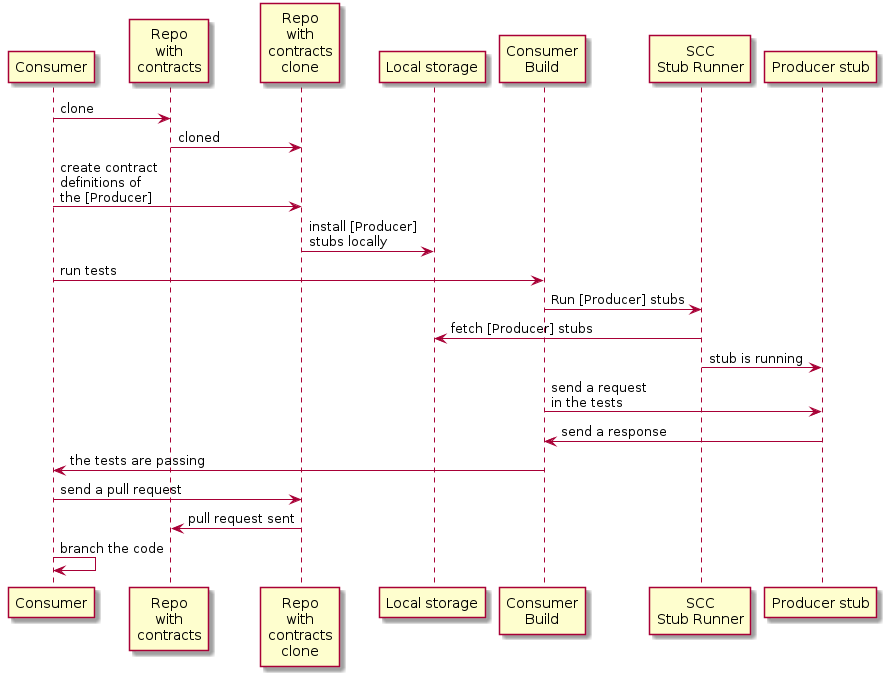
4.2. 消费者流
消费者:
-
在生产者发送请求时,写一个测试来捕获该请求。
测试失败,因为没有服务器存在。
-
克隆包含契约定义的仓库。
-
在生产者文件夹下,以消费者名称作为子文件夹,设置要求为合同。
例如,对于名为
producer的生产者和名为consumer的使用者,这些合同将存储在src/main/resources/contracts/producer/consumer/)下 -
一旦定义了合同,就会将生产者存档安装到本地存储,如下例所示:
$ cd src/main/resource/contracts/producer $ ./mvnw clean install
-
为使用者测试设置Spring Cloud Contract (SCC) Stub Runner,以执行以下操作:
-
从本地存储获取生产者存根。
-
工作在存根-每个消费者模式(这会启用基于消费者驱动契约模式)。
SCC 框架 插件 运行器:
-
获取生产者存根。
-
运行一个内存中的HTTP服务器存根,其中包含生产者存根。
-
现在您的测试与HTTP服务器存根通信,并且您的测试通过了
-
向包含合约定义的存储库创建拉取请求,并添加生产者的最新合约
-
分支你的消费者代码,直到生产者团队合并他们的代码
-
下图显示了以下 UML 图中显示的消费流:
4.3 产者流程
The producer:
-
接管具有合同定义的仓库的拉取请求。你可以从命令行进行,如下所示
$ git checkout -b the_branch_with_pull_request master git pull https://github.com/user_id/project_name.git the_branch_with_pull_request
-
安装合同定义,如下所示
$ ./mvnw clean install
-
设置插件从 JAR 文件而不是从
src/test/resources/contracts中获取合同定义,方法如下:Maven<plugin> <groupId>org.springframework.cloud</groupId> <artifactId>spring-cloud-contract-maven-plugin</artifactId> <version>${spring-cloud-contract.version}</version> <extensions>true</extensions> <configuration> <!-- We want to use the JAR with contracts with the following coordinates --> <contractDependency> <groupId>com.example</groupId> <artifactId>beer-contracts</artifactId> </contractDependency> <!-- The JAR with contracts should be taken from Maven local --> <contractsMode>LOCAL</contractsMode> <!-- ... additional configuration --> </configuration> </plugin>Gradlecontracts { // We want to use the JAR with contracts with the following coordinates // group id `com.example`, artifact id `beer-contracts`, LATEST version and NO classifier contractDependency { stringNotation = 'com.example:beer-contracts:+:' } // The JAR with contracts should be taken from Maven local contractsMode = "LOCAL" // Additional configuration } -
运行构建以生成测试和占位代码,如下:
Maven./mvnw clean installGradle./gradlew clean build -
编写缺失的实现,使测试通过。
-
合并包含协定定义的存储库中的拉取请求,如下所示:
$ git commit -am "Finished the implementation to make the contract tests pass" $ git checkout master $ git merge --no-ff the_branch_with_pull_request $ git push origin master
-
CI 系统使用契约定义构建项目,然后将包含契约定义的 JAR 文件上传到 Nexus 或 Artifactory。
-
切换到远程工作。
-
设置了插件,以便不再从本地存储中获取合同定义,而是从远程位置获取,如下所示:
Maven<plugin> <groupId>org.springframework.cloud</groupId> <artifactId>spring-cloud-contract-maven-plugin</artifactId> <version>${spring-cloud-contract.version}</version> <extensions>true</extensions> <configuration> <!-- We want to use the JAR with contracts with the following coordinates --> <contractDependency> <groupId>com.example</groupId> <artifactId>beer-contracts</artifactId> </contractDependency> <!-- The JAR with contracts should be taken from a remote location --> <contractsMode>REMOTE</contractsMode> <!-- ... additional configuration --> </configuration> </plugin>Gradlecontracts { // We want to use the JAR with contracts with the following coordinates // group id `com.example`, artifact id `beer-contracts`, LATEST version and NO classifier contractDependency { stringNotation = 'com.example:beer-contracts:+:' } // The JAR with contracts should be taken from a remote location contractsMode = "REMOTE" // Additional configuration } -
将生产者代码与新实现合并。
-
系统是:
-
构建项目
-
生成测试、桩和桩JAR
-
将应用程序和存根 artifacts 上传到 Nexus 或 Artifactory。
-
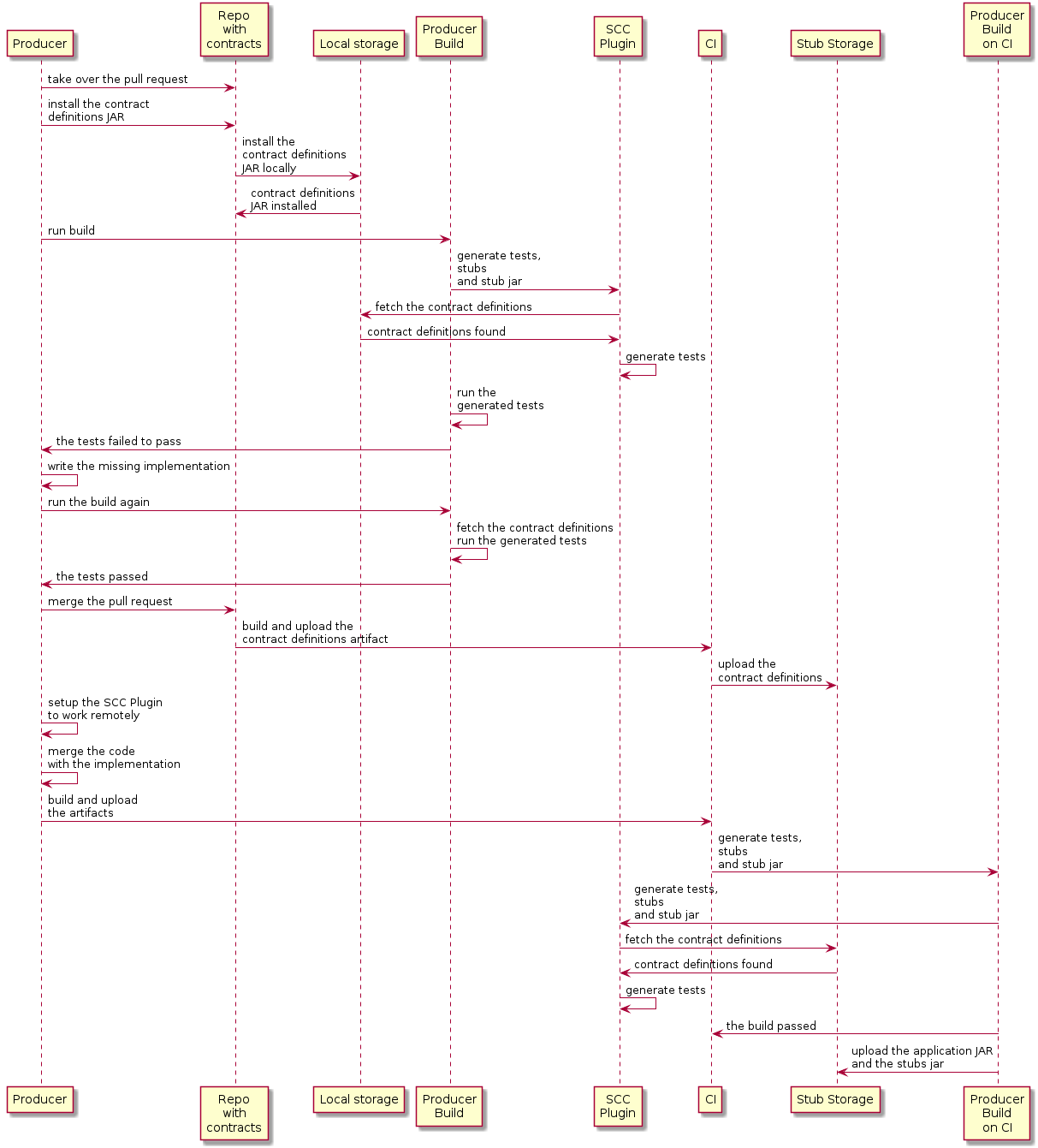
下面的UML图显示了生产者过程:
5. 使用推送到 Git 的生产者端契约的消费者驱动契约
您可以查看逐步指南,了解消费者驱动契约(CDC),其中契约位于生产者端,以了解在生产者端设置契约的消费者驱动契约流程。
存档存储实现是git仓库。我们将在描述提供者契约测试中存档的git设置部分。
您可以在文档的使用指南页面中找到更多关于为消费者和生产者端设置git存储库的信息。
6. 非Spring应用程序在Artifactory中使用存根进行提供者契约测试
6.1. 流程
您可以查看开发基于Spring Cloud Contract的首个应用,了解如何使用Nexus或Artifactory中的存根进行提供者契约测试。
6.2. 设置消费者
对于消费者端,您可以使用JUnit规则。这样,您不必启动Spring上下文。下面的列表显示了这样的规则(在JUnit4和JUnit5中);
@Rule
    public StubRunnerRule rule = new StubRunnerRule()
            .downloadStub("com.example","artifact-id", "0.0.1")
            .repoRoot("git://[email protected]:spring-cloud-samples/spring-cloud-contract-nodejs-contracts-git.git")
.stubsMode(StubRunnerProperties.StubsMode.REMOTE);@Rule
public StubRunnerExtension stubRunnerExtension = new StubRunnerExtension()
.downloadStub("com.example","artifact-id", "0.0.1")
.repoRoot("git://[email protected]:spring-cloud-samples/spring-cloud-contract-nodejs-contracts-git.git")
.stubsMode(StubRunnerProperties.StubsMode.REMOTE);6.3. 设置生产者
默认情况下,Spring Cloud Contract 插件为生成的测试使用 Rest Assured 的 MockMvc 设置。由于非 Spring 应用不使用 MockMvc,您可以将 testMode 更改为 EXPLICIT,以向在特定端口上绑定的应用程序发送真实请求。
在本示例中,我们使用一个名为 Javalin 的框架来启动一个非 Spring HTTP 服务器。
假设我们有以下应用程序:
package com.example.demo;

import io.javalin.Javalin;

public class DemoApplication {

    public static void main(String[] args) {
        new DemoApplication().run(7000);
    }

    public Javalin start(int port) {
        return Javalin.create().start(port);
    }

    public Javalin registerGet(Javalin app) {
        return app.get("/", ctx -> ctx.result("Hello World"));
    }

    public Javalin run(int port) {
        return registerGet(start(port));
    }

}
鉴于该应用程序,我们可以设置插件以使用 EXPLICIT 模式(即向真实端口发送请求),如下所示:
<plugin>
    <groupId>org.springframework.cloud</groupId>
    <artifactId>spring-cloud-contract-maven-plugin</artifactId>
    <version>${spring-cloud-contract.version}</version>
    <extensions>true</extensions>
    <configuration>
        <baseClassForTests>com.example.demo.BaseClass</baseClassForTests>
        <!-- This will setup the EXPLICIT mode for the tests -->
        <testMode>EXPLICIT</testMode>
    </configuration>
</plugin>contracts {
// This will setup the EXPLICIT mode for the tests
testMode = "EXPLICIT"
baseClassForTests = "com.example.demo.BaseClass"
}基类可能类似于以下内容:
import io.javalin.Javalin;
import io.restassured.RestAssured;
import org.junit.After;
import org.junit.Before;
import org.springframework.util.SocketUtils;

public class BaseClass {

    Javalin app;

    @Before
    public void setup() {
        // pick a random port
        int port = SocketUtils.findAvailableTcpPort();
        // start the application at a random port
        this.app = start(port);
        // tell Rest Assured where the started application is
        RestAssured.baseURI = "http://localhost:" + port;
    }

    @After
    public void close() {
        // stop the server after each test
        this.app.stop();
    }

    private Javalin start(int port) {
        // reuse the production logic to start a server
        return new DemoApplication().run(port);
    }
}
采用这种配置:
-
我们已设置 Spring Cloud Contract 插件,以
EXPLICIT模式发送真实请求,而非模拟请求。 -
我们已定义了一个基类,其功能包括:
-
为每个测试在随机端口上启动 HTTP 服务器。
-
设置 Rest Assured 以向该端口发送请求。
-
在每次测试后关闭 HTTP 服务器。
-
7. 在非JVM世界中使用Artifactory中的存根进行提供者契约测试
在此流程中,我们假设:
-
API 生产者和 API 消费者是非 JVM 应用程序。
-
合同定义以 YAML 格式编写。
-
存根存储为 Artifactory 或 Nexus。
-
Spring Cloud Contract Docker(SCC Docker)和 Spring Cloud Contract Stub Runner Docker(SCC Stub Runner Docker)镜像被使用。
您可以在此页面上了解有关如何使用Spring Cloud Contract与Docker的更多信息。
这里,您可以阅读一篇关于如何在多语言环境中使用 Spring Cloud Contract 的博客文章。
这里,您可以找到一个使用 Spring Cloud Contract 作为生产者和消费者的 NodeJS 应用程序示例。
7.1 生产者流程
从高层次来看,生产者:
-
编写契约定义(例如,使用 YAML 格式)。
-
设置构建工具以:
-
启动在给定端口上使用模拟服务的应用程序。
如果无法进行模拟,您可以设置基础设施并在状态化方式下定义测试。
-
运行 Spring Cloud Contract Docker 映像,并将正在运行的应用程序的端口作为环境变量传递。
-
SCC Docker镜像:<ul><li>从挂载的卷生成测试。</li><li>针对正在运行的应用程序运行测试。</li></ul>
在测试完成之后,存档会被上传到存档仓库(例如Artifactory或Git)。<br>
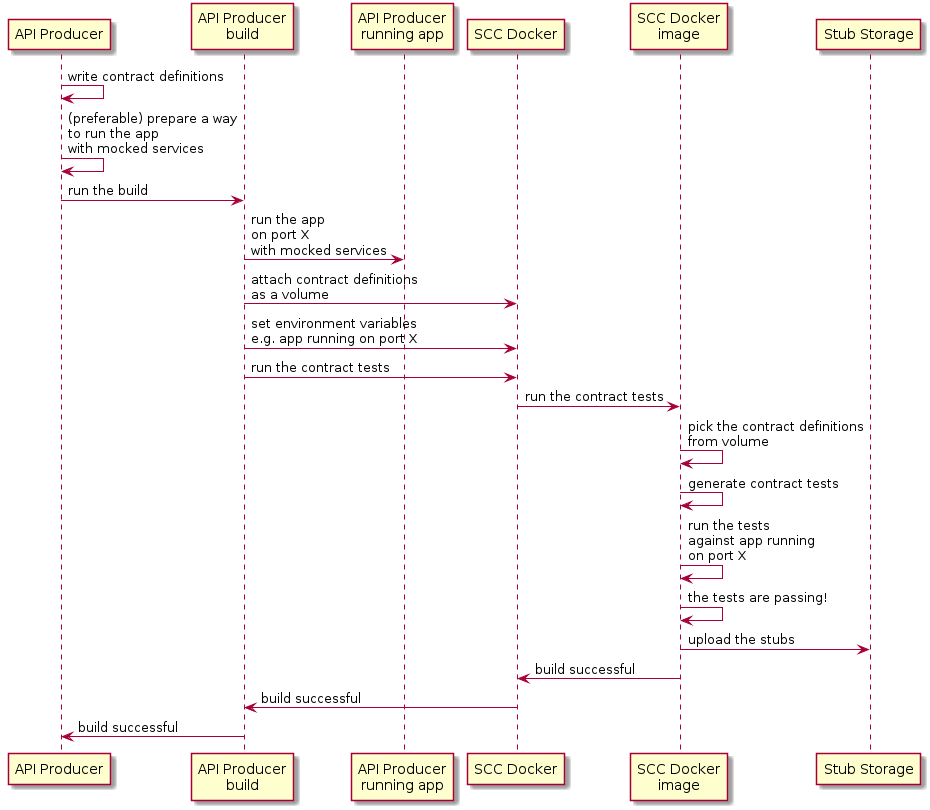
以下UML图显示了生产者流程:
7.2. 消费者流程
从高层来看,用户:
-
设置构建工具以:
-
开始运行 Spring Cloud Contract Stub Runner Docker 镜像并启动模拟实例。
环境变量配置:
-
存根获取。
-
该仓库的位置。
注意:
-
使用本地存储,您也可以将其作为卷进行挂载。
-
这些端口是存根正在运行的,需要公开。
-
-
针对正在运行的存根运行应用程序测试。
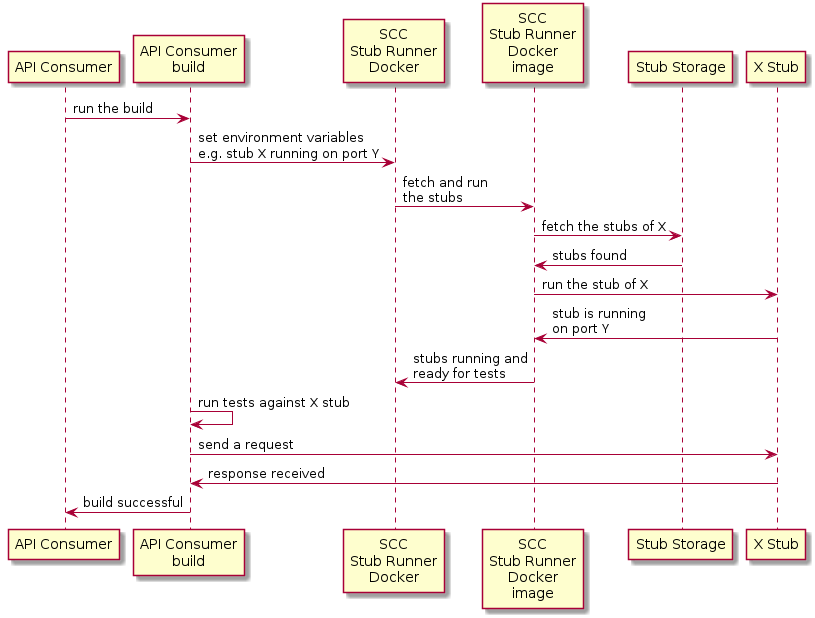
下图显示了以下 UML 图中显示的消费流:
8. 使用 REST Docs 和 Nexus 或 Artifactory 中的存根进行提供者契约测试
在此流程中,我们不使用 Spring Cloud Contract 插件来生成测试和存根。我们编写 Spring RESTDocs,并从中自动生成存根。最后,我们将构建设置为打包存根并将它们上传到存根存储站点——在我们的例子中是 Nexus 或 Artifactory。
参见研讨会页面,了解如何使用此流程的分步说明。
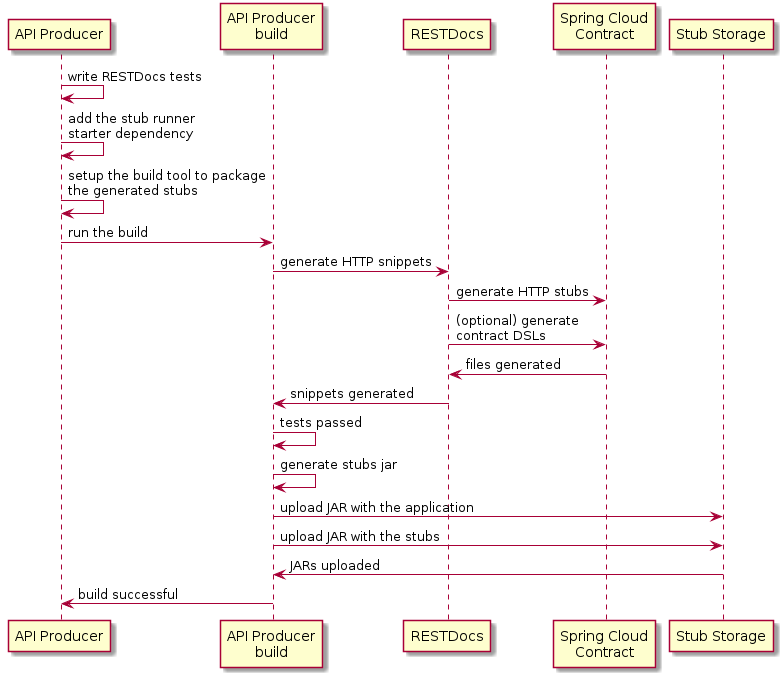
8.1. 生产者流程
作为生产商,我们:
-
我们编写API的RESTDocs测试。
-
我们将 Spring Cloud Contract Stub Runner starter 添加到我们的构建中(
spring-cloud-starter-contract-stub-runner),如下所示Maven<dependencies> <dependency> <groupId>org.springframework.cloud</groupId> <artifactId>spring-cloud-starter-contract-stub-runner</artifactId> <scope>test</scope> </dependency> </dependencies> <dependencyManagement> <dependencies> <dependency> <groupId>org.springframework.cloud</groupId> <artifactId>spring-cloud-dependencies</artifactId> <version>${spring-cloud.version}</version> <type>pom</type> <scope>import</scope> </dependency> </dependencies> </dependencyManagement>Gradledependencies { testImplementation 'org.springframework.cloud:spring-cloud-starter-contract-stub-runner' } dependencyManagement { imports { mavenBom "org.springframework.cloud:spring-cloud-dependencies:${springCloudVersion}" } } -
我们设置构建工具来打包我们的存根,如下所示:
Maven<!-- pom.xml --> <plugins> <plugin> <groupId>org.apache.maven.plugins</groupId> <artifactId>maven-assembly-plugin</artifactId> <executions> <execution> <id>stub</id> <phase>prepare-package</phase> <goals> <goal>single</goal> </goals> <inherited>false</inherited> <configuration> <attach>true</attach> <descriptors> ${basedir}/src/assembly/stub.xml </descriptors> </configuration> </execution> </executions> </plugin> </plugins> <!-- src/assembly/stub.xml --> <assembly xmlns="http://maven.apache.org/plugins/maven-assembly-plugin/assembly/1.1.3" xmlns:xsi="http://www.w3.org/2001/XMLSchema-instance" xsi:schemaLocation="http://maven.apache.org/plugins/maven-assembly-plugin/assembly/1.1.3 http://maven.apache.org/xsd/assembly-1.1.3.xsd"> <id>stubs</id> <formats> <format>jar</format> </formats> <includeBaseDirectory>false</includeBaseDirectory> <fileSets> <fileSet> <directory>${project.build.directory}/generated-snippets/stubs</directory> <outputDirectory>META-INF/${project.groupId}/${project.artifactId}/${project.version}/mappings</outputDirectory> <includes> <include>**/*</include> </includes> </fileSet> </fileSets> </assembly>Gradletask stubsJar(type: Jar) { classifier = "stubs" into("META-INF/${project.group}/${project.name}/${project.version}/mappings") { include('**/*.*') from("${project.buildDir}/generated-snippets/stubs") } } // we need the tests to pass to build the stub jar stubsJar.dependsOn(test) bootJar.dependsOn(stubsJar)
现在,当我们运行测试时,存根会自动发布并打包。
以下UML图显示了生产者流程:
8.2. 消费者流程
由于消费者流程不受生成桩工具的影响,因此您可以查看开发您的第一个基于Spring Cloud Contract的应用程序,了解在Nexus或Artifactory中使用桩进行提供者合同测试时消费者的流程。
9. 接下来阅读什么
你现在应该已经了解了如何使用 Spring Cloud Contract 和一些你应该遵循的最佳实践。你可以继续学习有关特定Spring Cloud Contract 功能,或者跳过并阅读关于 Spring Cloud Contract 高级功能。