Anthropic Chat
Anthropic Claude 是一系列基础人工智能模型,可用于多种应用场景。 对于开发者和企业而言,您可以利用 API 访问权限,并直接基于 Anthropic 的 AI 基础设施 进行构建。
Spring AI 支持 Anthropic 的 消息传递 API 用于同步和流式文本生成。
| Anthropic 的 Claude 模型也可通过 Amazon Bedrock Converse 使用。 Spring AI 也提供了专门的 Amazon Bedrock Converse Anthropic 客户端实现。 |
前提条件
您需要在 Anthropic 门户上创建一个 API 密钥。
在 Anthropic API仪表板上创建账户,并在获取API密钥页面生成API密钥。
Spring AI 项目定义了一个名为 spring.ai.anthropic.api-key 的配置属性,您应该将其设置为从 anthropic.com 获取的 API Key 的值。
您可以在application.properties文件中设置此配置属性:
spring.ai.anthropic.api-key=<your-anthropic-api-key>为了在处理API密钥等敏感信息时增强安全性,您可以使用Spring表达式语言(SpEL)引用自定义环境变量:
# In application.yml
spring:
  ai:
    anthropic:
      api-key: ${ANTHROPIC_API_KEY}
# In your environment or .env file
export ANTHROPIC_API_KEY=<your-anthropic-api-key>您也可以在应用程序代码中以编程方式获取此配置:
// Retrieve API key from a secure source or environment variable
String apiKey = System.getenv("ANTHROPIC_API_KEY");自动配置
|
There has been a significant change in the Spring AI auto-configuration, starter modules' artifact names. Please refer to the 升级说明以获取更多信息。 |
Spring AI 为 Anthropic Chat Client 提供了 Spring Boot 自动配置。
要启用它,请将以下依赖项添加到项目的 Maven pom.xml 或 Gradle build.gradle 文件中:
-
Maven
-
Gradle
<dependency>
    <groupId>org.springframework.ai</groupId>
    <artifactId>spring-ai-starter-model-anthropic</artifactId>
</dependency>
dependencies {
implementation 'org.springframework.ai:spring-ai-starter-model-anthropic'
}| 参考以下依赖管理部分,添加Spring AI BOM到你的构建文件中。 |
聊天属性
重试属性
前缀 spring.ai.retry 用作属性前缀,可让您配置 Anthropic 聊天模型的重试机制。
| 属性 | 描述 | 默认 |
|---|---|---|
spring.ai.retry.max-attempts |
最大重试次数。 |
10 |
spring.ai.retry.backoff.initial-interval |
指数退避策略的初始睡眠时长。 |
2 秒 |
spring.ai.retry.backoff.multiplier |
退避间隔乘数。 |
5 |
spring.ai.retry.backoff.max-interval |
最大退避时长。 |
3 分钟。 |
spring.ai.retry.on-client-errors |
如果为false,则抛出NonTransientAiException,且不重试客户端错误代码 |
false |
spring.ai.retry.exclude-on-http-codes |
不应触发重试的HTTP状态代码列表(例如,用于抛出非暂时性AI异常)。 |
empty |
spring.ai.retry.on-http-codes |
应触发重试的HTTP状态码列表(例如,用于抛出TransientAiException)。 |
empty |
| 目前,重试策略不适用于流式 API。 |
连接属性
前缀 spring.ai.anthropic 用作属性前缀,可让您连接到 Anthropic。
| 属性 | 描述 | 默认 |
|---|---|---|
spring.ai.anthropic.base-url |
要连接的URL |
|
spring.ai.anthropic.completions-path |
要追加到基URL后面的路径是什么。 |
|
spring.ai.anthropic.version |
Anthropic API 版本 |
2023-06-01 |
spring.ai.anthropic.api-key |
API 密钥 |
- |
spring.ai.anthropic.beta-version |
启用新的/实验性功能。如果设置为 |
|
配置属性
|
启用和禁用聊天自动配置现在通过顶级属性使用前缀 要启用,spring.ai.model.chat=anthropic(默认已启用) 要禁用,spring.ai.model.chat=none(或任何与 anthropic 不匹配的值) 这种修改是为了允许配置多个模型。 |
前缀 spring.ai.anthropic.chat 是属性前缀,可让您为 Anthropic 配置聊天模型实现。
| 属性 | 描述 | 默认 |
|---|---|---|
spring.ai.anthropic.chat.enabled(已移除且不再有效) |
启用 Anthropic 聊天模型。 |
true |
spring.ai.model.chat |
启用 Anthropic 聊天模型。 |
人类的 |
spring.ai.anthropic.chat.options.model |
这是要使用的Anthropic Chat模型。支持: |
|
spring.ai.anthropic.chat.options.temperature |
用于控制生成完成内容的表面创新性的采样温度。较高的值会使输出更加随机,而较低的值会使结果更加集中和确定性。不建议在同一完成请求中同时修改温度(temperature)和顶级概率(top_p),因为这两个设置之间的相互作用难以预测。 |
0.8 |
spring.ai.anthropic.chat.options.max-tokens |
聊天补全时生成的最大Tokens数量。输入Tokens和生成Tokens的总长度受到模型上下文长度的限制。 |
500 |
spring.ai.anthropic.chat.options.stop-sequence |
自定义文本序列,将导致模型停止生成。我们的模型通常会在自然完成其本轮对话时停止,此时的响应停止原因将是“end_turn”。如果您希望模型在遇到自定义文本字符串时停止生成,可以使用stop_sequences参数。如果模型遇到其中任何一个自定义序列,响应停止原因值将为“stop_sequence”,且响应停止序列值将包含匹配到的停止序列。 |
- |
spring.ai.anthropic.chat.options.top-p |
使用核采样。在核采样中,我们按概率递减的顺序计算每个后续标记的所有选项的累积分布,并在达到由 top_p 指定的特定概率时截断。您应仅调整温度或 top_p,而不能同时调整两者。仅推荐用于高级用例。通常情况下,您只需使用温度即可。 |
- |
spring.ai.anthropic.chat.options.top-k |
仅从每个后续标记的前 K 个选项中采样。用于去除“长尾”的低概率响应。在此了解更多技术细节。仅推荐用于高级用例。通常您只需使用温度参数即可。 |
- |
spring.ai.anthropic.chat.options.tool-names |
由其名称标识的工具列表,用于在单个提示请求中启用工具调用。具有这些名称的工具必须存在于 toolCallbacks 注册表中。 |
- |
spring.ai.anthropic.chat.options.tool-callbacks |
向ChatModel注册的工具回调。 |
- |
spring.ai.anthropic.chat.options.toolChoice |
控制模型调用哪个(如果有)工具。 |
- |
spring.ai.anthropic.chat.options.internal-tool-execution-enabled |
如果为 false,Spring AI 将不内部处理工具调用,而是将它们代理给客户端。此后,处理工具调用、将其分派给适当函数并返回结果的责任在于客户端。如果为 true(默认值),Spring AI 将内部处理函数调用。此设置仅适用于支持函数调用的聊天模型。 |
true |
spring.ai.anthropic.chat.options.http-headers |
可选的 HTTP 头部,将被添加到聊天补全请求中。 |
- |
| 有关模型别名及其描述的最新列表,请参阅Anthropic 官方模型别名文档。 |
所有以spring.ai.anthropic.chat.options为前缀的属性都可以通过向Prompt调用中添加特定于请求的运行时选项在运行时覆盖。 |
运行时选项
The AnthropicChatOptions.java provides model configurations, such as the model to use, the temperature, the max token count, etc.
On start-up, the default options can be configured with the AnthropicChatModel(api, options) constructor or the spring.ai.anthropic.chat.options.* properties.
在运行时,您可以通过向Prompt调用添加新的、针对请求的选项来覆盖默认选项。
例如,要为特定请求覆盖默认模型和温度:
ChatResponse response = chatModel.call(
    new Prompt(
        "Generate the names of 5 famous pirates.",
        AnthropicChatOptions.builder()
            .model("claude-3-7-sonnet-latest")
            .temperature(0.4)
        .build()
));| 除了特定于模型的AnthropicChatOptions之外,您还可以使用一个可移植的ChatOptions实例,该实例是通过ChatOptions#builder()创建的。 |
提示缓存
Anthropic 的 提示词缓存功能 允许您缓存经常使用的提示词,以降低使用成本并提高重复交互的响应速度。 缓存提示词后,后续相同的请求可以重用缓存内容,显著减少处理的输入Tokens数量。
|
支持的模型 提示词缓存目前支持 Claude Sonnet 4.5、Claude Opus 4.5、Claude Haiku 4.5、Claude Opus 4、Claude Sonnet 4、Claude Sonnet 3.7、Claude Sonnet 3.5、Claude Haiku 3.5、Claude Haiku 3 和 Claude Opus 3。 Tokens要求 不同的模型对于缓存有效性的最低标记阈值各不相同: - Claude Sonnet 4:1024个标记及以上 - Claude Haiku 模型:2048个标记及以上 - 其他模型:1024个标记及以上 |
缓存策略
Spring AI 通过 AnthropicCacheStrategy 枚举提供战略性缓存放置。
每种策略都会自动在最佳位置设置缓存断点,同时保持在 Anthropic 的 4 个断点限制之内。
| 策略模式 | 使用的断点 | 使用案例 |
|---|---|---|
|
0 |
完全禁用提示缓存。 在请求为一次性操作或内容过小而无法从缓存中获益时使用。 |
|
1 |
缓存系统消息内容。 工具通过 Anthropic 的自动约 20 块回溯机制隐式缓存。 当系统提示内容较大且稳定,且工具数量少于 20 个时使用。 |
|
1 |
仅缓存工具定义。系统消息不会被缓存,每次请求都会重新处理。 当工具定义较大且稳定(超过5000个标记)但系统提示频繁变化或按租户/上下文不同而变化时使用。 |
|
2 |
显式缓存工具定义(断点1)和系统消息(断点2)。 当您拥有20个以上工具(超出自动回溯范围)或希望对两个组件进行确定性缓存时使用。 系统变更不会使工具缓存失效。 |
|
1-4 |
缓存从开始到当前用户问题的完整对话历史。 适用于具有聊天记忆的多轮对话,其中对话历史会随时间增长。 |
由于 Anthropic 的级联失效机制,更改工具定义将使所有下游缓存断点(系统、消息)失效。
在使用 SYSTEM_AND_TOOLS 或 CONVERSATION_HISTORY 策略时,工具的稳定性至关重要。 |
启用提示缓存Enabling Prompt Caching
设置为0在1上,并选择一个2以启用提示缓存。
系统专有缓存
适用于:系统提示稳定且工具数量少于20个的情况(通过自动回溯隐式缓存工具)。
// Cache system message content (tools cached implicitly)
ChatResponse response = chatModel.call(
    new Prompt(
        List.of(
            new SystemMessage("You are a helpful AI assistant with extensive knowledge..."),
            new UserMessage("What is machine learning?")
        ),
        AnthropicChatOptions.builder()
            .model("claude-sonnet-4")
            .cacheOptions(AnthropicCacheOptions.builder()
                .strategy(AnthropicCacheStrategy.SYSTEM_ONLY)
                .build())
            .maxTokens(500)
            .build()
    )
);工具唯一缓存工具唯一缓存
适用于:具有动态系统提示的大规模稳定工具集(多租户应用、A/B 测试)。
// Cache tool definitions, system prompt processed fresh each time
ChatResponse response = chatModel.call(
    new Prompt(
        List.of(
            new SystemMessage("You are a " + persona + " assistant..."), // Dynamic per-tenant
            new UserMessage("What's the weather like in San Francisco?")
        ),
        AnthropicChatOptions.builder()
            .model("claude-sonnet-4")
            .cacheOptions(AnthropicCacheOptions.builder()
                .strategy(AnthropicCacheStrategy.TOOLS_ONLY)
                .build())
            .toolCallbacks(weatherToolCallback) // Large tool set cached
            .maxTokens(500)
            .build()
    )
);
系统和工具缓存
适用于:20 个以上工具(超出自动回溯范围)或当两个组件应独立缓存时。
// Cache both tool definitions and system message with independent breakpoints
// Changing system won't invalidate tool cache (but changing tools invalidates both)
ChatResponse response = chatModel.call(
    new Prompt(
        List.of(
            new SystemMessage("You are a weather analysis assistant..."),
            new UserMessage("What's the weather like in San Francisco?")
        ),
        AnthropicChatOptions.builder()
            .model("claude-sonnet-4")
            .cacheOptions(AnthropicCacheOptions.builder()
                .strategy(AnthropicCacheStrategy.SYSTEM_AND_TOOLS)
                .build())
            .toolCallbacks(weatherToolCallback) // 20+ tools
            .maxTokens(500)
            .build()
    )
);
会话历史缓存
// Cache conversation history with ChatClient and memory (cache breakpoint on last user message)
ChatClient chatClient = ChatClient.builder(chatModel)
    .defaultSystem("You are a personalized career counselor...")
    .defaultAdvisors(MessageChatMemoryAdvisor.builder(chatMemory)
        .conversationId(conversationId)
        .build())
    .build();

String response = chatClient.prompt()
    .user("What career advice would you give me?")
    .options(AnthropicChatOptions.builder()
        .model("claude-sonnet-4")
        .cacheOptions(AnthropicCacheOptions.builder()
            .strategy(AnthropicCacheStrategy.CONVERSATION_HISTORY)
            .build())
        .maxTokens(500)
        .build())
    .call()
    .content();
使用ChatClient fluent API
String response = ChatClient.create(chatModel)
    .prompt()
    .system("You are an expert document analyst...")
    .user("Analyze this large document: " + document)
    .options(AnthropicChatOptions.builder()
        .model("claude-sonnet-4")
        .cacheOptions(AnthropicCacheOptions.builder()
            .strategy(AnthropicCacheStrategy.SYSTEM_ONLY)
            .build())
        .build())
    .call()
    .content();
高级缓存选项
每消息TTL(5分钟或1小时)
默认情况下,缓存内容使用5分钟的TTL。 你可以为特定消息类型设置1小时的TTL。 当使用1小时TTL时,Spring AI会自动设置所需的Anthropic beta头。
ChatResponse response = chatModel.call(
    new Prompt(
        List.of(new SystemMessage(largeSystemPrompt)),
        AnthropicChatOptions.builder()
            .model("claude-sonnet-4")
            .cacheOptions(AnthropicCacheOptions.builder()
                .strategy(AnthropicCacheStrategy.SYSTEM_ONLY)
                .messageTypeTtl(MessageType.SYSTEM, AnthropicCacheTtl.ONE_HOUR)
                .build())
            .maxTokens(500)
            .build()
    )
);
延长TTL使用Anthropic测试功能 extended-cache-ttl-2025-04-11。 |
缓存资格筛选器
通过设置最小内容长度和可选的基于Tokens的长度函数,控制缓存断点的使用时机:
AnthropicCacheOptions cache = AnthropicCacheOptions.builder()
    .strategy(AnthropicCacheStrategy.CONVERSATION_HISTORY)
    .messageTypeMinContentLength(MessageType.SYSTEM, 1024)
    .messageTypeMinContentLength(MessageType.USER, 1024)
    .messageTypeMinContentLength(MessageType.ASSISTANT, 1024)
    .contentLengthFunction(text -> MyTokenCounter.count(text))
    .build();

ChatResponse response = chatModel.call(
    new Prompt(
        List.of(/* messages */),
        AnthropicChatOptions.builder()
            .model("claude-sonnet-4")
            .cacheOptions(cache)
            .build()
    )
);
如果使用 SYSTEM_AND_TOOLS 策略,工具定义始终会被考虑缓存,与内容长度无关。 |
使用示例
这是一个完整的示例,演示了带成本跟踪的提示缓存:
// Create system content that will be reused multiple times
String largeSystemPrompt = "You are an expert software architect specializing in distributed systems...";

// First request - creates cache
ChatResponse firstResponse = chatModel.call(
    new Prompt(
        List.of(
            new SystemMessage(largeSystemPrompt),
            new UserMessage("What is microservices architecture?")
        ),
        AnthropicChatOptions.builder()
            .model("claude-sonnet-4")
            .cacheOptions(AnthropicCacheOptions.builder()
                .strategy(AnthropicCacheStrategy.SYSTEM_ONLY)
                .build())
            .maxTokens(500)
            .build()
    )
);

// Access cache-related token usage
AnthropicApi.Usage firstUsage = (AnthropicApi.Usage) firstResponse.getMetadata()
    .getUsage().getNativeUsage();

System.out.println("Cache creation tokens: " + firstUsage.cacheCreationInputTokens());
System.out.println("Cache read tokens: " + firstUsage.cacheReadInputTokens());

// Second request with same system prompt - reads from cache
ChatResponse secondResponse = chatModel.call(
    new Prompt(
        List.of(
            new SystemMessage(largeSystemPrompt),
            new UserMessage("What are the benefits of event sourcing?")
        ),
        AnthropicChatOptions.builder()
            .model("claude-sonnet-4")
            .cacheOptions(AnthropicCacheOptions.builder()
                .strategy(AnthropicCacheStrategy.SYSTEM_ONLY)
                .build())
            .maxTokens(500)
            .build()
    )
);

AnthropicApi.Usage secondUsage = (AnthropicApi.Usage) secondResponse.getMetadata()
    .getUsage().getNativeUsage();

System.out.println("Cache creation tokens: " + secondUsage.cacheCreationInputTokens()); // Should be 0
System.out.println("Cache read tokens: " + secondUsage.cacheReadInputTokens()); // Should be > 0
计数器使用跟踪
Usage 记录提供了有关缓存相关Tokens消耗的详细信息。
要访问Anthropic特定的缓存指标,请使用 getNativeUsage() 方法:
AnthropicApi.Usage usage = (AnthropicApi.Usage) response.getMetadata()
    .getUsage().getNativeUsage();
缓存相关的特定度量指标包括:
-
0: 当创建缓存条时使用的Tokens数量
-
cacheReadInputTokens(): 返回从现有缓存条目中读取的标记数量
当您首次发送缓存提示时:
- cacheCreationInputTokens() 将大于 0
- cacheReadInputTokens() 将等于 0
当你再次发送相同的缓存提示时:
- cacheCreationInputTokens() 将为 0
- cacheReadInputTokens() 将大于 0
真实世界用例
法律文件分析
通过在多个问题之间缓存文档内容,高效分析大型法律合同或合规文件:
// Load a legal contract (PDF or text)
String legalContract = loadDocument("merger-agreement.pdf"); // ~3000 tokens

// System prompt with legal expertise
String legalSystemPrompt = "You are an expert legal analyst specializing in corporate law. " +
    "Analyze the following contract and provide precise answers about terms, obligations, and risks: " +
    legalContract;

// First analysis - creates cache
ChatResponse riskAnalysis = chatModel.call(
    new Prompt(
        List.of(
            new SystemMessage(legalSystemPrompt),
            new UserMessage("What are the key termination clauses and associated penalties?")
        ),
        AnthropicChatOptions.builder()
            .model("claude-sonnet-4")
            .cacheOptions(AnthropicCacheOptions.builder()
                .strategy(AnthropicCacheStrategy.SYSTEM_ONLY)
                .build())
            .maxTokens(1000)
            .build()
    )
);

// Subsequent questions reuse cached document - 90% cost savings
ChatResponse obligationAnalysis = chatModel.call(
    new Prompt(
        List.of(
            new SystemMessage(legalSystemPrompt), // Same content - cache hit
            new UserMessage("List all financial obligations and payment schedules.")
        ),
        AnthropicChatOptions.builder()
            .model("claude-sonnet-4")
            .cacheOptions(AnthropicCacheOptions.builder()
                .strategy(AnthropicCacheStrategy.SYSTEM_ONLY)
                .build())
            .maxTokens(1000)
            .build()
    )
);
批量代码审查
使用一致的评审标准处理多个代码文件,同时缓存评审指南:
// Define comprehensive code review guidelines
String reviewGuidelines = """
    You are a senior software engineer conducting code reviews. Apply these criteria:
    - Security vulnerabilities and best practices
    - Performance optimizations and memory usage
    - Code maintainability and readability
    - Testing coverage and edge cases
    - Design patterns and architecture compliance
    """;

List<String> codeFiles = Arrays.asList(
    "UserService.java", "PaymentController.java", "SecurityConfig.java"
);

List<String> reviews = new ArrayList<>();

for (String filename : codeFiles) {
    String sourceCode = loadSourceFile(filename);

    ChatResponse review = chatModel.call(
        new Prompt(
            List.of(
                new SystemMessage(reviewGuidelines), // Cached across all reviews
                new UserMessage("Review this " + filename + " code:\n\n" + sourceCode)
            ),
            AnthropicChatOptions.builder()
                .model("claude-sonnet-4")
                .cacheOptions(AnthropicCacheOptions.builder()
                    .strategy(AnthropicCacheStrategy.SYSTEM_ONLY)
                    .build())
                .maxTokens(800)
                .build()
        )
    );

    reviews.add(review.getResult().getOutput().getText());
}

// Guidelines cached after first request, subsequent reviews are faster and cheaper
多租户SaaS与共享工具
构建一个多租户应用程序,其中工具共享,但系统提示按租户自定义:
// Define large shared tool set (used by all tenants)
List<FunctionCallback> sharedTools = Arrays.asList(
    weatherToolCallback,    // ~500 tokens
    calendarToolCallback,   // ~800 tokens
    emailToolCallback,      // ~700 tokens
    analyticsToolCallback,  // ~600 tokens
    reportingToolCallback,  // ~900 tokens
    // ... 20+ more tools, totaling 5000+ tokens
);

@Service
public class MultiTenantAIService {

    public String handleTenantRequest(String tenantId, String userQuery) {
        // Get tenant-specific configuration
        TenantConfig config = tenantRepository.findById(tenantId);

        // Dynamic system prompt per tenant
        String tenantSystemPrompt = String.format("""
            You are %s's AI assistant. Company values: %s.
            Brand voice: %s. Compliance requirements: %s.
            """, config.companyName(), config.values(),
                 config.brandVoice(), config.compliance());

        ChatResponse response = chatModel.call(
            new Prompt(
                List.of(
                    new SystemMessage(tenantSystemPrompt), // Different per tenant, NOT cached
                    new UserMessage(userQuery)
                ),
                AnthropicChatOptions.builder()
                    .model("claude-sonnet-4")
                    .cacheOptions(AnthropicCacheOptions.builder()
                        .strategy(AnthropicCacheStrategy.TOOLS_ONLY) // Cache tools only
                        .build())
                    .toolCallbacks(sharedTools) // Cached once, shared across all tenants
                    .maxTokens(800)
                    .build()
            )
        );

        return response.getResult().getOutput().getText();
    }
}

// Tools cached once (5000 tokens @ 10% = 500 token cost for cache hits)
// Each tenant's unique system prompt processed fresh (200-500 tokens @ 100%)
// Total per request: ~700-1000 tokens vs 5500+ without TOOLS_ONLY
客户支持与知识库
创建一个客户支持系统,该系统会缓存您的产品知识库,以提供一致、准确的响应:
// Load comprehensive product knowledge
String knowledgeBase = """
    PRODUCT DOCUMENTATION:
    - API endpoints and authentication methods
    - Common troubleshooting procedures
    - Billing and subscription details
    - Integration guides and examples
    - Known issues and workarounds
    """ + loadProductDocs(); // ~2500 tokens

@Service
public class CustomerSupportService {

    public String handleCustomerQuery(String customerQuery, String customerId) {
        ChatResponse response = chatModel.call(
            new Prompt(
                List.of(
                    new SystemMessage("You are a helpful customer support agent. " +
                        "Use this knowledge base to provide accurate solutions: " + knowledgeBase),
                    new UserMessage("Customer " + customerId + " asks: " + customerQuery)
                ),
                AnthropicChatOptions.builder()
                    .model("claude-sonnet-4")
                    .cacheOptions(AnthropicCacheOptions.builder()
                        .strategy(AnthropicCacheStrategy.SYSTEM_ONLY)
                        .build())
                    .maxTokens(600)
                    .build()
            )
        );

        return response.getResult().getOutput().getText();
    }
}

// Knowledge base is cached across all customer queries
// Multiple support agents can benefit from the same cached content
最佳实践
-
选择正确的策略:
-
对于工具数量少于20个的稳定系统提示,使用
SYSTEM_ONLY(通过自动回溯隐式缓存工具) -
使用
TOOLS_ONLY用于大型稳定工具集(5000+ 标记)以及动态系统提示(多租户、A/B 测试) -
当您有20个以上的工具(超出自动回溯范围)或希望两者独立缓存时,请使用
SYSTEM_AND_TOOLS -
使用
CONVERSATION_HISTORY与 ChatClient 内存进行多轮对话 -
使用
NONE明确禁用缓存
-
-
理解级联失效: Anthropic 的缓存层级 (
tools → system → messages) 意味着更改会向下流动:-
更改 工具 会失效:工具 + 系统 + 消息(所有缓存) ❌❌❌
-
更改 系统 会使其失效:系统 + 消息(工具缓存保持有效) ✅❌❌
-
更改 消息 会使其失效:仅消息(工具和系统缓存仍有效) ✅✅❌
**Tool stability is critical** when using `SYSTEM_AND_TOOLS` or `CONVERSATION_HISTORY` strategies.
-
-
系统与工具独立性: 设置为
SYSTEM_AND_TOOLS时,更改系统消息不会使工具缓存失效,即使系统提示发生变化,也能高效重用已缓存的工具。 -
满足Tokens要求: 重点关注满足最低Tokens要求的缓存内容(Sonnet 4 为 1024+ 个Tokens,Haiku 模型为 2048+ 个Tokens)。
-
重复使用相同内容:缓存最适合与提示内容的完全匹配。 即使是很小的更改也会需要一个新的缓存条目。
-
监控Tokens使用情况: 使用缓存使用统计信息来跟踪缓存的有效性:
java AnthropicApi.Usage usage = (AnthropicApi.Usage) response.getMetadata().getUsage().getNativeUsage(); if (usage != null) { System.out.println("Cache creation: " + usage.cacheCreationInputTokens()); System.out.println("Cache read: " + usage.cacheReadInputTokens()); } -
战略性缓存放置: 该实现会根据您选择的策略自动在最佳位置放置缓存断点,确保符合 Anthropic 的 4 个断点限制。
-
缓存生命周期: 默认TTL为5分钟;可通过
messageTypeTtl(…)按消息类型设置1小时的TTL。每次访问缓存都会重置计时器。 -
工具缓存限制:请注意,基于工具的交互可能不会在响应中提供缓存使用元数据。
实现细节
Spring AI 中的提示缓存实现遵循以下关键设计原则:
-
战略性缓存放置: 根据所选策略,缓存断点会自动放置在最佳位置,确保符合 Anthropic 的 4 个断点限制。
-
CONVERSATION_HISTORY在以下位置设置缓存断点:工具(如果存在)、系统消息以及最后一个用户消息 -
这使得 Anthropic 的前缀匹配能够增量式地缓存不断增长的对话历史
-
每次迭代都基于之前缓存的前缀,以最大化缓存的重用
-
-
提供商可移植性:缓存配置通过
AnthropicChatOptions进行,而非单独的消息,从而在切换不同AI提供商时保持兼容性。 -
线程安全:缓存断点跟踪采用线程安全机制实现,以正确处理并发请求。
-
自动内容排序: 该实现确保根据 Anthropic API 的要求,正确地对 JSON 内容块和缓存控制进行网络传输顺序处理。
-
聚合资格检查: 对于
CONVERSATION_HISTORY,实现会考虑最近约20个内容块内的所有消息类型(用户、助手、工具),以确定组合内容是否满足缓存的最低Tokens阈值。
思考
Anthropic Claude 模型支持“思考”功能,允许模型在给出最终答案之前展示其推理过程。此功能能够实现更加透明和详尽的问题解决,尤其适用于需要逐步推理的复杂问题。
|
支持的模型 思维功能由以下 Claude 模型支持:
模型能力:
API 请求结构在所有支持的模型中都相同,但输出行为有所不同。 |
思考配置
要启用对任何受支持的 Claude 模型的推理,请在您的请求中包含以下配置:
必填配置
-
添加
thinking对象:-
"type": "enabled" -
budget_tokens: 推理的标记限制(建议从1024开始)
-
-
Tokens预算规则:
-
budget_tokens必须通常小于max_tokens -
Claude 可能使用的标记数少于分配的标记数。
-
更大的预算会增加推理的深度,但可能会影响延迟。
-
在使用带有交错思维的工具调用时(仅限 Claude 4),此约束将被放宽,但 Spring AI 尚不支持。
-
关键考虑因素
-
Claude 3.7 在响应中返回完整的思维内容
-
Claude 4 返回一个模型内部推理的 摘要 版本,以降低延迟并保护敏感内容
-
思考Tokens可计费,作为输出Tokens的一部分(即使并非所有Tokens都在响应中可见)
-
交错思考仅在Claude 4模型上可用,并需要beta标头
interleaved-thinking-2025-05-14
工具集成与交叉思考
Claude 4 模型支持在工具使用过程中进行交错式思考,使模型能够在工具调用之间进行推理。
|
当前的 Spring AI 实现分别支持基础思维和工具使用,但尚未支持将思维与工具使用交织进行(即在多次工具调用之间持续进行思维)。 |
有关使用工具进行交错思考的详细信息,请参阅 Anthropic 文档。
非流式示例
以下是使用 ChatClient API 在非流式请求中启用思考功能的方法:
ChatClient chatClient = ChatClient.create(chatModel);

// For Claude 3.7 Sonnet - explicit thinking configuration required
ChatResponse response = chatClient.prompt()
    .options(AnthropicChatOptions.builder()
        .model("claude-3-7-sonnet-latest")
        .temperature(1.0)  // Temperature should be set to 1 when thinking is enabled
        .maxTokens(8192)
        .thinking(AnthropicApi.ThinkingType.ENABLED, 2048)  // Must be ≥1024 && < max_tokens
        .build())
    .user("Are there an infinite number of prime numbers such that n mod 4 == 3?")
    .call()
    .chatResponse();

// For Claude 4 models - thinking is enabled by default
ChatResponse response4 = chatClient.prompt()
    .options(AnthropicChatOptions.builder()
        .model("claude-opus-4-0")
        .maxTokens(8192)
        // No explicit thinking configuration needed
        .build())
    .user("Are there an infinite number of prime numbers such that n mod 4 == 3?")
    .call()
    .chatResponse();

// Process the response which may contain thinking content
for (Generation generation : response.getResults()) {
    AssistantMessage message = generation.getOutput();
    if (message.getText() != null) {
        // Regular text response
        System.out.println("Text response: " + message.getText());
    }
    else if (message.getMetadata().containsKey("signature")) {
        // Thinking content
        System.out.println("Thinking: " + message.getMetadata().get("thinking"));
        System.out.println("Signature: " + message.getMetadata().get("signature"));
    }
}
流式示例
您还可以使用流式响应进行思考:
ChatClient chatClient = ChatClient.create(chatModel);

// For Claude 3.7 Sonnet - explicit thinking configuration
Flux<ChatResponse> responseFlux = chatClient.prompt()
    .options(AnthropicChatOptions.builder()
        .model("claude-3-7-sonnet-latest")
        .temperature(1.0)
        .maxTokens(8192)
        .thinking(AnthropicApi.ThinkingType.ENABLED, 2048)
        .build())
    .user("Are there an infinite number of prime numbers such that n mod 4 == 3?")
    .stream();

// For Claude 4 models - thinking is enabled by default
Flux<ChatResponse> responseFlux4 = chatClient.prompt()
    .options(AnthropicChatOptions.builder()
        .model("claude-opus-4-0")
        .maxTokens(8192)
        // No explicit thinking configuration needed
        .build())
    .user("Are there an infinite number of prime numbers such that n mod 4 == 3?")
    .stream();

// For streaming, you might want to collect just the text responses
String textContent = responseFlux.collectList()
    .block()
    .stream()
    .map(ChatResponse::getResults)
    .flatMap(List::stream)
    .map(Generation::getOutput)
    .map(AssistantMessage::getText)
    .filter(text -> text != null && !text.isBlank())
.collect(Collectors.joining());工具/函数调用
您可以使用 AnthropicChatModel 注册自定义 Java 工具,并让 Anthropic Claude 模型智能地选择输出一个包含参数的 JSON 对象,以调用一个或多个已注册的函数。
这是一种将 LLM 功能与外部工具和 API 相连接的强大技术。
了解更多关于 工具调用 的信息。
工具选择
tool_choice 参数允许您控制模型如何使用提供的工具。此功能让您对工具执行行为进行细粒度控制。
有关完整API详细信息,请参阅 Anthropic tool_choice 文档。
工具选择选项
Spring AI 通过 AnthropicApi.ToolChoice 接口提供四种工具选择策略:
-
ToolChoiceAuto(默认):模型自动决定是否使用工具或以文本回复 -
ToolChoiceAny: 模型必须至少使用一个可用工具 -
ToolChoiceTool: 模型必须通过名称使用特定工具 -
ToolChoiceNone: 模型无法使用任何工具
使用示例
自动模式(默认行为)
让模型自行决定是否使用工具:
ChatResponse response = chatModel.call(
    new Prompt(
        "What's the weather in San Francisco?",
        AnthropicChatOptions.builder()
            .toolChoice(new AnthropicApi.ToolChoiceAuto())
            .toolCallbacks(weatherToolCallback)
            .build()
    )
);
强制使用工具(任意)
要求模型至少使用一个工具:
ChatResponse response = chatModel.call(
    new Prompt(
        "What's the weather?",
        AnthropicChatOptions.builder()
            .toolChoice(new AnthropicApi.ToolChoiceAny())
            .toolCallbacks(weatherToolCallback, calculatorToolCallback)
            .build()
    )
);
强制指定工具
要求模型使用特定名称的工具:
ChatResponse response = chatModel.call(
    new Prompt(
        "What's the weather in San Francisco?",
        AnthropicChatOptions.builder()
            .toolChoice(new AnthropicApi.ToolChoiceTool("get_weather"))
            .toolCallbacks(weatherToolCallback, calculatorToolCallback)
            .build()
    )
);
禁用工具使用
防止模型使用任何工具:
ChatResponse response = chatModel.call(
    new Prompt(
        "What's the weather in San Francisco?",
        AnthropicChatOptions.builder()
            .toolChoice(new AnthropicApi.ToolChoiceNone())
            .toolCallbacks(weatherToolCallback)
            .build()
    )
);
禁用并行工具使用
强制模型一次仅使用一个工具:
ChatResponse response = chatModel.call(
    new Prompt(
        "What's the weather in San Francisco and what's 2+2?",
        AnthropicChatOptions.builder()
            .toolChoice(new AnthropicApi.ToolChoiceAuto(true)) // disableParallelToolUse = true
            .toolCallbacks(weatherToolCallback, calculatorToolCallback)
            .build()
    )
);多模态
多模态是指模型同时理解和处理来自多种来源的信息的能力,包括文本、PDF、图像和数据格式。
图片
目前,Anthropic Claude 3 支持 base64 源类型用于 images,以及 image/jpeg、image/png、image/gif 和 image/webp 媒体类型。
请查看视觉指南以获取更多信息。
Anthropic Claude 3.5 Sonnet 还支持 pdf 源类型用于 application/pdf 文件。
Spring AI的Message接口通过引入媒体类型来支持多模态AI模型。
此类型包含消息中媒体附件的数据和信息,使用Spring的org.springframework.util.MimeType及一个java.lang.Object来存储原始媒体数据。
以下是摘自 AnthropicChatModelIT.java 的一个简单代码示例,展示了用户文本与图像的结合。
var imageData = new ClassPathResource("/multimodal.test.png");

var userMessage = new UserMessage("Explain what do you see on this picture?",
        List.of(new Media(MimeTypeUtils.IMAGE_PNG, this.imageData)));

ChatResponse response = chatModel.call(new Prompt(List.of(this.userMessage)));

logger.info(response.getResult().getOutput().getText());
它以 multimodal.test.png 图像作为输入:

以及文本消息“解释一下你在这张图片上看到了什么?”,并生成类似如下的回复:
The image shows a close-up view of a wire fruit basket containing several pieces of fruit.
...
从 Sonnet 3.5 开始,提供 PDF 支持(测试版)。
使用 application/pdf 媒体类型将 PDF 文件附加到消息中:
var pdfData = new ClassPathResource("/spring-ai-reference-overview.pdf");

var userMessage = new UserMessage(
        "You are a very professional document summarization specialist. Please summarize the given document.",
        List.of(new Media(new MimeType("application", "pdf"), pdfData)));

var response = this.chatModel.call(new Prompt(List.of(userMessage)));
引用
Anthropic的引用API允许Claude在生成回复时引用所提供文档的具体部分。 当提示中包含引用文档时,Claude可以引用源材料,并且引用元数据(字符范围、页码或内容块)会返回在响应元数据中。
引用有助于提升:
-
准确性验证:用户可以将Claude的回复与源材料进行核对
-
透明度:准确查看文档的哪些部分为响应提供了信息
-
合规性:满足受监管行业中的源代码署名要求
-
信任:通过展示信息的来源来建立信心
|
支持的模型 引用功能在 Claude 3.7 Sonnet 和 Claude 4 模型(Opus 和 Sonnet)上受支持。 文档类型 支持三种类型的引用文档:
|
创建引文文档
使用 CitationDocument 构建器来创建可以被引用的文档:
纯文本文档
CitationDocument document = CitationDocument.builder()
    .plainText("The Eiffel Tower was completed in 1889 in Paris, France. " +
               "It stands 330 meters tall and was designed by Gustave Eiffel.")
    .title("Eiffel Tower Facts")
    .citationsEnabled(true)
    .build();
PDF文档
// From file path
CitationDocument document = CitationDocument.builder()
    .pdfFile("path/to/document.pdf")
    .title("Technical Specification")
    .citationsEnabled(true)
    .build();

// From byte array
byte[] pdfBytes = loadPdfBytes();
CitationDocument document = CitationDocument.builder()
    .pdf(pdfBytes)
    .title("Product Manual")
    .citationsEnabled(true)
    .build();
自定义内容块
对于细粒度的引用控制,请使用自定义内容块:
CitationDocument document = CitationDocument.builder()
    .customContent(
        "The Great Wall of China is approximately 21,196 kilometers long.",
        "It was built over many centuries, starting in the 7th century BC.",
        "The wall was constructed to protect Chinese states from invasions."
    )
    .title("Great Wall Facts")
    .citationsEnabled(true)
    .build();
在请求中使用引用
在聊天选项中包含引用文档:
ChatResponse response = chatModel.call(
    new Prompt(
        "When was the Eiffel Tower built and how tall is it?",
        AnthropicChatOptions.builder()
            .model("claude-3-7-sonnet-latest")
            .maxTokens(1024)
            .citationDocuments(document)
            .build()
    )
);
多个文档
您可以为 Claude 提供多个文档作为参考:
CitationDocument parisDoc = CitationDocument.builder()
    .plainText("Paris is the capital city of France with a population of 2.1 million.")
    .title("Paris Information")
    .citationsEnabled(true)
    .build();

CitationDocument eiffelDoc = CitationDocument.builder()
    .plainText("The Eiffel Tower was designed by Gustave Eiffel for the 1889 World's Fair.")
    .title("Eiffel Tower History")
    .citationsEnabled(true)
    .build();

ChatResponse response = chatModel.call(
    new Prompt(
        "What is the capital of France and who designed the Eiffel Tower?",
        AnthropicChatOptions.builder()
            .model("claude-3-7-sonnet-latest")
            .citationDocuments(parisDoc, eiffelDoc)
            .build()
    )
);
访问引文
引用信息返回在响应元数据中:
ChatResponse response = chatModel.call(prompt);

// Get citations from metadata
List<Citation> citations = (List<Citation>) response.getMetadata().get("citations");

// Optional: Get citation count directly from metadata
Integer citationCount = (Integer) response.getMetadata().get("citationCount");
System.out.println("Total citations: " + citationCount);

// Process each citation
for (Citation citation : citations) {
    System.out.println("Document: " + citation.getDocumentTitle());
    System.out.println("Location: " + citation.getLocationDescription());
    System.out.println("Cited text: " + citation.getCitedText());
    System.out.println("Document index: " + citation.getDocumentIndex());
    System.out.println();
}
引用类型
引用包含不同类型的文档所对应的不同位置信息:
字符位置(纯文本)
对于纯文本文档,引用包含字符索引:
Citation citation = citations.get(0);
if (citation.getType() == Citation.LocationType.CHAR_LOCATION) {
    int start = citation.getStartCharIndex();
    int end = citation.getEndCharIndex();
    String text = citation.getCitedText();
    System.out.println("Characters " + start + "-" + end + ": " + text);
}
页面位置 (PDF)
对于PDF文档,引文包含页码:
Citation citation = citations.get(0);
if (citation.getType() == Citation.LocationType.PAGE_LOCATION) {
    int startPage = citation.getStartPageNumber();
    int endPage = citation.getEndPageNumber();
    System.out.println("Pages " + startPage + "-" + endPage);
}
内容块位置(自定义内容)
对于自定义内容,引用会指向特定的内容块:
Citation citation = citations.get(0);
if (citation.getType() == Citation.LocationType.CONTENT_BLOCK_LOCATION) {
    int startBlock = citation.getStartBlockIndex();
    int endBlock = citation.getEndBlockIndex();
    System.out.println("Content blocks " + startBlock + "-" + endBlock);
}
完整示例
这是一个完整的示例,演示了引用的使用方法:
// Create a citation document
CitationDocument document = CitationDocument.builder()
    .plainText("Spring AI is an application framework for AI engineering. " +
               "It provides a Spring-friendly API for developing AI applications. " +
               "The framework includes abstractions for chat models, embedding models, " +
               "and vector databases.")
    .title("Spring AI Overview")
    .citationsEnabled(true)
    .build();

// Call the model with the document
ChatResponse response = chatModel.call(
    new Prompt(
        "What is Spring AI?",
        AnthropicChatOptions.builder()
            .model("claude-3-7-sonnet-latest")
            .maxTokens(1024)
            .citationDocuments(document)
            .build()
    )
);

// Display the response
System.out.println("Response: " + response.getResult().getOutput().getText());
System.out.println("\nCitations:");

// Process citations
List<Citation> citations = (List<Citation>) response.getMetadata().get("citations");

if (citations != null && !citations.isEmpty()) {
    for (int i = 0; i < citations.size(); i++) {
        Citation citation = citations.get(i);
        System.out.println("\n[" + (i + 1) + "] " + citation.getDocumentTitle());
        System.out.println("    Location: " + citation.getLocationDescription());
        System.out.println("    Text: " + citation.getCitedText());
    }
} else {
    System.out.println("No citations were provided in the response.");
}
最佳实践
-
使用描述性标题: 为引文文档提供有意义的标题,以帮助用户在引文中识别来源。
-
检查空引用: 并非所有响应都包含引用,因此在访问引用元数据之前,请始终验证其是否存在。
-
考虑文档大小: 更大的文档提供了更多的上下文,但会消耗更多的输入Tokens,并可能影响响应时间。
-
利用多个文档:当回答涉及多个来源的问题时,请在单次请求中提供所有相关文档,而不是进行多次调用。
-
使用适当的文档类型:对于简单内容选择纯文本,对于现有文档选择PDF,当需要对引用粒度进行精细控制时选择自定义内容块。
真实世界用例
法律文件分析
在保持来源标注的同时分析合同和法律文件:
CitationDocument contract = CitationDocument.builder()
    .pdfFile("merger-agreement.pdf")
    .title("Merger Agreement 2024")
    .citationsEnabled(true)
    .build();

ChatResponse response = chatModel.call(
    new Prompt(
        "What are the key termination clauses in this contract?",
        AnthropicChatOptions.builder()
            .model("claude-sonnet-4")
            .maxTokens(2000)
            .citationDocuments(contract)
            .build()
    )
);

// Citations will reference specific pages in the PDF
客户支持知识库
提供准确的客户支持答复,并附有可验证的来源:
CitationDocument kbArticle1 = CitationDocument.builder()
    .plainText(loadKnowledgeBaseArticle("authentication"))
    .title("Authentication Guide")
    .citationsEnabled(true)
    .build();

CitationDocument kbArticle2 = CitationDocument.builder()
    .plainText(loadKnowledgeBaseArticle("billing"))
    .title("Billing FAQ")
    .citationsEnabled(true)
    .build();

ChatResponse response = chatModel.call(
    new Prompt(
        "How do I reset my password and update my billing information?",
        AnthropicChatOptions.builder()
            .model("claude-3-7-sonnet-latest")
            .citationDocuments(kbArticle1, kbArticle2)
            .build()
    )
);

// Citations show which KB articles were referenced
研究与合规
生成需要引用源文件以满足合规性要求的报告:
CitationDocument clinicalStudy = CitationDocument.builder()
    .pdfFile("clinical-trial-results.pdf")
    .title("Clinical Trial Phase III Results")
    .citationsEnabled(true)
    .build();

CitationDocument regulatoryGuidance = CitationDocument.builder()
    .plainText(loadRegulatoryDocument())
    .title("FDA Guidance Document")
    .citationsEnabled(true)
    .build();

ChatResponse response = chatModel.call(
    new Prompt(
        "Summarize the efficacy findings and regulatory implications.",
        AnthropicChatOptions.builder()
            .model("claude-sonnet-4")
            .maxTokens(3000)
            .citationDocuments(clinicalStudy, regulatoryGuidance)
            .build()
    )
);

// Citations provide audit trail for compliance
引用文档选项
上下文字段
可选地提供关于文档的背景信息,这些信息不会被引用,但可以帮助 Claude 更好地理解内容:
CitationDocument document = CitationDocument.builder()
    .plainText("...")
    .title("Legal Contract")
    .context("This is a merger agreement dated January 2024 between Company A and Company B")
    .build();
控制引用
默认情况下,所有文档的引用功能均被禁用(需手动启用)。
要启用引用功能,请显式设置 citationsEnabled(true):
CitationDocument document = CitationDocument.builder()
    .plainText("The Eiffel Tower was completed in 1889...")
    .title("Historical Facts")
    .citationsEnabled(true)  // Explicitly enable citations for this document
    .build();
你也可以提供不包含引文的文档,以作为背景信息:
CitationDocument backgroundDoc = CitationDocument.builder()
    .plainText("Background information about the industry...")
    .title("Context Document")
    // citationsEnabled defaults to false - Claude will use this but not cite it
.build();|
Anthropic 要求在同一个请求中的所有文档具有一致的引用设置。 您不能在同一请求中混合启用引用和禁用引用的文档。 |
技能
Anthropic 的 技能 API 通过为文档生成提供专业化的预打包功能,扩展了 Claude 的能力。 技能使 Claude 能够创建实际可下载的文件——Excel 电子表格、PowerPoint 演示文稿、Word 文档和 PDF 文件——而不仅仅是描述这些文档可能包含的内容。
技能解决了传统大语言模型的一个根本性局限:
-
传统 Claude: "这是您的销售报告将呈现的样子……"(仅文字描述)
-
使用技能: 创建一个实际的
sales_report.xlsx文件,您可以下载并在 Excel 中打开
|
支持的模型 技能功能支持 Claude Sonnet 4、Claude Sonnet 4.5、Claude Opus 4 及后续版本模型。 要求
|
预构建的Anthropic技能
Spring AI 提供通过 AnthropicSkill 枚举对 Anthropic 的预构建技能进行类型安全的访问:
| 技能 | 描述 | 生成的文件类型 |
|---|---|---|
|
Excel 电子表格的生成与操作 |
|
|
PowerPoint 演示文稿创建 |
|
|
Word 文档生成 |
|
|
PDF文档创建 |
|
基本用法
通过将它们添加到您的 AnthropicChatOptions 来启用技能:
ChatResponse response = chatModel.call(
    new Prompt(
        "Create an Excel spreadsheet with Q1 2025 sales data. " +
        "Include columns for Month, Revenue, and Expenses with 3 rows of sample data.",
        AnthropicChatOptions.builder()
            .model("claude-sonnet-4-5")
            .maxTokens(4096)
            .skill(AnthropicApi.AnthropicSkill.XLSX)
            .build()
    )
);

// Claude will generate an actual Excel file
String responseText = response.getResult().getOutput().getText();
System.out.println(responseText);
// Output: "I've created an Excel spreadsheet with your Q1 2025 sales data..."
多项技能
你可以在单个请求中启用多个技能(最多8个):
ChatResponse response = chatModel.call(
    new Prompt(
        "Create a sales report with both an Excel file containing the raw data " +
        "and a PowerPoint presentation summarizing the key findings.",
        AnthropicChatOptions.builder()
            .model("claude-sonnet-4-5")
            .maxTokens(8192)
            .skill(AnthropicApi.AnthropicSkill.XLSX)
            .skill(AnthropicApi.AnthropicSkill.PPTX)
            .build()
    )
);
使用 SkillContainer 进行高级配置
如需更多控制,请直接使用 SkillContainer:
AnthropicApi.SkillContainer container = AnthropicApi.SkillContainer.builder()
    .skill(AnthropicApi.AnthropicSkill.XLSX)
    .skill(AnthropicApi.AnthropicSkill.PPTX, "20251013") // Specific version
    .build();

ChatResponse response = chatModel.call(
    new Prompt(
        "Generate the quarterly report",
        AnthropicChatOptions.builder()
            .model("claude-sonnet-4-5")
            .maxTokens(4096)
            .skillContainer(container)
            .build()
    )
);
使用ChatClient fluent API
技能与 ChatClient 流畅 API 无缝配合:
String response = ChatClient.create(chatModel)
    .prompt()
    .user("Create a PowerPoint presentation about Spring AI with 3 slides: " +
          "Title, Key Features, and Getting Started")
    .options(AnthropicChatOptions.builder()
        .model("claude-sonnet-4-5")
        .maxTokens(4096)
        .skill(AnthropicApi.AnthropicSkill.PPTX)
        .build())
    .call()
    .content();
使用技能进行流式处理
技能适用于流式响应:
Flux<ChatResponse> responseFlux = chatModel.stream(
    new Prompt(
        "Create a Word document explaining machine learning concepts",
        AnthropicChatOptions.builder()
            .model("claude-sonnet-4-5")
            .maxTokens(4096)
            .skill(AnthropicApi.AnthropicSkill.DOCX)
            .build()
    )
);

responseFlux.subscribe(response -> {
    String content = response.getResult().getOutput().getText();
    System.out.print(content);
});
下载生成的文件
当Claude使用技能生成文件时,响应中包含可用于通过Files API下载实际文件的文件ID。
Spring AI提供了AnthropicSkillsResponseHelper工具类来提取文件ID并下载文件。
提取文件ID
import org.springframework.ai.anthropic.AnthropicSkillsResponseHelper;

ChatResponse response = chatModel.call(prompt);

// Extract all file IDs from the response
List<String> fileIds = AnthropicSkillsResponseHelper.extractFileIds(response);

for (String fileId : fileIds) {
    System.out.println("Generated file ID: " + fileId);
}
获取文件元数据
下载前,您可以获取文件元数据:
@Autowired
private AnthropicApi anthropicApi;

// Get metadata for a specific file
String fileId = fileIds.get(0);
AnthropicApi.FileMetadata metadata = anthropicApi.getFileMetadata(fileId);

System.out.println("Filename: " + metadata.filename());     // e.g., "sales_report.xlsx"
System.out.println("Size: " + metadata.size() + " bytes");  // e.g., 5082
System.out.println("MIME Type: " + metadata.mimeType());    // e.g., "application/vnd..."
下载文件内容
// Download file content as bytes
byte[] fileContent = anthropicApi.downloadFile(fileId);

// Save to local file system
Path outputPath = Path.of("downloads", metadata.filename());
Files.write(outputPath, fileContent);

System.out.println("Saved file to: " + outputPath);
便捷方法:下载所有文件
AnthropicSkillsResponseHelper 提供了一个便捷方法,可一次性下载所有生成的文件:
// Download all files to a target directory
Path targetDir = Path.of("generated-files");
Files.createDirectories(targetDir);

List<Path> savedFiles = AnthropicSkillsResponseHelper.downloadAllFiles(response, anthropicApi, targetDir);

for (Path file : savedFiles) {
    System.out.println("Downloaded: " + file.getFileName() +
                       " (" + Files.size(file) + " bytes)");
}
完整文件下载示例
这是一个完整的示例,展示如何在文件下载中使用 Skills:
@Service
public class DocumentGenerationService {

    private final AnthropicChatModel chatModel;
    private final AnthropicApi anthropicApi;

    public DocumentGenerationService(AnthropicChatModel chatModel, AnthropicApi anthropicApi) {
        this.chatModel = chatModel;
        this.anthropicApi = anthropicApi;
    }

    public Path generateSalesReport(String quarter, Path outputDir) throws IOException {
        // Generate Excel report using Skills
        ChatResponse response = chatModel.call(
            new Prompt(
                "Create an Excel spreadsheet with " + quarter + " sales data. " +
                "Include Month, Revenue, Expenses, and Profit columns.",
                AnthropicChatOptions.builder()
                    .model("claude-sonnet-4-5")
                    .maxTokens(4096)
                    .skill(AnthropicApi.AnthropicSkill.XLSX)
                    .build()
            )
        );

        // Extract file IDs from the response
        List<String> fileIds = AnthropicSkillsResponseHelper.extractFileIds(response);

        if (fileIds.isEmpty()) {
            throw new RuntimeException("No file was generated");
        }

        // Download the generated file
        String fileId = fileIds.get(0);
        AnthropicApi.FileMetadata metadata = anthropicApi.getFileMetadata(fileId);
        byte[] content = anthropicApi.downloadFile(fileId);

        // Save to output directory
        Path outputPath = outputDir.resolve(metadata.filename());
        Files.write(outputPath, content);

        return outputPath;
    }
}
文件 API 操作
AnthropicApi 提供对 Files API 的直接访问:
| 方法 | 描述 |
|---|---|
|
获取元数据,包括文件名、大小、MIME 类型和过期时间 |
|
以字节数组形式下载文件内容 |
|
支持分页的文件列表 |
|
立即删除文件(文件将在24小时后自动过期) |
列出文件
// List files with pagination
AnthropicApi.FilesListResponse files = anthropicApi.listFiles(20, null);

for (AnthropicApi.FileMetadata file : files.data()) {
    System.out.println(file.id() + ": " + file.filename());
}

// Check for more pages
if (files.hasMore()) {
    AnthropicApi.FilesListResponse nextPage = anthropicApi.listFiles(20, files.nextPage());
    // Process next page...
}最佳实践
-
使用合适的模型:技能在 Claude Sonnet 4 及更高版本的模型上效果最佳。请确保您使用的是受支持的模型。
-
设置足够的最大Tokens数: 文档生成可能需要大量Tokens。对于复杂文档,使用
maxTokens(4096)或更高值。 -
提示要具体: 提供关于文档结构、内容和格式的清晰、详细的说明。
-
及时处理文件下载:生成的文件在24小时后过期。请在生成后尽快下载文件。
-
检查文件ID: 在尝试下载之前,始终验证是否返回了文件ID。某些提示可能会生成纯文本响应而不会创建文件。
-
使用防御性错误处理: 将文件操作包裹在 try-catch 块中,以优雅地处理网络问题或过期文件。
List<String> fileIds = AnthropicSkillsResponseHelper.extractFileIds(response);

if (fileIds.isEmpty()) {
    // Claude may have responded with text instead of generating a file
    String text = response.getResult().getOutput().getText();
    log.warn("No files generated. Response: {}", text);
    return;
}

try {
    byte[] content = anthropicApi.downloadFile(fileIds.get(0));
    // Process file...
} catch (Exception e) {
    log.error("Failed to download file: {}", e.getMessage());
}
真实世界用例
自动生成报告
从数据生成格式化的业务报告:
@Service
public class ReportService {

    private final AnthropicChatModel chatModel;
    private final AnthropicApi anthropicApi;

    public byte[] generateMonthlyReport(SalesData data) throws IOException {
        String prompt = String.format(
            "Create a PowerPoint presentation summarizing monthly sales performance. " +
            "Total Revenue: $%,.2f, Total Expenses: $%,.2f, Net Profit: $%,.2f. " +
            "Include charts and key insights. Create 5 slides: " +
            "1) Title, 2) Revenue Overview, 3) Expense Breakdown, " +
            "4) Profit Analysis, 5) Recommendations.",
            data.revenue(), data.expenses(), data.profit()
        );

        ChatResponse response = chatModel.call(
            new Prompt(prompt,
                AnthropicChatOptions.builder()
                    .model("claude-sonnet-4-5")
                    .maxTokens(8192)
                    .skill(AnthropicApi.AnthropicSkill.PPTX)
                    .build()
            )
        );

        List<String> fileIds = AnthropicSkillsResponseHelper.extractFileIds(response);
        return anthropicApi.downloadFile(fileIds.get(0));
    }
}
数据导出服务
将结构化数据导出为 Excel 格式:
@RestController
public class ExportController {

    private final AnthropicChatModel chatModel;
    private final AnthropicApi anthropicApi;
    private final CustomerRepository customerRepository;

    @GetMapping("/export/customers")
    public ResponseEntity<byte[]> exportCustomers() throws IOException {
        List<Customer> customers = customerRepository.findAll();

        String dataDescription = customers.stream()
            .map(c -> String.format("%s, %s, %s", c.name(), c.email(), c.tier()))
            .collect(Collectors.joining("\n"));

        ChatResponse response = chatModel.call(
            new Prompt(
                "Create an Excel spreadsheet with customer data. " +
                "Columns: Name, Email, Tier. Format the header row with bold text. " +
                "Data:\n" + dataDescription,
                AnthropicChatOptions.builder()
                    .model("claude-sonnet-4-5")
                    .maxTokens(4096)
                    .skill(AnthropicApi.AnthropicSkill.XLSX)
                    .build()
            )
        );

        List<String> fileIds = AnthropicSkillsResponseHelper.extractFileIds(response);
        byte[] content = anthropicApi.downloadFile(fileIds.get(0));
        AnthropicApi.FileMetadata metadata = anthropicApi.getFileMetadata(fileIds.get(0));

        return ResponseEntity.ok()
            .header(HttpHeaders.CONTENT_DISPOSITION,
                    "attachment; filename=\"" + metadata.filename() + "\"")
            .contentType(MediaType.parseMediaType(metadata.mimeType()))
            .body(content);
    }
}
多格式文档生成
从单个请求生成多种文档格式:
public Map<String, byte[]> generateProjectDocumentation(ProjectInfo project) throws IOException {
    ChatResponse response = chatModel.call(
        new Prompt(
            "Create project documentation for: " + project.name() + "\n" +
            "Description: " + project.description() + "\n\n" +
            "Generate:\n" +
            "1. An Excel file with the project timeline and milestones\n" +
            "2. A PowerPoint overview presentation (3-5 slides)\n" +
            "3. A Word document with detailed specifications",
            AnthropicChatOptions.builder()
                .model("claude-sonnet-4-5")
                .maxTokens(16384)
                .skill(AnthropicApi.AnthropicSkill.XLSX)
                .skill(AnthropicApi.AnthropicSkill.PPTX)
                .skill(AnthropicApi.AnthropicSkill.DOCX)
                .build()
        )
    );

    Map<String, byte[]> documents = new HashMap<>();
    List<String> fileIds = AnthropicSkillsResponseHelper.extractFileIds(response);

    for (String fileId : fileIds) {
        AnthropicApi.FileMetadata metadata = anthropicApi.getFileMetadata(fileId);
        byte[] content = anthropicApi.downloadFile(fileId);
        documents.put(metadata.filename(), content);
    }

    return documents;
}
将技能与其他功能结合
技能可以与其他 Anthropic 功能(如提示缓存)结合使用:
ChatResponse response = chatModel.call(
    new Prompt(
        List.of(
            new SystemMessage("You are an expert data analyst and document creator..."),
            new UserMessage("Create a financial summary spreadsheet")
        ),
        AnthropicChatOptions.builder()
            .model("claude-sonnet-4-5")
            .maxTokens(4096)
            .skill(AnthropicApi.AnthropicSkill.XLSX)
            .cacheOptions(AnthropicCacheOptions.builder()
                .strategy(AnthropicCacheStrategy.SYSTEM_ONLY)
                .build())
            .build()
    )
);
自定义技能
除了预构建技能外,Anthropic 还支持您创建的自定义技能,用于特定的文档模板、格式规则或领域特定的行为。
自定义技能是包含说明的 SKILL.md 文件,您可以将其上传至您的 Anthropic 工作区。
上传后,您可以在 Spring AI 中与预构建技能一起使用它们。
自定义技能非常适合用于:
-
企业品牌标识: 应用一致的页眉、页脚、Logo 和配色方案
-
合规要求: 添加所需的免责声明、保密通知或审计追踪
-
文档模板: 强制执行报告、提案或规范的特定结构
-
领域专业知识: 包含行业特定的术语、计算方法或格式化规则
有关创建自定义技能的详细信息,请参阅 Anthropic Skills API 文档。
上传自定义技能
使用 Anthropic API 上传您的技能。
请注意 files[] 参数的特定格式要求:
curl -X POST "https://api.anthropic.com/v1/skills" \
  -H "x-api-key: $ANTHROPIC_API_KEY" \
  -H "anthropic-version: 2023-06-01" \
  -H "anthropic-beta: skills-2025-10-02" \
  -F "display_title=My Custom Skill" \
  -F "files[][email protected];filename=my-skill-name/SKILL.md"
|
响应中包含您的技能ID:
{
  "id": "skill_01AbCdEfGhIjKlMnOpQrStUv",
  "display_title": "My Custom Skill",
  "source": "custom",
  "latest_version": "1765845644409101"
}
在 Spring AI 中使用自定义技能
通过使用 .skill() 方法,按其 ID 引用您的自定义技能:
ChatResponse response = chatModel.call(
    new Prompt(
        "Create a quarterly sales report",
        AnthropicChatOptions.builder()
            .model("claude-sonnet-4-5")
            .maxTokens(4096)
            .skill("skill_01AbCdEfGhIjKlMnOpQrStUv")
            .build()
    )
);
结合预构建技能和自定义技能
你可以在同一请求中同时使用预构建技能和自定义技能。 这使你能够利用 Anthropic 的文档生成功能,同时满足你组织的特定需求:
ChatResponse response = chatModel.call(
    new Prompt(
        "Create a sales report spreadsheet",
        AnthropicChatOptions.builder()
            .model("claude-sonnet-4-5")
            .maxTokens(4096)
            .skill(AnthropicApi.AnthropicSkill.XLSX)       // Pre-built
            .skill("skill_01AbCdEfGhIjKlMnOpQrStUv")       // Your custom skill
            .build()
    )
);
使用 SkillContainer 与自定义技能
如需对技能版本有更多控制,请直接使用 SkillContainer:
AnthropicApi.SkillContainer container = AnthropicApi.SkillContainer.builder()
    .skill(AnthropicApi.AnthropicSkill.XLSX)
    .skill("skill_01AbCdEfGhIjKlMnOpQrStUv")                    // Uses latest version
    .skill("skill_02XyZaBcDeFgHiJkLmNoPq", "1765845644409101")  // Specific version
    .build();

ChatResponse response = chatModel.call(
    new Prompt(
        "Generate the report",
        AnthropicChatOptions.builder()
            .model("claude-sonnet-4-5")
            .maxTokens(8192)
            .skillContainer(container)
            .build()
    )
);
更新自定义技能
要更新现有技能,请将新版本上传到 /versions 端点:
curl -X POST "https://api.anthropic.com/v1/skills/YOUR_SKILL_ID/versions" \
  -H "x-api-key: $ANTHROPIC_API_KEY" \
  -H "anthropic-version: 2023-06-01" \
  -H "anthropic-beta: skills-2025-10-02" \
  -F "files[][email protected];filename=my-skill-name/SKILL.md"
当使用 latest 作为版本(默认值)时,新版本会自动被采用。
完整自定义技能示例
这是一个完整的示例,展示了一个可选择应用自定义品牌技能的服务:
@Service
public class BrandedDocumentService {

    private static final String BRANDING_SKILL_ID = "skill_01AbCdEfGhIjKlMnOpQrStUv";

    private final AnthropicChatModel chatModel;
    private final AnthropicApi anthropicApi;

    public BrandedDocumentService(AnthropicChatModel chatModel, AnthropicApi anthropicApi) {
        this.chatModel = chatModel;
        this.anthropicApi = anthropicApi;
    }

    public byte[] generateReport(String prompt, boolean includeBranding) throws IOException {
        // Build options with document skill
        AnthropicChatOptions.Builder optionsBuilder = AnthropicChatOptions.builder()
                .model("claude-sonnet-4-5")
                .maxTokens(8192)
                .skill(AnthropicApi.AnthropicSkill.XLSX);

        // Add custom branding skill if requested
        if (includeBranding) {
            optionsBuilder.skill(BRANDING_SKILL_ID);
        }

        ChatResponse response = chatModel.call(
            new Prompt(prompt, optionsBuilder.build())
        );

        // Extract and download the generated file
        List<String> fileIds = AnthropicSkillsResponseHelper.extractFileIds(response);

        if (fileIds.isEmpty()) {
            throw new RuntimeException("No file was generated");
        }

        return anthropicApi.downloadFile(fileIds.get(0));
    }
}
示例控制器
创建一个新的Spring Boot项目,并将spring-boot-starter-web添加到您的pom(或gradle)依赖中。
添加一个application.properties文件,位于src/main/resources目录下,以启用并配置Anthropic聊天模型:
spring.ai.anthropic.api-key=YOUR_API_KEY
spring.ai.anthropic.chat.options.model=claude-3-5-sonnet-latest
spring.ai.anthropic.chat.options.temperature=0.7
spring.ai.anthropic.chat.options.max-tokens=450
将 api-key 替换为您的 Anthropic 凭证。 |
这将创建一个AnthropicChatModel实现,您可以将其注入到您的类中。
以下是一个使用聊天模型进行文本生成的简单@Controller类的例子。
@RestController
public class ChatController {

    private final AnthropicChatModel chatModel;

    @Autowired
    public ChatController(AnthropicChatModel chatModel) {
        this.chatModel = chatModel;
    }

    @GetMapping("/ai/generate")
    public Map generate(@RequestParam(value = "message", defaultValue = "Tell me a joke") String message) {
        return Map.of("generation", this.chatModel.call(message));
    }

    @GetMapping("/ai/generateStream")
	public Flux<ChatResponse> generateStream(@RequestParam(value = "message", defaultValue = "Tell me a joke") String message) {
        Prompt prompt = new Prompt(new UserMessage(message));
        return this.chatModel.stream(prompt);
    }
}
手动配置
The AnthropicChatModel implements the ChatModel and StreamingChatModel and uses the Low-level AnthropicApi Client to connect to the Anthropic service.
将 spring-ai-anthropic 依赖添加到您项目的 Maven pom.xml 文件中:
<dependency>
    <groupId>org.springframework.ai</groupId>
    <artifactId>spring-ai-anthropic</artifactId>
</dependency>
或者添加到您的Gradle 构建脚本文件中。
dependencies {
    implementation 'org.springframework.ai:spring-ai-anthropic'
}| 参考以下依赖管理部分,添加Spring AI BOM到你的构建文件中。 |
接下来,创建一个AnthropicChatModel并用它来生成文本:
var anthropicApi = new AnthropicApi(System.getenv("ANTHROPIC_API_KEY"));
var anthropicChatOptions = AnthropicChatOptions.builder()
            .model("claude-3-7-sonnet-20250219")
            .temperature(0.4)
            .maxTokens(200)
        .build()
var chatModel = AnthropicChatModel.builder().anthropicApi(anthropicApi)
                .defaultOptions(anthropicChatOptions).build();

ChatResponse response = this.chatModel.call(
    new Prompt("Generate the names of 5 famous pirates."));

// Or with streaming responses
Flux<ChatResponse> response = this.chatModel.stream(
new Prompt("Generate the names of 5 famous pirates."));数字AnthropicChatOptions为聊天请求提供了配置信息。
数字AnthropicChatOptions.Builder是流利选项构建器。
低级AnthropicApi客户端
The AnthropicApi provides is lightweight Java client for Anthropic Message API.
以下类图说明了 AnthropicApi 聊天接口和构建块:
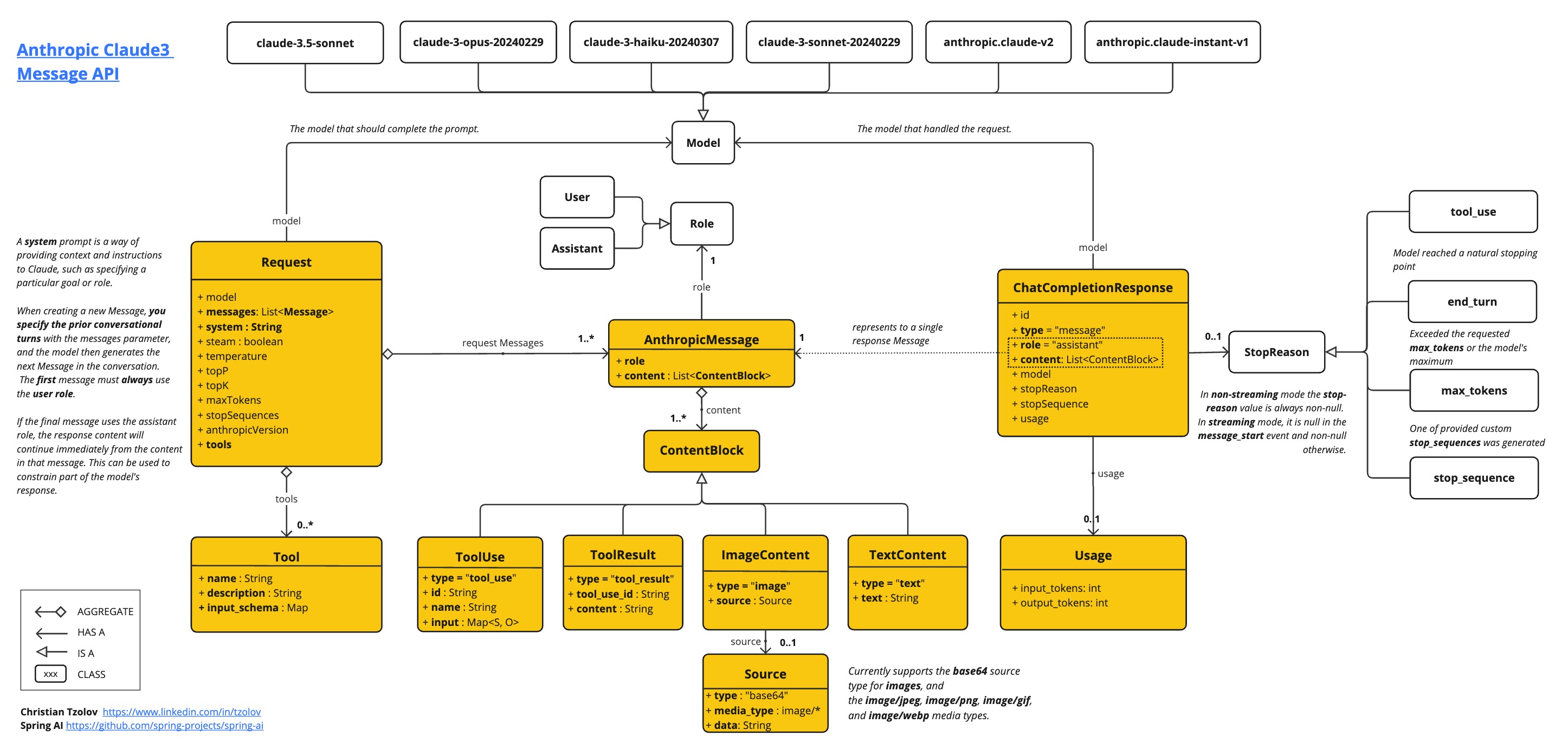
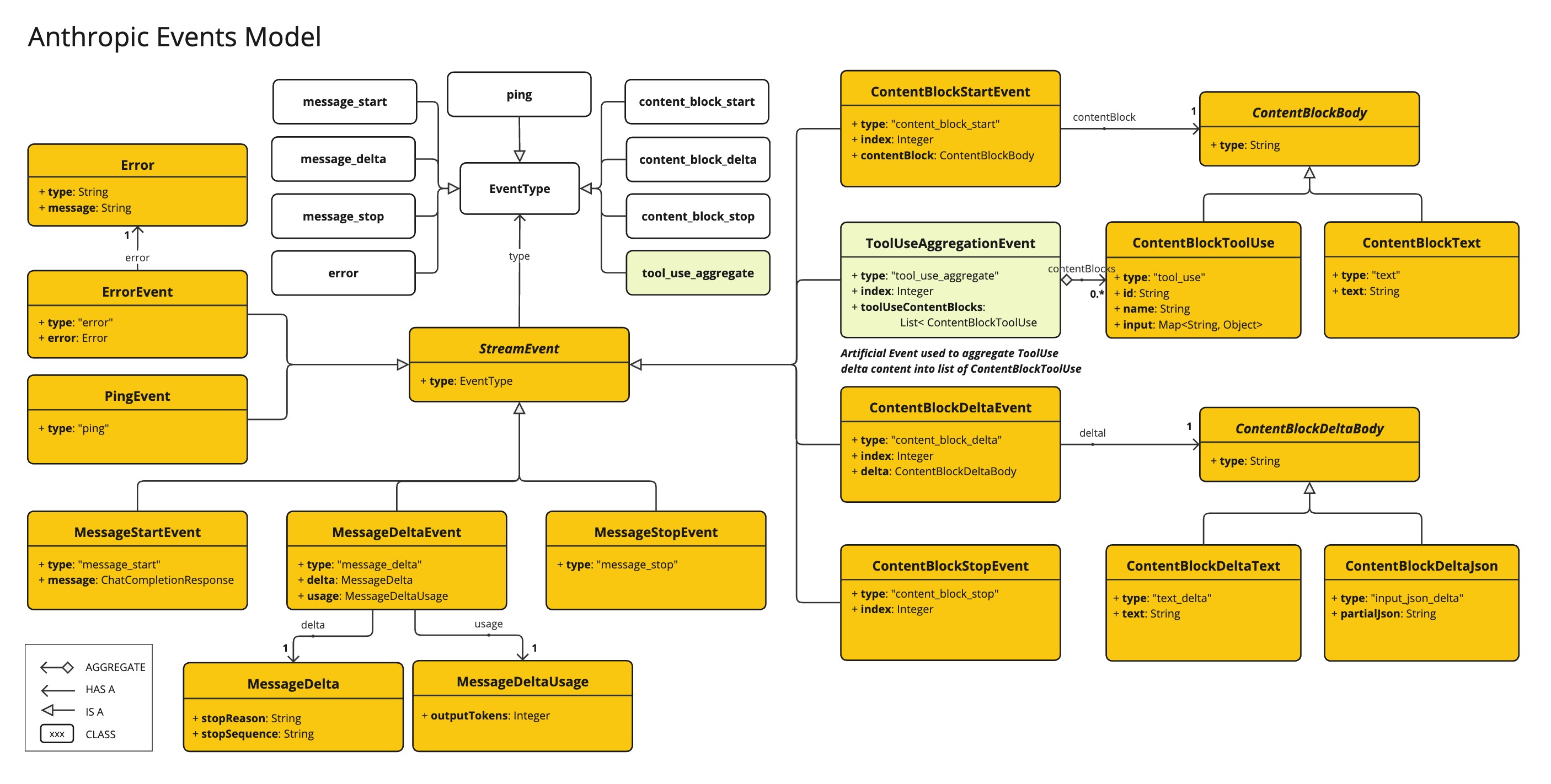
以下是如何以编程方式使用API的简单代码片段:
AnthropicApi anthropicApi =
    new AnthropicApi(System.getenv("ANTHROPIC_API_KEY"));

AnthropicMessage chatCompletionMessage = new AnthropicMessage(
        List.of(new ContentBlock("Tell me a Joke?")), Role.USER);

// Sync request
ResponseEntity<ChatCompletionResponse> response = this.anthropicApi
    .chatCompletionEntity(new ChatCompletionRequest(AnthropicApi.ChatModel.CLAUDE_OPUS_4_5.getValue(),
            List.of(this.chatCompletionMessage), null, 100, 0.8, false));

// Streaming request
Flux<StreamResponse> response = this.anthropicApi
    .chatCompletionStream(new ChatCompletionRequest(AnthropicApi.ChatModel.CLAUDE_OPUS_4_5.getValue(),
            List.of(this.chatCompletionMessage), null, 100, 0.8, true));
请参阅 AnthropicApi.java 的 JavaDoc 以获取更多信息。
底层API示例
-
The AnthropicApiIT.java test provides some general examples how to use the lightweight library.