AMQP 支持
AMQP (RabbitMQ) 支持
Spring Integration 提供通道适配器,用于使用高级消息队列协议 (AMQP) 接收和发送消息。
您需要将以下依赖项包含到您的项目中:
<dependency>
    <groupId>org.springframework.integration</groupId>
    <artifactId>spring-integration-amqp</artifactId>
    <version>6.1.9</version>
</dependency>compile "org.springframework.integration:spring-integration-amqp:6.1.9"
以下适配器可用:
Spring Integration 还提供点对点消息通道和基于 AMQP 交换机与队列的发布 - 订阅消息通道。
为了提供 AMQP 支持,Spring Integration 依赖于 (Spring AMQP),它将 Spring 的核心概念应用于基于 AMQP 的 messaging 解决方案的开发。 Spring AMQP 提供了与 (Spring JMS) 类似的语义。
虽然提供的 AMQP 通道适配器仅用于单向消息传递(发送或接收),但 Spring Integration 还提供了用于请求 - 回复操作的入站和出站 AMQP 网关。
提示: 您应熟悉 Spring AMQP 项目的参考文档。 该文档提供了关于 Spring 与 AMQP(尤其是 RabbitMQ)集成的更深入信息。
入站通道适配器
以下列表展示了 AMQP 入站通道适配器的可能配置选项:
@Bean
public IntegrationFlow amqpInbound(ConnectionFactory connectionFactory) {
    return IntegrationFlow.from(Amqp.inboundAdapter(connectionFactory, "aName"))
            .handle(m -> System.out.println(m.getPayload()))
            .get();
}
@Bean
public MessageChannel amqpInputChannel() {
    return new DirectChannel();
}

@Bean
public AmqpInboundChannelAdapter inbound(SimpleMessageListenerContainer listenerContainer,
        @Qualifier("amqpInputChannel") MessageChannel channel) {
    AmqpInboundChannelAdapter adapter = new AmqpInboundChannelAdapter(listenerContainer);
    adapter.setOutputChannel(channel);
    return adapter;
}

@Bean
public SimpleMessageListenerContainer container(ConnectionFactory connectionFactory) {
    SimpleMessageListenerContainer container =
                               new SimpleMessageListenerContainer(connectionFactory);
    container.setQueueNames("aName");
    container.setConcurrentConsumers(2);
    // ...
    return container;
}

@Bean
@ServiceActivator(inputChannel = "amqpInputChannel")
public MessageHandler handler() {
    return new MessageHandler() {

        @Override
        public void handleMessage(Message<?> message) throws MessagingException {
            System.out.println(message.getPayload());
        }

    };
}
<int-amqp:inbound-channel-adapter
                                  id="inboundAmqp"                (1)
                                  channel="inboundChannel"        (2)
                                  queue-names="si.test.queue"     (3)
                                  acknowledge-mode="AUTO"         (4)
                                  advice-chain=""                 (5)
                                  channel-transacted=""           (6)
                                  concurrent-consumers=""         (7)
                                  connection-factory=""           (8)
                                  error-channel=""                (9)
                                  expose-listener-channel=""      (10)
                                  header-mapper=""                (11)
                                  mapped-request-headers=""       (12)
                                  listener-container=""           (13)
                                  message-converter=""            (14)
                                  message-properties-converter="" (15)
                                  phase=""                        (16)
                                  prefetch-count=""               (17)
                                  receive-timeout=""              (18)
                                  recovery-interval=""            (19)
                                  missing-queues-fatal=""         (20)
                                  shutdown-timeout=""             (21)
                                  task-executor=""                (22)
                                  transaction-attribute=""        (23)
                                  transaction-manager=""          (24)
                                  tx-size=""                      (25)
                                  consumers-per-queue             (26)
                                  batch-mode="MESSAGES"/>         (27)

<1> The unique ID for this adapter.
Optional.
<2> Message channel to which converted messages should be sent.
Required.
<3> Names of the AMQP queues (comma-separated list) from which messages should be consumed.
Required.
<4> Acknowledge mode for the `MessageListenerContainer`.
When set to `MANUAL`, the delivery tag and channel are provided in message headers `amqp_deliveryTag` and `amqp_channel`, respectively.
The user application is responsible for acknowledgement.
`NONE` means no acknowledgements (`autoAck`).
`AUTO` means the adapter's container acknowledges when the downstream flow completes.
Optional (defaults to AUTO).
See <<amqp-inbound-ack>>.
<5> Extra AOP Advices to handle cross-cutting behavior associated with this inbound channel adapter.
Optional.
<6> Flag to indicate that channels created by this component are transactional.
If true, it tells the framework to use a transactional channel and to end all operations (send or receive) with a commit or rollback, depending on the outcome, with an exception that signals a rollback.
Optional (Defaults to false).
<7> Specify the number of concurrent consumers to create.
The default is `1`.
We recommend raising the number of concurrent consumers to scale the consumption of messages coming in from a queue.
However, note that any ordering guarantees are lost once multiple consumers are registered.
In general, use one consumer for low-volume queues.
Not allowed when 'consumers-per-queue' is set.
Optional.
<8> Bean reference to the RabbitMQ `ConnectionFactory`.
Optional (defaults to `connectionFactory`).
<9> Message channel to which error messages should be sent.
Optional.
<10> Whether the listener channel (com.rabbitmq.client.Channel) is exposed to a registered `ChannelAwareMessageListener`.
Optional (defaults to true).
<11> A reference to an `AmqpHeaderMapper` to use when receiving AMQP Messages.
Optional.
By default, only standard AMQP properties (such as `contentType`) are copied to Spring Integration `MessageHeaders`.
Any user-defined headers within the AMQP `MessageProperties` are NOT copied to the message by the default `DefaultAmqpHeaderMapper`.
Not allowed if 'request-header-names' is provided.
<12> Comma-separated list of the names of AMQP Headers to be mapped from the AMQP request into the `MessageHeaders`.
This can only be provided if the 'header-mapper' reference is not provided.
The values in this list can also be simple patterns to be matched against the header names (such as "\*" or "thing1*, thing2" or "*something").
<13> Reference to the `AbstractMessageListenerContainer` to use for receiving AMQP Messages.
If this attribute is provided, no other attribute related to the listener container configuration should be provided.
In other words, by setting this reference, you must take full responsibility for the listener container configuration.
The only exception is the `MessageListener` itself.
Since that is actually the core responsibility of this channel adapter implementation, the referenced listener container must not already have its own `MessageListener`.
Optional.
<14> The `MessageConverter` to use when receiving AMQP messages.
Optional.
<15> The `MessagePropertiesConverter` to use when receiving AMQP messages.
Optional.
<16> Specifies the phase in which the underlying `AbstractMessageListenerContainer` should be started and stopped.
The startup order proceeds from lowest to highest, and the shutdown order is the reverse of that.
By default, this value is `Integer.MAX_VALUE`, meaning that this container starts as late as possible and stops as soon as possible.
Optional.
<17> Tells the AMQP broker how many messages to send to each consumer in a single request.
Often, you can set this value high to improve throughput.
It should be greater than or equal to the transaction size (see the `tx-size` attribute, later in this list).
Optional (defaults to `1`).
<18> Receive timeout in milliseconds.
Optional (defaults to `1000`).
<19> Specifies the interval between recovery attempts of the underlying `AbstractMessageListenerContainer` (in milliseconds).
Optional (defaults to `5000`).
<20> If 'true' and none of the queues are available on the broker, the container throws a fatal exception during startup and stops if the queues are deleted when the container is running (after making three attempts to passively declare the queues).
If `false`, the container does not throw an exception and goes into recovery mode, attempting to restart according to the `recovery-interval`.
Optional (defaults to `true`).
<21> The time to wait for workers (in milliseconds) after the underlying `AbstractMessageListenerContainer` is stopped and before the AMQP connection is forced closed.
If any workers are active when the shutdown signal comes, they are allowed to finish processing as long as they can finish within this timeout.
Otherwise, the connection is closed and messages remain unacknowledged (if the channel is transactional).
Optional (defaults to `5000`).
<22> By default, the underlying `AbstractMessageListenerContainer` uses a `SimpleAsyncTaskExecutor` implementation, that fires up a new thread for each task, running it asynchronously.
By default, the number of concurrent threads is unlimited.
Note that this implementation does not reuse threads.
Consider using a thread-pooling `TaskExecutor` implementation as an alternative.
Optional (defaults to `SimpleAsyncTaskExecutor`).
<23> By default, the underlying `AbstractMessageListenerContainer` creates a new instance of the `DefaultTransactionAttribute` (it takes the EJB approach to rolling back on runtime but not checked exceptions).
Optional (defaults to `DefaultTransactionAttribute`).
<24> Sets a bean reference to an external `PlatformTransactionManager` on the underlying `AbstractMessageListenerContainer`.
The transaction manager works in conjunction with the `channel-transacted` attribute.
If there is already a transaction in progress when the framework is sending or receiving a message and the `channelTransacted` flag is `true`, the commit or rollback of the messaging transaction is deferred until the end of the current transaction.
If the `channelTransacted` flag is `false`, no transaction semantics apply to the messaging operation (it is auto-acked).
For further information, see
https://docs.spring.io/spring-amqp/reference/html/%255Freference.html#%5Ftransactions[Transactions with Spring AMQP].
Optional.
<25> Tells the `SimpleMessageListenerContainer` how many messages to process in a single transaction (if the channel is transactional).
For best results, it should be less than or equal to the value set in `prefetch-count`.
Not allowed when 'consumers-per-queue' is set.
Optional (defaults to `1`).
<26> Indicates that the underlying listener container should be a `DirectMessageListenerContainer` instead of the default `SimpleMessageListenerContainer`.
See the https://docs.spring.io/spring-amqp/reference/html/[Spring AMQP Reference Manual] for more information.
<27> When the container's `consumerBatchEnabled` is `true`, determines how the adapter presents the batch of messages in the message payload.
When set to `MESSAGES` (default), the payload is a `List<Message<?>>` where each message has headers mapped from the incoming AMQP `Message` and the payload is the converted `body`.
When set to `EXTRACT_PAYLOADS`, the payload is a `List<?>` where the elements are converted from the AMQP `Message` body.
`EXTRACT_PAYLOADS_WITH_HEADERS` is similar to `EXTRACT_PAYLOADS` but, in addition, the headers from each message are mapped from the `MessageProperties` into a `List<Map<String, Object>` at the corresponding index; the header name is `AmqpInboundChannelAdapter.CONSOLIDATED_HEADERS`.|
容器
请注意,当使用 XML 配置外部容器时,无法使用 Spring AMQP 命名空间来定义该容器。
这是因为该命名空间要求至少包含一个 |
尽管 Spring Integration 的 JMS 和 AMQP 支持相似,但仍存在重要差异。
JMS 入站通道适配器在底层使用 JmsDestinationPollingSource,并期望配置一个轮询器(poller)。
AMQP 入站通道适配器使用 AbstractMessageListenerContainer,并且是消息驱动的。
在这方面,它更接近于 JMS 消息驱动通道适配器。 |
从版本 5.5 开始,AmqpInboundChannelAdapter可以配置为使用在内部调用重试操作时应用于RecoveryCallback的org.springframework.amqp.rabbit.retry.MessageRecoverer策略。
有关更多信息,请参阅setMessageRecoverer()的 JavaDocs。
@Publisher 注解也可以与 @RabbitListener 结合使用:
@Configuration
@EnableIntegration
@EnableRabbit
@EnablePublisher
public static class ContextConfiguration {

    @Bean
    QueueChannel fromRabbitViaPublisher() {
        return new QueueChannel();
    }

    @RabbitListener(queuesToDeclare = @Queue("publisherQueue"))
    @Publisher("fromRabbitViaPublisher")
    @Payload("#args.payload.toUpperCase()")
    public void consumeForPublisher(String payload) {

    }

}
默认情况下,@Publisher AOP 拦截器处理方法调用返回的值。
然而,@RabbitListener 方法的返回值被视为 AMQP 回复消息。
因此,这种方法不能与 @Publisher 一起使用,所以推荐使用带有相应 SpEL 表达式针对方法参数的 @Payload 注解来实现这种组合。
有关 基于注解的配置 部分中 @Publisher 的更多信息,请参见相关文档。
当在监听器容器中使用独占或单活跃消费者时,建议将容器属性 forceStop 设置为 true。
这将防止一种竞态条件:在停止容器后,另一个消费者可能在该实例完全停止之前就开始消费消息。 |
批处理消息
有关批量消息的更多信息,请参阅 Spring AMQP 文档。
要使用 Spring Integration 生成批量消息,只需将出站端点配置为 BatchingRabbitTemplate。
在接收批量消息时,默认情况下,监听器容器会提取每个片段消息,并且适配器将为每个片段生成一个 Message<?>。
从 5.2 版本开始,如果容器的 deBatchingEnabled 属性设置为 false,则去分批操作将由适配器执行,并生成单个 Message<List<?>>,其负载为片段负载的列表(在适当的情况下经过转换)。
默认的 BatchingStrategy 是 SimpleBatchingStrategy,但可以在适配器上覆盖此设置。
在使用批处理进行需要重试的恢复操作时,必须使用 org.springframework.amqp.rabbit.retry.MessageBatchRecoverer。 |
轮询入站通道适配器
概述
版本 5.0.1 引入了轮询通道适配器,允许按需获取单个消息——例如使用 MessageSourcePollingTemplate 或轮询器。
有关更多信息,请参阅 延迟确认可轮询消息源。
当前不支持 XML 配置。
以下示例展示了如何配置一个 AmqpMessageSource:
@Bean
public IntegrationFlow flow() {
    return IntegrationFlow.from(Amqp.inboundPolledAdapter(connectionFactory(), DSL_QUEUE),
                    e -> e.poller(Pollers.fixedDelay(1_000)).autoStartup(false))
            .handle(p -> {
                ...
            })
            .get();
}
@Bean
public AmqpMessageSource source(ConnectionFactory connectionFactory) {
    return new AmqpMessageSource(connectionFactory, "someQueue");
}
查看Javadoc以获取配置属性。
This adapter currently does not have XML configuration support.传入网关
入站网关支持入站通道适配器上的所有属性(除了将'channel'替换为'request-channel'),以及一些额外的属性。 以下列表显示了可用的属性:
@Bean // return the upper cased payload
public IntegrationFlow amqpInboundGateway(ConnectionFactory connectionFactory) {
    return IntegrationFlow.from(Amqp.inboundGateway(connectionFactory, "foo"))
            .transform(String.class, String::toUpperCase)
            .get();
}
@Bean
public MessageChannel amqpInputChannel() {
    return new DirectChannel();
}

@Bean
public AmqpInboundGateway inbound(SimpleMessageListenerContainer listenerContainer,
        @Qualifier("amqpInputChannel") MessageChannel channel) {
    AmqpInboundGateway gateway = new AmqpInboundGateway(listenerContainer);
    gateway.setRequestChannel(channel);
    gateway.setDefaultReplyTo("bar");
    return gateway;
}

@Bean
public SimpleMessageListenerContainer container(ConnectionFactory connectionFactory) {
    SimpleMessageListenerContainer container =
                    new SimpleMessageListenerContainer(connectionFactory);
    container.setQueueNames("foo");
    container.setConcurrentConsumers(2);
    // ...
    return container;
}

@Bean
@ServiceActivator(inputChannel = "amqpInputChannel")
public MessageHandler handler() {
    return new AbstractReplyProducingMessageHandler() {

        @Override
        protected Object handleRequestMessage(Message<?> requestMessage) {
            return "reply to " + requestMessage.getPayload();
        }

    };
}
<int-amqp:inbound-gateway
                          id="inboundGateway"                (1)
                          request-channel="myRequestChannel" (2)
                          header-mapper=""                   (3)
                          mapped-request-headers=""          (4)
                          mapped-reply-headers=""            (5)
                          reply-channel="myReplyChannel"     (6)
                          reply-timeout="1000"               (7)
                          amqp-template=""                   (8)
default-reply-to="" /> (9)| 1 | 此适配器的唯一 ID。 可选。 |
| 2 | 消息通道,转换后的消息将发送至此。 必需。 |
| 3 | 引用一个 AmqpHeaderMapper,用于接收 AMQP 消息。
可选。
默认情况下,仅标准 AMQP 属性(例如 contentType)会被复制到 Spring Integration 的 MessageHeaders 中或从其中复制出来。
AMQP MessageProperties 中的任何用户自定义头信息都不会通过默认的 DefaultAmqpHeaderMapper 与 AMQP 消息进行复制。
如果提供了'request-header-names'或'reply-header-names',则不允许使用此选项。 |
| 4 | 以逗号分隔的 AMQP 头名称列表,这些头将从 AMQP 请求映射到 MessageHeaders。
仅当未提供 'header-mapper' 引用时,方可提供此属性。
该列表中的值也可以是用于匹配头名称的简单模式(例如 "*"、"thing1*, thing2" 或 "*thing1")。 |
| 5 | 要映射到 AMQP 回复消息的 AMQP 消息属性中的MessageHeaders名称的逗号分隔列表。
所有标准标头(例如contentType)都会映射到 AMQP 消息属性,而用户定义的标头会映射到“headers”属性。
仅当未提供“header-mapper”引用时,才能提供此属性。
此列表中的值也可以是用于与标头名称进行匹配的模式(例如"*"或"foo*, bar"或"*foo")。 |
| 6 | 消息通道,预期在此接收回复消息。 可选。 |
| 7 | 为底层 o.s.i.core.MessagingTemplate 设置接收来自回复通道消息的 receiveTimeout。
如果未指定,此属性默认为 1000(1 秒)。
仅当容器线程在发送回复之前将任务转交给另一个线程时才适用。 |
| 8 | 自定义的 AmqpTemplate Bean 引用(以便更好地控制要发送的回复消息)。
您可以为 RabbitTemplate 提供替代实现。 |
| 9 | 当 requestMessage 没有 replyTo 属性时,将使用 replyTo o.s.amqp.core.Address。
如果未指定此选项,且未提供 amqp-template,请求消息中不存在 replyTo 属性,
则会抛出 IllegalStateException,因为无法路由回复。
如果未指定此选项但提供了外部 amqp-template,则不会抛出异常。
如果您预期请求消息中不存在 replyTo 属性的情况,则必须指定此选项,
或在该模板上配置默认的 exchange 和 routingKey。 |
有关配置listener-container属性的说明,请参见入站通道适配器中的注释。
从版本 5.5 开始,AmqpInboundChannelAdapter可以配置为使用在内部调用重试操作时应用于RecoveryCallback的org.springframework.amqp.rabbit.retry.MessageRecoverer策略。
有关更多信息,请参阅setMessageRecoverer()的 JavaDocs。
批处理消息
查看 批量消息。
入站端点确认模式
默认情况下,入站端点使用 AUTO 确认模式,这意味着当下游集成流程完成时(或通过 QueueChannel 或 ExecutorChannel 将消息移交到另一个线程),容器会自动确认该消息。
将模式设置为 NONE 会配置消费者完全不使用确认机制(代理在发送消息后立即自动确认)。
将模式设置为 MANUAL 允许用户代码在处理过程中的某个其他点对消息进行确认。
为了支持此功能,在此模式下,端点会在 amqp_channel 和 amqp_deliveryTag 标头中分别提供 Channel 和 deliveryTag。
您可以在 Channel 上执行任何有效的 Rabbit 命令,但通常仅使用 basicAck 和 basicNack(或 basicReject)。
为了不干扰容器的运行,您不应保留对通道的引用,而应仅在当前消息的上下文中使用它。
由于 Channel 是对“实时”对象的引用,因此无法对其进行序列化;如果消息被持久化,该引用将会丢失。 |
以下示例展示了如何使用 MANUAL 确认:
@ServiceActivator(inputChannel = "foo", outputChannel = "bar")
public Object handle(@Payload String payload, @Header(AmqpHeaders.CHANNEL) Channel channel,
        @Header(AmqpHeaders.DELIVERY_TAG) Long deliveryTag) throws Exception {

    // Do some processing

    if (allOK) {
        channel.basicAck(deliveryTag, false);

        // perhaps do some more processing

    }
    else {
        channel.basicNack(deliveryTag, false, true);
    }
    return someResultForDownStreamProcessing;
}
出站端点
以下出站端点具有许多相似的配置选项。
从 5.2 版本开始,已添加confirm-timeout。
通常情况下,当启用发布者确认时,代理将快速返回一个 ack(或 nack),该消息会被发送到相应的通道。
如果在收到确认之前通道已关闭,Spring AMQP 框架将合成一个 nack。
“缺失”的 ack 绝不应发生,但如果您设置了此属性,端点将定期检查它们,如果超时未收到确认,则合成一个 nack。
出站通道适配器
以下示例展示了 AMQP 出站通道适配器的可用属性:
@Bean
public IntegrationFlow amqpOutbound(AmqpTemplate amqpTemplate,
        MessageChannel amqpOutboundChannel) {
    return IntegrationFlow.from(amqpOutboundChannel)
            .handle(Amqp.outboundAdapter(amqpTemplate)
                        .routingKey("queue1")) // default exchange - route to queue 'queue1'
            .get();
}
@Bean
@ServiceActivator(inputChannel = "amqpOutboundChannel")
public AmqpOutboundEndpoint amqpOutbound(AmqpTemplate amqpTemplate) {
    AmqpOutboundEndpoint outbound = new AmqpOutboundEndpoint(amqpTemplate);
    outbound.setRoutingKey("queue1"); // default exchange - route to queue 'queue1'
    return outbound;
}

@Bean
public MessageChannel amqpOutboundChannel() {
    return new DirectChannel();
}
<int-amqp:outbound-channel-adapter id="outboundAmqp"             (1)
                               channel="outboundChannel"         (2)
                               amqp-template="myAmqpTemplate"    (3)
                               exchange-name=""                  (4)
                               exchange-name-expression=""       (5)
                               order="1"                         (6)
                               routing-key=""                    (7)
                               routing-key-expression=""         (8)
                               default-delivery-mode""           (9)
                               confirm-correlation-expression="" (10)
                               confirm-ack-channel=""            (11)
                               confirm-nack-channel=""           (12)
                               confirm-timeout=""                (13)
                               wait-for-confirm=""               (14)
                               return-channel=""                 (15)
                               error-message-strategy=""         (16)
                               header-mapper=""                  (17)
                               mapped-request-headers=""         (18)
                               lazy-connect="true"               (19)
multi-send="false"/> (20)| 1 | 此适配器的唯一 ID。 可选。 |
| 2 | 消息通道,消息应发送至该通道以进行转换并发布到 AMQP 交换器。 必需项。 |
| 3 | 对已配置的 AMQP 模板的 Bean 引用。
可选(默认为 amqpTemplate)。 |
| 4 | 要发送消息的 AMQP 交换器的名称。 如果未提供,消息将发送到默认的无名称交换器。 与 'exchange-name-expression' 互斥。 可选。 |
| 5 | 一个 SpEL 表达式,用于求值以确定消息发送到的 AMQP 交换机的名称,其中消息作为根对象。 如果未提供,消息将发送到默认的无名称交换机。 与 'exchange-name' 互斥。 可选。 |
| 6 | 当注册多个消费者时,此消费者的订单顺序,从而实现负载均衡和故障转移。
可选(默认为 Ordered.LOWEST_PRECEDENCE [=Integer.MAX_VALUE])。 |
| 7 | 发送消息时使用的固定路由键。
默认情况下,这是一个空的 String。
与 'routing-key-expression' 互斥。
可选。 |
| 8 | 一个 SpEL 表达式,用于在发送消息时确定要使用的路由键,其中消息作为根对象(例如,'payload.key')。
默认为空 String。
与 'routing-key' 互斥。
可选。 |
| 9 | 消息的默认传递模式:PERSISTENT 或 NON_PERSISTENT。
如果 header-mapper 设置了传递模式,则会被覆盖。
如果存在 Spring Integration 消息头 amqp_deliveryMode,则 DefaultHeaderMapper 将设置该值。
如果未提供此属性且头部映射器也未设置它,则默认值取决于底层 Spring AMQP MessagePropertiesConverter(由 RabbitTemplate 使用)。
如果完全未进行自定义,则默认为 PERSISTENT。
可选。 |
| 10 | 定义关联数据的表达式。当提供此配置时,将配置底层的 AMQP 模板以接收发布者确认。需要专用的 RabbitTemplate 和 CachingConnectionFactory,并将 publisherConfirms 属性设置为 true。当收到发布者确认且提供了关联数据时,它将根据确认类型写入confirm-ack-channel或confirm-nack-channel。确认的负载是关联数据,如该表达式所定义。该消息的 'amqp_publishConfirm' 头设置为 true (ack) 或 false (nack)。示例:headers['myCorrelationData'] 和 payload。版本 4。1 引入了 amqp_publishConfirmNackCause 消息头。它包含用于发布者确认的 'nack' 的 cause。从版本 4 开始。2,如果表达式解析为 Message<?> 实例(例如 #this),则在 ack/nack 通道上发出的消息将基于该消息,并添加额外的标头。以前,无论类型如何,新消息都是使用关联数据作为其有效负载创建的。另请参阅 发布者的确认和返回的替代机制。
Optional. |
| 11 | 正数 (ack) 发布者确认发送到的通道。
负载是由 confirm-correlation-expression 定义的关联数据。
如果表达式为 #root 或 #this,则消息基于原始消息构建,并将 amqp_publishConfirm 头设置为 true。
另见 发布者和返回的替代机制。
可选(默认为 nullChannel)。 |
| 12 | 发送负数(nack)发布者确认的通道。
负载是由 confirm-correlation-expression 定义的关联数据(如果未配置 ErrorMessageStrategy)。
如果表达式为 #root 或 #this,则消息基于原始消息构建,并将 amqp_publishConfirm 头设置为 false。
当存在 ErrorMessageStrategy 时,消息是一个带有 NackedAmqpMessageException 负载的 ErrorMessage。
另请参阅 发布者确认和返回的替代机制。
可选(默认为 nullChannel)。 |
| 13 | 当设置时,如果在此时间(毫秒)内未收到发布者的确认,适配器将合成一个否定确认(nack)。 挂起的确认会每隔该值的 50% 进行检查,因此实际发送 nack 的时间将在该值的 1 倍到 1.5 倍之间。 另请参阅 发布者确认和返回的替代机制。 默认值为无(不会生成 nacks)。 |
| 14 | 当设置为 true 时,调用线程将阻塞,等待发布者的确认。
这需要为 confirms 配置 RabbitTemplate,同时也需要 confirm-correlation-expression。
线程将最多阻塞 confirm-timeout(默认情况下为 5 秒)。
如果发生超时,将抛出 MessageTimeoutException。
如果启用了返回功能且消息被返回,或者在等待确认期间发生任何其他异常,将抛出 MessageHandlingException,并附带相应的消息。 |
| 15 | 发送返回消息的通道。
当提供时,底层的 AMQP 模板将被配置为将不可投递的消息返回给适配器。
当没有配置ErrorMessageStrategy时,消息将从 AMQP 接收的数据中构建,并包含以下附加头部:amqp_returnReplyCode、amqp_returnReplyText、amqp_returnExchange、amqp_returnRoutingKey。
当存在ErrorMessageStrategy时,该消息是一个带有ReturnedAmqpMessageException负载的ErrorMessage。
另请参阅发布确认和返回的替代机制。
可选。 |
| 16 | 用于在发送已返回或负确认消息时构建 ErrorMessage 实例的 ErrorMessageStrategy 实现的引用。 |
| 17 | 对用于发送 AMQP 消息的AmqpHeaderMapper的引用。
默认情况下,仅将标准 AMQP 属性(如contentType)复制到 Spring Integration MessageHeaders。
默认`DefaultAmqpHeaderMapper`不会复制任何用户定义的头部到消息中。
如果提供了'request-header-names',则不允许使用。
可选。 |
| 18 | 以逗号分隔的 AMQP 头名称列表,用于从 MessageHeaders 映射到 AMQP 消息。
如果提供了 'header-mapper' 引用,则不允许使用此属性。
此列表中的值也可以是用于匹配头名称的简单模式(例如 "*"、"thing1*, thing2" 或 "*thing1")。 |
| 19 | 当设置为 false 时,端点会在应用程序上下文初始化期间尝试连接到代理。
这允许快速检测错误的配置,但如果代理宕机,也会导致初始化失败。
当设置为 true(默认值)时,连接将在发送第一条消息时建立(如果尚未由其他组件建立)。 |
| 20 | 当设置为true时,类型为Iterable<Message<?>>的有效负载将作为离散消息在单个RabbitTemplate调用的范围内通过同一通道发送。
需要一个RabbitTemplate。
当wait-for-confirms为true时,在消息发送后会调用RabbitTemplate.waitForConfirmsOrDie()。
使用事务模板时,发送操作将在新事务或已启动的事务(如果存在)中执行。 |
|
return-channel
使用 |
出站网关
以下列表显示了 AMQP 出站网关的可能属性:
@Bean
public IntegrationFlow amqpOutbound(AmqpTemplate amqpTemplate) {
    return f -> f.handle(Amqp.outboundGateway(amqpTemplate)
                    .routingKey("foo")) // default exchange - route to queue 'foo'
            .get();
}

@MessagingGateway(defaultRequestChannel = "amqpOutbound.input")
public interface MyGateway {

    String sendToRabbit(String data);

}
@Bean
@ServiceActivator(inputChannel = "amqpOutboundChannel")
public AmqpOutboundEndpoint amqpOutbound(AmqpTemplate amqpTemplate) {
    AmqpOutboundEndpoint outbound = new AmqpOutboundEndpoint(amqpTemplate);
    outbound.setExpectReply(true);
    outbound.setRoutingKey("foo"); // default exchange - route to queue 'foo'
    return outbound;
}

@Bean
public MessageChannel amqpOutboundChannel() {
    return new DirectChannel();
}

@MessagingGateway(defaultRequestChannel = "amqpOutboundChannel")
public interface MyGateway {

    String sendToRabbit(String data);

}
<int-amqp:outbound-gateway id="outboundGateway"               (1)
                           request-channel="myRequestChannel" (2)
                           amqp-template=""                   (3)
                           exchange-name=""                   (4)
                           exchange-name-expression=""        (5)
                           order="1"                          (6)
                           reply-channel=""                   (7)
                           reply-timeout=""                   (8)
                           requires-reply=""                  (9)
                           routing-key=""                     (10)
                           routing-key-expression=""          (11)
                           default-delivery-mode""            (12)
                           confirm-correlation-expression=""  (13)
                           confirm-ack-channel=""             (14)
                           confirm-nack-channel=""            (15)
                           confirm-timeout=""                 (16)
                           return-channel=""                  (17)
                           error-message-strategy=""          (18)
lazy-connect="true" /> (19)| 1 | 此适配器的唯一 ID。 可选。 |
| 2 | 消息通道,消息将被发送至该通道以进行转换并发布到 AMQP 交换器。 必需。 |
| 3 | 对已配置的 AMQP 模板的 Bean 引用。
可选(默认为 amqpTemplate)。 |
| 4 | 要发送消息的 AMQP 交换器的名称。 如果未提供,消息将发送到默认的无名称交换器。 与 'exchange-name-expression' 互斥。 可选。 |
| 5 | 一个 SpEL 表达式,用于计算应发送消息的 AMQP 交换机的名称,其中消息作为根对象。 如果未提供,消息将发送到默认的无名称交换机。 与 'exchange-name' 互斥。 可选。 |
| 6 | 当注册多个消费者时,此消费者的订单顺序,从而实现负载均衡和故障转移。
可选(默认为 Ordered.LOWEST_PRECEDENCE [=Integer.MAX_VALUE])。 |
| 7 | 消息通道,用于在从 AMQP 队列接收并转换回复后发送这些回复。 可选。 |
| 8 | 网关在将回复消息发送到 reply-channel 时等待的时间。
仅当 reply-channel 可能阻塞时才适用此设置——例如,当前已满且容量有限的 QueueChannel。
默认为无限。 |
| 9 | 当 true 时,如果在 AmqpTemplate’s `replyTimeout 属性规定的时间内未收到回复消息,网关将抛出异常。
默认为 true。 |
| 10 | 发送消息时使用的routing-key。
默认情况下,这是一个空的String。
与“routing-key-expression”互斥。
可选。 |
| 11 | 一个 SpEL 表达式,用于评估在发送消息时要使用的 routing-key,其中消息作为根对象(例如,'payload.key')。
默认情况下,这是一个空的 String。
与 'routing-key' 互斥。
可选的。 |
| 12 | 消息的默认传递模式:PERSISTENT 或 NON_PERSISTENT。
如果 header-mapper 设置了传递模式,则会被覆盖。
如果存在 Spring Integration 消息头 amqp_deliveryMode,则 DefaultHeaderMapper 将设置该值。
如果未提供此属性且头部映射器也未设置它,则默认值取决于底层 Spring AMQP MessagePropertiesConverter(由 RabbitTemplate 使用)。
如果完全未进行自定义,则默认为 PERSISTENT。
可选。 |
| 13 | 自 4.0 版本起。2.定义关联数据的表达式。当提供此配置时,它将配置底层的 AMQP 模板以接收发布者确认。需要专用的 RabbitTemplate 和 CachingConnectionFactory,并将 publisherConfirms 属性设置为 true。当收到发布者的确认且提供了关联数据时,根据确认类型的不同,它会被写入到 confirm-ack-channel 或 confirm-nack-channel 中。确认的负载是由此表达式定义的关联数据。消息的头部已设置为 'amqp_publishConfirm',其值为 true (ack) 或 false (nack)。对于 nack 次确认,Spring Integration 提供了一个额外的头信息 amqp_publishConfirmNackCause。示例:headers['myCorrelationData'] 和 payload。如果表达式解析为 Message<?> 实例(例如 #this),则从 ack/nack 通道发出的消息将基于该消息,并添加额外的头信息。以前,无论类型如何,新消息都是使用关联数据作为其有效负载创建的。另请参阅 发布者的确认和返回的替代机制。
Optional. |
| 14 | 发送到正数(ack)发布者确认的通道。
负载是由 confirm-correlation-expression 定义的关联数据。
如果表达式为 #root 或 #this,则消息基于原始消息构建,并将 amqp_publishConfirm 头设置为 true。
另见 发布者和返回的替代机制。
可选(默认为 nullChannel)。 |
| 15 | 发送到负数 (nack) 发布者确认的通道。
负载是由 confirm-correlation-expression 定义的关联数据(如果未配置 ErrorMessageStrategy)。
如果表达式为 #root 或 #this,则消息基于原始消息构建,并将 amqp_publishConfirm 头设置为 false。
当存在 ErrorMessageStrategy 时,消息是一个带有 NackedAmqpMessageException 负载的 ErrorMessage。
另请参阅 发布者和返回的替代机制。
可选(默认为 nullChannel)。 |
| 16 | 设置后,如果在指定的毫秒时间内未收到发布者确认,网关将合成一个否定确认(nack)。 待处理的确认每为此值的 50% 检查一次,因此实际发送 nack 的时间将在该值的 1 倍到 1.5 倍之间。 默认值为无(不会生成 nack)。 |
| 17 | 发送返回消息的通道。
当提供时,底层的 AMQP 模板被配置为将不可投递的消息返回给适配器。
当未配置ErrorMessageStrategy时,消息由从 AMQP 接收的数据构建,并包含以下附加头信息:amqp_returnReplyCode、amqp_returnReplyText、amqp_returnExchange和amqp_returnRoutingKey。
当存在ErrorMessageStrategy时,该消息是一个带有ReturnedAmqpMessageException负载的ErrorMessage。
另请参阅发布确认和返回的替代机制。
可选。 |
| 18 | 用于在发送已返回或负确认消息时构建 ErrorMessage 实例的 ErrorMessageStrategy 实现的引用。 |
| 19 | 当设置为 false 时,端点会在应用上下文初始化期间尝试连接到代理。
如果代理宕机,这将通过记录错误消息来实现“快速失败”的配置检测。
当设置为 true(默认值)时,连接将在发送第一条消息时建立(如果尚未建立,因为其他组件已建立它)。 |
|
return-channel
使用 |
底层 AmqpTemplate 的默认 replyTimeout 为五秒。
如果需要更长的超时时间,则必须在 template 上进行配置。 |
请注意,出站适配器与出站网关配置之间的唯一区别在于expectReply属性的设置。
异步出站网关
上一节讨论的网关是同步的,即发送线程会挂起,直到收到回复(或发生超时)。
Spring Integration 4.3 版本添加了一个异步网关,它使用了来自 Spring AMQP 的 AsyncRabbitTemplate。
当消息发送时,发送操作完成后线程会立即返回;当消息被接收时,回复将在模板的监听器容器线程上发送。
这在网关由轮询线程调用时非常有用。
线程将被释放,可用于框架中的其他任务。
以下列表展示了 AMQP 异步出站网关的可能配置选项:
@Configuration
public class AmqpAsyncApplication {

    @Bean
    public IntegrationFlow asyncAmqpOutbound(AsyncRabbitTemplate asyncRabbitTemplate) {
        return f -> f
                .handle(Amqp.asyncOutboundGateway(asyncRabbitTemplate)
                        .routingKey("queue1")); // default exchange - route to queue 'queue1'
    }

    @MessagingGateway(defaultRequestChannel = "asyncAmqpOutbound.input")
    public interface MyGateway {

        String sendToRabbit(String data);

    }

}
@Configuration
public class AmqpAsyncConfig {

    @Bean
    @ServiceActivator(inputChannel = "amqpOutboundChannel")
    public AsyncAmqpOutboundGateway amqpOutbound(AsyncRabbitTemplate asyncTemplate) {
        AsyncAmqpOutboundGateway outbound = new AsyncAmqpOutboundGateway(asyncTemplate);
        outbound.setRoutingKey("foo"); // default exchange - route to queue 'foo'
        return outbound;
    }

    @Bean
    public AsyncRabbitTemplate asyncTemplate(RabbitTemplate rabbitTemplate,
                     SimpleMessageListenerContainer replyContainer) {

        return new AsyncRabbitTemplate(rabbitTemplate, replyContainer);
    }

    @Bean
    public SimpleMessageListenerContainer replyContainer() {
        SimpleMessageListenerContainer container = new SimpleMessageListenerContainer(ccf);
        container.setQueueNames("asyncRQ1");
        return container;
    }

    @Bean
    public MessageChannel amqpOutboundChannel() {
        return new DirectChannel();
    }

}
<int-amqp:outbound-async-gateway id="asyncOutboundGateway"    (1)
                           request-channel="myRequestChannel" (2)
                           async-template=""                  (3)
                           exchange-name=""                   (4)
                           exchange-name-expression=""        (5)
                           order="1"                          (6)
                           reply-channel=""                   (7)
                           reply-timeout=""                   (8)
                           requires-reply=""                  (9)
                           routing-key=""                     (10)
                           routing-key-expression=""          (11)
                           default-delivery-mode""            (12)
                           confirm-correlation-expression=""  (13)
                           confirm-ack-channel=""             (14)
                           confirm-nack-channel=""            (15)
                           confirm-timeout=""                 (16)
                           return-channel=""                  (17)
lazy-connect="true" /> (18)| 1 | 此适配器的唯一 ID。 可选。 |
| 2 | 消息通道,消息应发送至此通道以进行转换并发布到 AMQP 交换。 必需。 |
| 3 | 对已配置的 AsyncRabbitTemplate 的 Bean 引用。
可选(默认为 asyncRabbitTemplate)。 |
| 4 | 要发送消息的 AMQP 交换器的名称。 如果未提供,消息将发送到默认的无名称交换器。 与 'exchange-name-expression' 互斥。 可选。 |
| 5 | 一个 SpEL 表达式,用于求值以确定消息发送到的 AMQP 交换机的名称,其中消息作为根对象。 如果未提供,消息将发送到默认的无名称交换机。 与 'exchange-name' 互斥。 可选。 |
| 6 | 当注册多个消费者时,为此消费者指定的顺序,从而实现负载均衡和故障转移。
可选(默认为 Ordered.LOWEST_PRECEDENCE [=Integer.MAX_VALUE])。 |
| 7 | 消息通道,用于在从 AMQP 队列接收并转换回复后发送这些回复。 可选。 |
| 8 | 网关在向 reply-channel 发送回复消息时等待的时间。
仅当 reply-channel 可能阻塞时才适用此设置——例如容量已满且当前处于满状态的 QueueChannel。
默认值为无限。 |
| 9 | 当在 AsyncRabbitTemplate’s `receiveTimeout 属性规定的时间内未收到回复消息,且此设置值为 true 时,网关会将错误消息发送至入站消息的 errorChannel 头部。
当在 AsyncRabbitTemplate’s `receiveTimeout 属性规定的时间内未收到回复消息,且此设置值为 false 时,网关会将错误消息发送至默认的 errorChannel(如果可用)。
其默认值为 true。 |
| 10 | 发送消息时要使用的路由键。
默认情况下,这是一个空的 String。
与 'routing-key-expression' 互斥。
可选。 |
| 11 | 一个 SpEL 表达式,用于在发送消息时计算所使用的路由键,
其中消息作为根对象(例如,'payload.key')。
默认情况下,这是一个空的 String。
与 'routing-key' 互斥。
可选。 |
| 12 | 消息的默认传递模式:PERSISTENT 或 NON_PERSISTENT。
如果设置了 header-mapper,则会被覆盖。
如果存在 Spring Integration 消息头(amqp_deliveryMode),则 DefaultHeaderMapper 将设置该值。
如果未提供此属性且头部映射器也未设置它,则默认值取决于底层 Spring AMQP 所使用的 MessagePropertiesConverter,该组件由 RabbitTemplate 使用。
如果未进行自定义,则默认值为 PERSISTENT。
可选。 |
| 13 | 定义关联数据的表达式。当提供此配置时,将配置底层的 AMQP 模板以接收发布者确认。需要专用的 RabbitTemplate 和一个 CachingConnectionFactory,且其 publisherConfirms 属性设置为 true。当收到发布者确认且提供了关联数据时,确认信息将根据确认类型写入 confirm-ack-channel 或 confirm-nack-channel。确认的负载是由此表达式定义的相关数据,且消息的 'amqp_publishConfirm' 头被设置为 true (ack) 或 false (nack)。对于 nack 个实例,将提供额外的标头(amqp_publishConfirmNackCause)。示例:headers['myCorrelationData']、payload。如果表达式解析为 Message<?> 实例(例如“#this”),则在 ack/nack 通道上发出的消息将基于该消息,并添加额外的标头。另请参阅 发布者的确认和返回的替代机制。
Optional. |
| 14 | 发送正向 (ack) 发布者确认消息的通道。
有效负载是由 confirm-correlation-expression 定义的关联数据。
需要底层 AsyncRabbitTemplate 将其 enableConfirms 属性设置为 true。
另请参阅 发布者和返回的替代机制。
可选(默认值为 nullChannel)。 |
| 15 | 自版本 4.2 起。
发送负数(nack)发布者确认的通道。
负载是由 confirm-correlation-expression 定义的关联数据。
需要底层 AsyncRabbitTemplate 将其 enableConfirms 属性设置为 true。
另见 发布者和返回的替代机制。
可选(默认为 nullChannel)。 |
| 16 | 如果已设置,当在此毫秒时间内未收到发布者的确认时,网关将合成一个否定确认(nack)。 挂起的确认会每隔该值的 50% 进行检查一次,因此实际发送 nack 的时间将在该值的 1 倍到 1.5 倍之间。 另请参阅 发布者确认和返回的替代机制。 默认值为无(不会生成 nack)。 |
| 17 | 返回消息发送到的通道。
如果提供,底层的 AMQP 模板将配置为将不可投递的消息返回给网关。
消息是根据从 AMQP 接收到的数据构建的,并包含以下附加头信息:amqp_returnReplyCode、amqp_returnReplyText、amqp_returnExchange 和 amqp_returnRoutingKey。
需要底层 AsyncRabbitTemplate 的 mandatory 属性设置为 true。
另请参阅 发布确认和返回的替代机制。
可选。 |
| 18 | 当设置为 false 时,端点会在应用上下文初始化期间尝试连接到代理。
这样做允许通过记录错误消息(如果代理宕机)来快速失败地检测配置错误。
当设置为 true(默认值)时,连接会在发送第一条消息时建立(如果尚未由其他组件建立)。 |
另请参阅 异步服务激活器 以获取更多信息。
|
RabbitTemplate
当您使用确认和返回时,我们建议将 |
发布器确认和返回的替代机制
当连接工厂配置为发布确认和返回时,上述部分讨论了配置消息通道以异步接收确认和返回的内容。 从 5.4 版本开始,存在一种额外的机制,通常更易于使用。
在此情况下,请勿配置 confirm-correlation-expression 或确认与返回通道。
相反,请在 AmqpHeaders.PUBLISH_CONFIRM_CORRELATION 头中添加一个 CorrelationData 实例;随后,您可以通过检查已发送消息的 CorrelationData 实例中未来的状态来稍后等待结果(们)。
在 future 完成之前,returnedMessage 字段将始终被填充(如果有消息返回)。
CorrelationData corr = new CorrelationData("someId"); // <--- Unique "id" is required for returns
someFlow.getInputChannel().send(MessageBuilder.withPayload("test")
        .setHeader("rk", "someKeyThatWontRoute")
        .setHeader(AmqpHeaders.PUBLISH_CONFIRM_CORRELATION, corr)
        .build());
...
try {
    Confirm Confirm = corr.getFuture().get(10, TimeUnit.SECONDS);
    Message returned = corr.getReturnedMessage();
    if (returned !- null) {
        // message could not be routed
    }
}
catch { ... }
为了提高性能,您可能希望批量发送多条消息,稍后再等待确认,而不是逐条发送。
返回的消息是转换后的原始消息;您可以根据需要为 CorrelationData 创建子类以添加额外数据。
入站消息转换
传入消息到达通道适配器或网关后,会使用消息转换器将其转换为 spring-messaging Message<?> 有效负载。默认情况下,使用 SimpleMessageConverter,它处理 Java 序列化和文本。默认使用 DefaultHeaderMapper.inboundMapper() 映射标头。如果发生转换错误,且未定义错误通道,则异常将抛出到容器中,并由监听器容器的错误处理器处理。默认的错误处理程序将转换错误视为致命错误,消息将被拒绝(如果队列配置了死信交换器,则路由到死信交换器)。如果定义了错误通道,则 ErrorMessage 有效载荷是一个包含属性 failedMessage(无法转换的 Spring AMQP 消息)和 cause 的 ListenerExecutionFailedException。如果容器 AcknowledgeMode 为 AUTO(默认值),且错误流在不抛出异常的情况下消耗了错误,则原始消息将被确认。如果错误流抛出异常,则异常类型与容器的错误处理器共同决定消息是否重新入队。如果容器配置为 AcknowledgeMode.MANUAL,则有效载荷为 ManualAckListenerExecutionFailedException,并包含附加属性 channel 和 deliveryTag。这使得错误流能够调用 basicAck 或 basicNack(或 basicReject)来处理消息,以控制其处置方式。
出站消息转换
Spring AMQP 1.4 引入了 ContentTypeDelegatingMessageConverter,其中实际的转换器会根据传入消息的内容类型属性进行选择。
这可用于入站端点。
从 Spring Integration 4.3 版本开始,您也可以在出站端点使用 ContentTypeDelegatingMessageConverter,并通过 contentType 标头指定所使用的转换器。
以下示例配置了一个 ContentTypeDelegatingMessageConverter,默认转换器为 SimpleMessageConverter(用于处理 Java 序列化和纯文本),并搭配一个 JSON 转换器:
<amqp:outbound-channel-adapter id="withContentTypeConverter" channel="ctRequestChannel"
                               exchange-name="someExchange"
                               routing-key="someKey"
                               amqp-template="amqpTemplateContentTypeConverter" />

<int:channel id="ctRequestChannel"/>

<rabbit:template id="amqpTemplateContentTypeConverter"
        connection-factory="connectionFactory" message-converter="ctConverter" />

<bean id="ctConverter"
        class="o.s.amqp.support.converter.ContentTypeDelegatingMessageConverter">
    <property name="delegates">
        <map>
            <entry key="application/json">
                <bean class="o.s.amqp.support.converter.Jackson2JsonMessageConverter" />
            </entry>
        </map>
    </property>
</bean>
向 ctRequestChannel 发送消息并将 contentType 头设置为 application/json,这将导致选择 JSON 转换器。
这适用于出站通道适配器和网关。
|
从 5.0 版本开始,添加到出站消息 然而,在某些情况下需要之前的行为——例如,当包含 JSON 的 现在,出站通道适配器和网关(以及基于 AMQP 的通道)上有一个名为 从版本 5.1.9 开始,当生成回复并希望覆盖由转换器填充的头部时,为 |
出站用户 ID
Spring AMQP 1.6 版本引入了一种机制,允许为出站消息指定默认用户 ID。
始终可以设置 AmqpHeaders.USER_ID 标头,该标头现在优先于默认值。
这可能对消息接收者有用。
对于入站消息,如果消息发布者设置了该属性,则它将在 AmqpHeaders.RECEIVED_USER_ID 标头中可用。
请注意,RabbitMQ 会验证用户 ID 是否为连接的实际用户 ID,或者连接是否允许模拟。
要配置出站消息的默认用户 ID,请在 RabbitTemplate 上进行配置,并配置出站适配器或网关使用该模板。
同样,若要在回复中设置用户 ID 属性,请将适当配置的模板注入到入站网关中。
有关更多信息,请参阅 Spring AMQP 文档。
延迟消息交换
Spring AMQP 支持 RabbitMQ 延迟消息交换插件。
对于入站消息,x-delay 标头被映射到 AmqpHeaders.RECEIVED_DELAY 标头。
设置 AMQPHeaders.DELAY 标头会导致出站消息中设置相应的 x-delay 标头。
您还可以在出站端点上指定 delay 和 delayExpression 属性(使用 XML 配置时为 delay-expression)。
这些属性的优先级高于 AmqpHeaders.DELAY 标头。
基于 AMQP 的消息通道
有两种可用的消息通道实现。
一种是点对点(point-to-point),另一种是发布-订阅(publish-subscribe)。
这两种通道都为底层的 AmqpTemplate 和 SimpleMessageListenerContainer 提供了广泛的配置属性(如本章前面所示,针对通道适配器和网关)。
不过,此处展示的示例仅包含最小化配置。
请查阅 XML 架构以查看可用的属性。
点对点通道可能如下所示:
<int-amqp:channel id="p2pChannel"/>在底层,前面的示例会导致声明一个名为 si.p2pChannel 的 Queue,并且该通道会向该 Queue 发送消息(技术上是通过向无名称的直接交换发送,其路由键与此 Queue 的名称匹配)。
该通道还会在该 Queue 上注册一个消费者。
如果您希望通道是“可轮询”的而不是基于消息驱动的,请提供值为 false 的 message-driven 标志,如下例所示:
<int-amqp:channel id="p2pPollableChannel" message-driven="false"/>发布-订阅通道可能如下所示:
<int-amqp:publish-subscribe-channel id="pubSubChannel"/>在底层,上述示例会导致声明一个名为 si.fanout.pubSubChannel 的扇出(fanout)交换机,并且该通道会向此扇出交换机发送消息。
该通道还会声明一个由服务器命名的、排他的、自动删除的、非持久的 Queue,并将其绑定到扇出交换机,同时在该 Queue 上注册一个消费者以接收消息。
发布 - 订阅通道没有“可轮询”选项。
它必须是消息驱动的。
从版本 4.1 开始,基于 AMQP 的消息通道(结合 channel-transacted)支持
template-channel-transacted,以区分 transactional 的 AbstractMessageListenerContainer 配置和
RabbitTemplate 的配置。
请注意,此前 channel-transacted 默认是 true。
现在,默认情况下,AbstractMessageListenerContainer 为 false。
在 4.3 版本之前,基于 AMQP 的通道仅支持负载和消息头为 Serializable 的消息。
整个消息会被转换(序列化)并发送到 RabbitMQ。
现在,您可以将 extract-payload 属性(或使用 Java 配置时为 setExtractPayload())设置为 true。
当此标志为 true 时,消息负载会被转换,并且消息头会被映射,其方式类似于使用通道适配器时的情况。
这种安排使得基于 AMQP 的通道可以与不可序列化的负载一起使用(可能配合其他消息转换器,例如 Jackson2JsonMessageConverter)。
有关默认映射消息头的更多信息,请参见 AMQP 消息头。
您可以通过提供使用 outbound-header-mapper 和 inbound-header-mapper 属性的自定义映射器来修改映射关系。
您现在还可以指定一个 default-delivery-mode,当不存在 amqp_deliveryMode 消息头时,它用于设置交付模式。
默认情况下,Spring AMQP MessageProperties 使用 PERSISTENT 交付模式。
| 与其他持久化支持的通道一样,AMQP 支持的通道旨在提供消息持久性以避免消息丢失。 它们并非用于将工作分发给其他对等应用程序。 为此目的,请使用通道适配器。 |
从版本 5.0 开始,可轮询通道现在会将轮询线程阻塞指定的 receiveTimeout(默认值为 1 秒)。
此前,与其他 PollableChannel 实现不同,如果无可用消息,无论接收超时时间如何,线程都会立即返回给调度器。
与使用 basicGet() 检索消息(无超时)相比,阻塞操作的成本略高,因为每条消息都需要创建一个消费者来接收。
若要恢复之前的行为,请将轮询器的 receiveTimeout 设置为 0。 |
使用 Java 配置进行配置
以下示例展示了如何使用 Java 配置来配置通道:
@Bean
public AmqpChannelFactoryBean pollable(ConnectionFactory connectionFactory) {
    AmqpChannelFactoryBean factoryBean = new AmqpChannelFactoryBean();
    factoryBean.setConnectionFactory(connectionFactory);
    factoryBean.setQueueName("foo");
    factoryBean.setPubSub(false);
    return factoryBean;
}

@Bean
public AmqpChannelFactoryBean messageDriven(ConnectionFactory connectionFactory) {
    AmqpChannelFactoryBean factoryBean = new AmqpChannelFactoryBean(true);
    factoryBean.setConnectionFactory(connectionFactory);
    factoryBean.setQueueName("bar");
    factoryBean.setPubSub(false);
    return factoryBean;
}

@Bean
public AmqpChannelFactoryBean pubSub(ConnectionFactory connectionFactory) {
    AmqpChannelFactoryBean factoryBean = new AmqpChannelFactoryBean(true);
    factoryBean.setConnectionFactory(connectionFactory);
    factoryBean.setQueueName("baz");
    factoryBean.setPubSub(false);
    return factoryBean;
}
使用 Java DSL 进行配置
以下示例展示了如何使用 Java DSL 配置通道:
@Bean
public IntegrationFlow pollableInFlow(ConnectionFactory connectionFactory) {
    return IntegrationFlow.from(...)
            ...
            .channel(Amqp.pollableChannel(connectionFactory)
                    .queueName("foo"))
            ...
            .get();
}

@Bean
public IntegrationFlow messageDrivenInFow(ConnectionFactory connectionFactory) {
    return IntegrationFlow.from(...)
            ...
            .channel(Amqp.channel(connectionFactory)
                    .queueName("bar"))
            ...
            .get();
}

@Bean
public IntegrationFlow pubSubInFlow(ConnectionFactory connectionFactory) {
    return IntegrationFlow.from(...)
            ...
            .channel(Amqp.publishSubscribeChannel(connectionFactory)
                    .queueName("baz"))
            ...
            .get();
}
AMQP 消息头
概述
Spring Integration AMQP 适配器会自动映射所有 AMQP 属性和标头。
(这是与 4.3 版本的变化——此前,仅映射标准标头)。
默认情况下,这些属性通过
DefaultAmqpHeaderMapper在 Spring Integration MessageHeaders 之间进行复制。
您可以传入自己实现的 AMQP 特定头部映射器,因为适配器具有支持此操作的相关属性。
AMQP MessageProperties 中的任何用户自定义标头都会被复制到一个 AMQP 消息中,除非被 DefaultAmqpHeaderMapper 的 requestHeaderNames 或 replyHeaderNames 属性显式否定。
默认情况下,对于出站映射器,不会映射任何 x-* 标头。
有关原因,请参阅本节后面出现的 警告。
要覆盖默认设置并恢复到 4.3 版本之前的行为,请在属性中使用 STANDARD_REQUEST_HEADERS 和
STANDARD_REPLY_HEADERS。
在映射用户自定义标头时,值也可以包含简单的通配符模式(例如 thing* 或 *thing)进行匹配。
* 匹配所有标头。 |
从版本 4.1 开始,AbstractHeaderMapper(一个 DefaultAmqpHeaderMapper 超类)允许为 requestHeaderNames 和 replyHeaderNames 属性配置 NON_STANDARD_HEADERS Tokens(除了现有的 STANDARD_REQUEST_HEADERS 和 STANDARD_REPLY_HEADERS),以映射所有用户定义的标头。
org.springframework.amqp.support.AmqpHeaders 类标识 DefaultAmqpHeaderMapper 使用的默认标头:
-
amqp_appId -
amqp_clusterId -
amqp_contentEncoding -
amqp_contentLength -
content-type(see ThecontentType标头) -
amqp_correlationId -
amqp_delay -
amqp_deliveryMode -
amqp_deliveryTag -
amqp_expiration -
amqp_messageCount -
amqp_messageId -
amqp_receivedDelay -
amqp_receivedDeliveryMode -
amqp_receivedExchange -
amqp_receivedRoutingKey -
amqp_redelivered -
amqp_replyTo -
amqp_timestamp -
amqp_type -
amqp_userId -
amqp_publishConfirm -
amqp_publishConfirmNackCause -
amqp_returnReplyCode -
amqp_returnReplyText -
amqp_returnExchange -
amqp_returnRoutingKey -
amqp_channel -
amqp_consumerTag -
amqp_consumerQueue
正如本节前面所述,使用 * 的头部映射模式是复制所有头部的常用方法。然而,这可能会产生一些意想不到的副作用,因为某些 RabbitMQ 专有属性/标头也会被复制。例如,当您使用 联合 时,接收到的消息可能包含一个名为 x-received-from 的属性,该属性包含发送消息的节点。如果您在入站网关的请求和回复头映射中使用通配符字符 *,该头将被复制,这可能会引起一些联合问题。此回复消息可能会被回传至发送代理,这可能导致代理认为消息正在循环,从而静默丢弃该消息。如果您希望使用通配符头部映射的便利性,您可能需要在下游流程中过滤掉某些头部。例如,为了避免将 x-received-from 响应头复制回回复中,您可以在向 AMQP 入站网关发送回复之前使用 <int:header-filter … header-names="x-received-from">。或者,您可以显式列出您实际希望映射的属性,而不是使用通配符。出于这些原因,对于入站消息,映射器(默认情况下)不会映射任何 x-* 标头。它也不会将 deliveryMode 映射到 amqp_deliveryMode 标头,以避免将该标头从入站消息传播到出站消息。相反,此标头被映射到 amqp_receivedDeliveryMode,该值在输出中未进行映射。
|
从版本 4.3 开始,可以在头部映射的模式前加上 ! 来否定该模式。
被否定的模式具有优先级,因此像 STANDARD_REQUEST_HEADERS,thing1,ba*,!thing2,!thing3,qux,!thing1 这样的列表不会映射 thing1(也不会映射 thing2 或 thing3)。
标准头部以及 bad 和 qux 会被映射。
这种否定技术非常有用,例如,当 JSON 反序列化逻辑在下游接收器中以不同方式执行时,可以防止为传入消息映射 JSON 类型的头部。
为此,应在入站通道适配器/网关的头部映射器中配置一个 !json_* 模式。
如果您有一个以 ! 开头且确实希望映射的用户自定义标头,则需要使用 \ 对其进行转义,如下所示:STANDARD_REQUEST_HEADERS,\!myBangHeader。
现在已映射名为 !myBangHeader 的标头。 |
从版本 5.1 开始,如果出站消息中不存在相应的 amqp_messageId 或 amqp_timestamp 标头,DefaultAmqpHeaderMapper 将回退到分别将 MessageHeaders.ID 和 MessageHeaders.TIMESTAMP 映射为 MessageProperties.messageId 和 MessageProperties.timestamp。
入站属性将像以前一样映射到 amqp_* 标头。
当消息消费者使用有状态重试时,填充 messageId 属性非常有用。 |
这contentTypeheader
与其他头部不同,AmqpHeaders.CONTENT_TYPE前没有添加amqp_;这使得contentType头部能够在不同技术之间透明传递。
例如,发送到RabbitMQ队列的入站HTTP消息。
The contentType 页头映射到 Spring AMQP 的 MessageProperties.contentType 属性,随后该属性再映射到 RabbitMQ 的 content_type 属性。
在 5.1 版本之前,此标头也被映射为 MessageProperties.headers 映射中的一个条目;这是不正确的,而且由于底层的 Spring AMQP 消息转换器可能已更改内容类型,该值也可能是错误的。
此类更改会反映在第一类 content_type 属性中,但不会反映在 RabbitMQ 标头映射中。
入站映射忽略了标头映射的值。
contentType 不再映射到标头映射中的条目。
严格消息排序
本节描述传入和传出消息的消息排序。
传入
如果您需要严格排序传入的消息,必须将传入监听器容器的 prefetchCount 属性配置为 1。
这是因为,如果消息失败并重新投递,它将在现有的预取消息之后到达。
自 Spring AMQP 2.0 版本起,prefetchCount 的默认值已设置为 250,以提升性能。
严格排序要求会以降低性能为代价。
出站
考虑以下集成流程:
@Bean
public IntegrationFlow flow(RabbitTemplate template) {
    return IntegrationFlow.from(Gateway.class)
            .split(s -> s.delimiters(","))
            .<String, String>transform(String::toUpperCase)
            .handle(Amqp.outboundAdapter(template).routingKey("rk"))
            .get();
}
假设我们向网关发送消息 A、B 和 C。
虽然消息 A、B、C 很可能按顺序发送,但无法保证这一点。
这是因为模板会为每次发送操作从缓存中“借用”一个通道,且无法保证每条消息都使用相同的通道。
一种解决方案是在拆分器之前启动事务,但在 RabbitMQ 中事务成本较高,可能会使性能降低数百倍。
为了以更高效的方式解决此问题,从 5.1 版本开始,Spring Integration 提供了 BoundRabbitChannelAdvice,它是一个 HandleMessageAdvice。
请参阅 处理消息建议。
当应用于拆分器之前时,它确保所有下游操作都在同一个通道上执行,并且(可选地)可以等待发送的所有消息的发布者确认(如果连接工厂已配置为确认模式)。
以下示例展示了如何使用 BoundRabbitChannelAdvice:
@Bean
public IntegrationFlow flow(RabbitTemplate template) {
    return IntegrationFlow.from(Gateway.class)
            .split(s -> s.delimiters(",")
                    .advice(new BoundRabbitChannelAdvice(template, Duration.ofSeconds(10))))
            .<String, String>transform(String::toUpperCase)
            .handle(Amqp.outboundAdapter(template).routingKey("rk"))
            .get();
}
请注意,相同的 RabbitTemplate(实现了 RabbitOperations)在通知和出站适配器中被使用。
该通知在模板的 invoke 方法内运行下游流程,以便所有操作都在同一通道上执行。
如果提供了可选的超时时间,当流程完成后,通知将调用 waitForConfirmsOrDie 方法;如果在指定时间内未收到确认,该方法将抛出异常。
下游流程中不得出现线程移交(QueueChannel、ExecutorChannel 及其他情况)。 |
AMQP 示例
要体验 AMQP 适配器,请查看 Spring Integration 示例 Git 仓库中提供的示例:https://github.com/SpringSource/spring-integration-samples
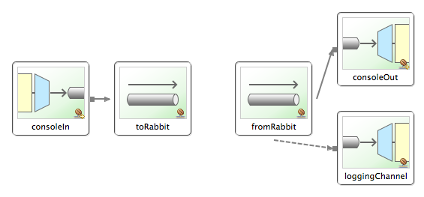
目前,一个示例通过使用出站通道适配器和入站通道适配器,展示了 Spring Integration AMQP 适配器的基本功能。 该示例中使用的 AMQP 代理实现为 RabbitMQ。
| 为了运行此示例,您需要一个正在运行的 RabbitMQ 实例。 仅安装带有基本默认值的本地版本即可满足要求。 有关详细的 RabbitMQ 安装步骤,请参阅 https://www.rabbitmq.com/install.html |
启动示例应用程序后,在命令提示符中输入一些文本,包含该输入文本的消息将被分发到 AMQP 队列。 随后,Spring Integration 将检索该消息并将其打印到控制台。
下图说明了本示例中使用的基本 Spring Integration 组件集:
RabbitMQ 流队列支持
版本 6.0 增加了对 RabbitMQ 流队列的支持。
这些端点的 DSL 工厂类是 RabbitStream。
RabbitMQ 流式入站通道适配器
@Bean
IntegrationFlow simpleStream(Environment env) {
	return IntegrationFlow.from(RabbitStream.inboundAdapter(env).streamName("my.stream"))
			// ...
			.get();
}

@Bean
IntegrationFlow superStream(Environment env) {
	return IntegrationFlow.from(RabbitStream.inboundAdapter(env).superStream("my.super.stream", "my.consumer"))
			// ...
			.get();
}